
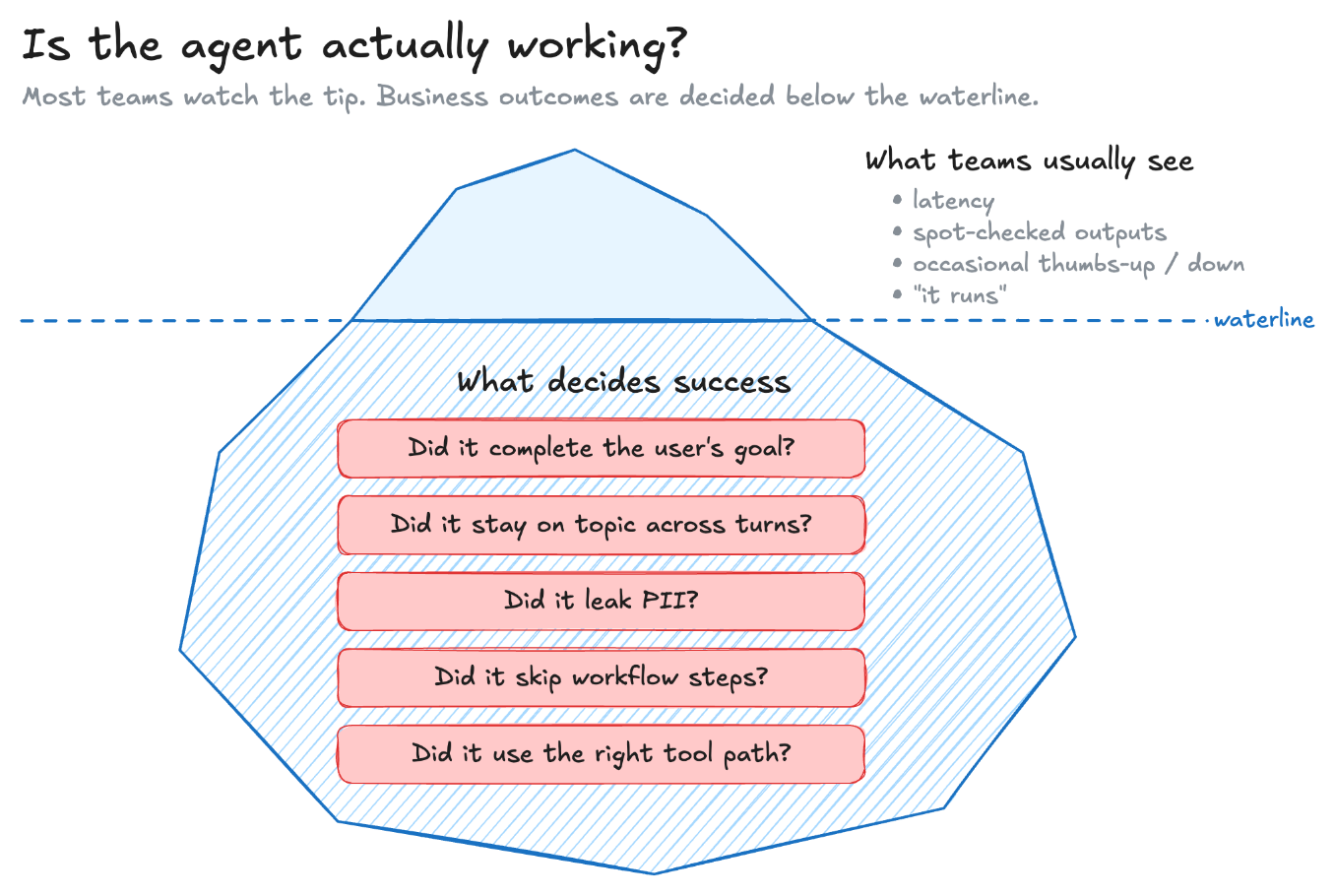
When you deploy an agent to production, one of the hardest questions is whether it’s actually working? The bar isn’t whether it runs. It’s whether it does what the business needs, at scale. Many teams will tell you they can’t really see this. They spot-check outputs, watch latency, and collect user feedback when they can get it. None of that tells you whether the agent finished the user’s task, stayed on topic across a long session, leaked personally identifiable information (PII), or quietly skipped half the steps it was supposed to follow.
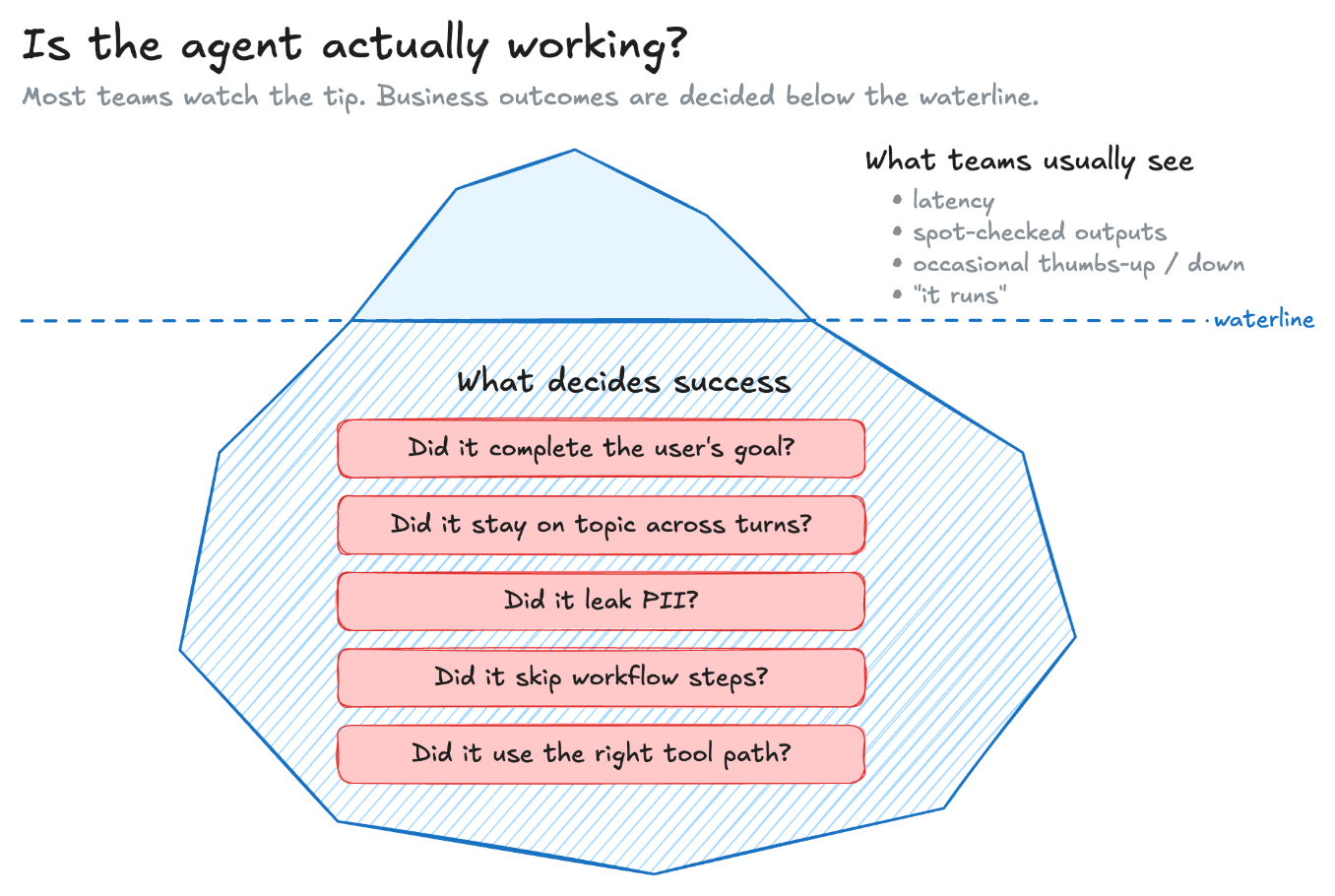
Figure 1: Teams usually watch surface signals, but business outcomes are decided by the agent behaviors below the waterline
Agent evaluation solves this problem. What makes this challenging is that a good score on one metric can hide a failure on another. A support agent can resolve every ticket and still expose personal information in its replies. In this case, the agent is failing although it has a high completion rate. To get evaluation right, measure the behaviors that matter for each agent, at the right level of detail.
This post shows how to do this on Amazon Bedrock AgentCore. We use the AgentCore built-in evaluators together with the DeepEval and AutoEval evaluators directly from AgentCore Evaluations.
Start with business outcomes, instead of metric names
The most common mistake is to start with the metric list and pick the names that sound right. “Helpfulness sounds good, so we use it.” The result runs and produces numbers, but it gives almost no useful insight. The metric fits its label, not what success means for the agent.
Instead, start with three steps.
- Define success in business terms. For a customer support agent, that might be first-contact resolution. For a research agent, it might be producing a complete, well-sourced answer grounded entirely in retrieved documents. For a content moderation assistant, it means flagging everything that should be flagged and only what should be flagged.
- Break the outcome into observable behaviors. A customer support agent that achieves first-contact resolution will typically complete the user’s stated goal, stay coherent across turns when the issue requires clarification, keep responses within compliance boundaries, and correctly invoke backend tools like ticket creation or order lookup.
- Map each behavior to an evaluator at the right level. Trace-level metrics cover per-turn or per-tool-call behaviors. Session-level metrics cover outcomes that only make sense when you look at the whole conversation.
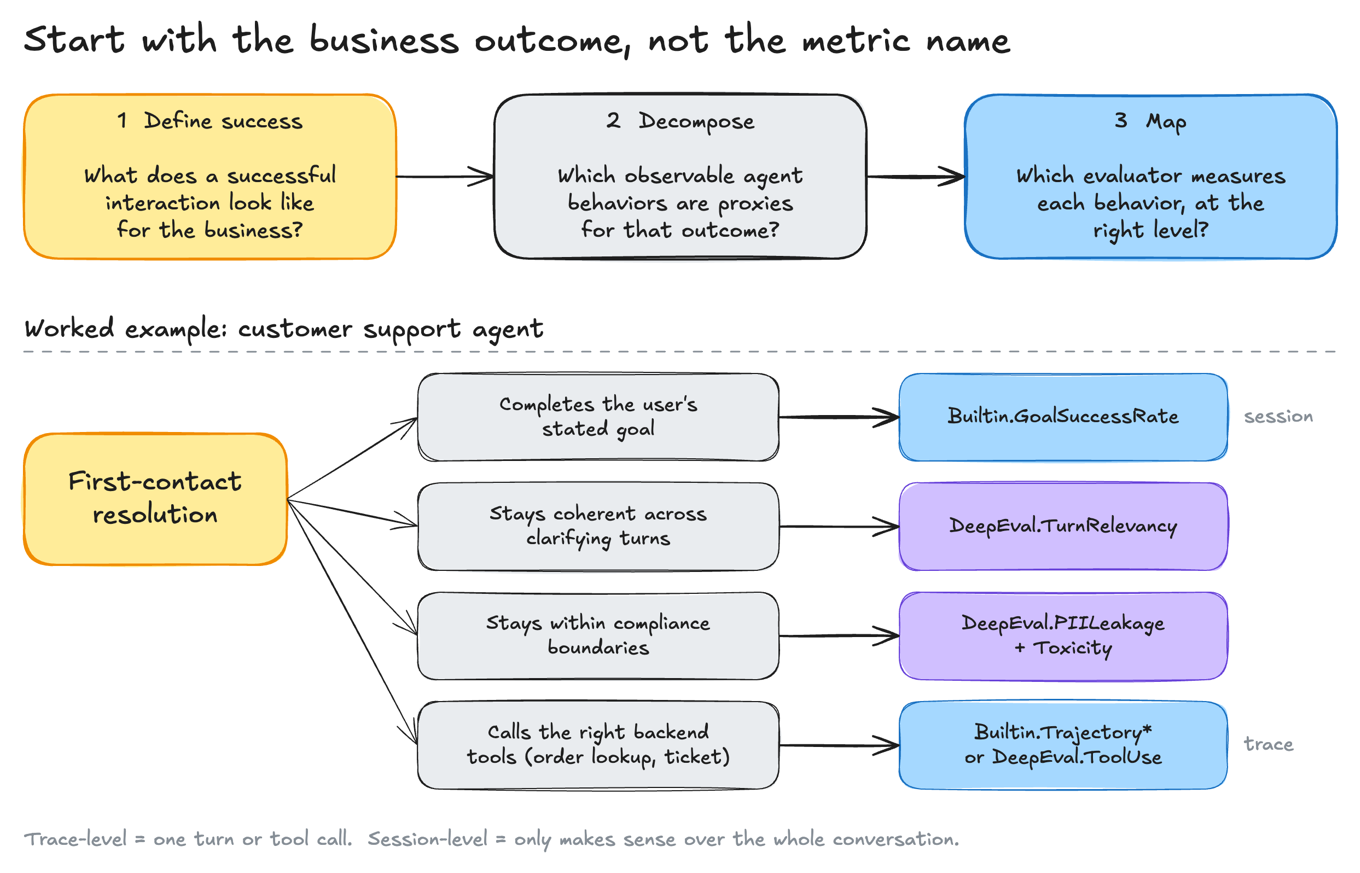
Figure 2: Translating a business outcome into observable behaviors and then into specific evaluators at the trace or session level
This three-step process is the mental model that makes evaluation useful. The rest of this post is about what AgentCore gives you to execute it.
The evaluator catalog
AgentCore has a broad catalog of evaluators from three sources:
- Built-in evaluators are authored and quality-tested by AWS. You reference them by their ID (
Builtin.GoalSuccessRate,Builtin.Helpfulness, and 13 more) and the service handles everything else. They are benchmarked for reliability and cover the common dimensions, so they are the straightforward place to start. - Third-party managed evaluators come from DeepEval and AutoEval, two established open-source evaluation libraries. When you use them in managed mode, AgentCore hosts the code, picks the judge model, and runs inference on its own capacity, exactly like built-in evaluators. If your team already uses one of these libraries in development, you can run the same metrics in production without a separate evaluation service.
- Custom evaluators take a built-in or third-party evaluator as a base, so you can swap in your own model and modify the prompt or rubric.
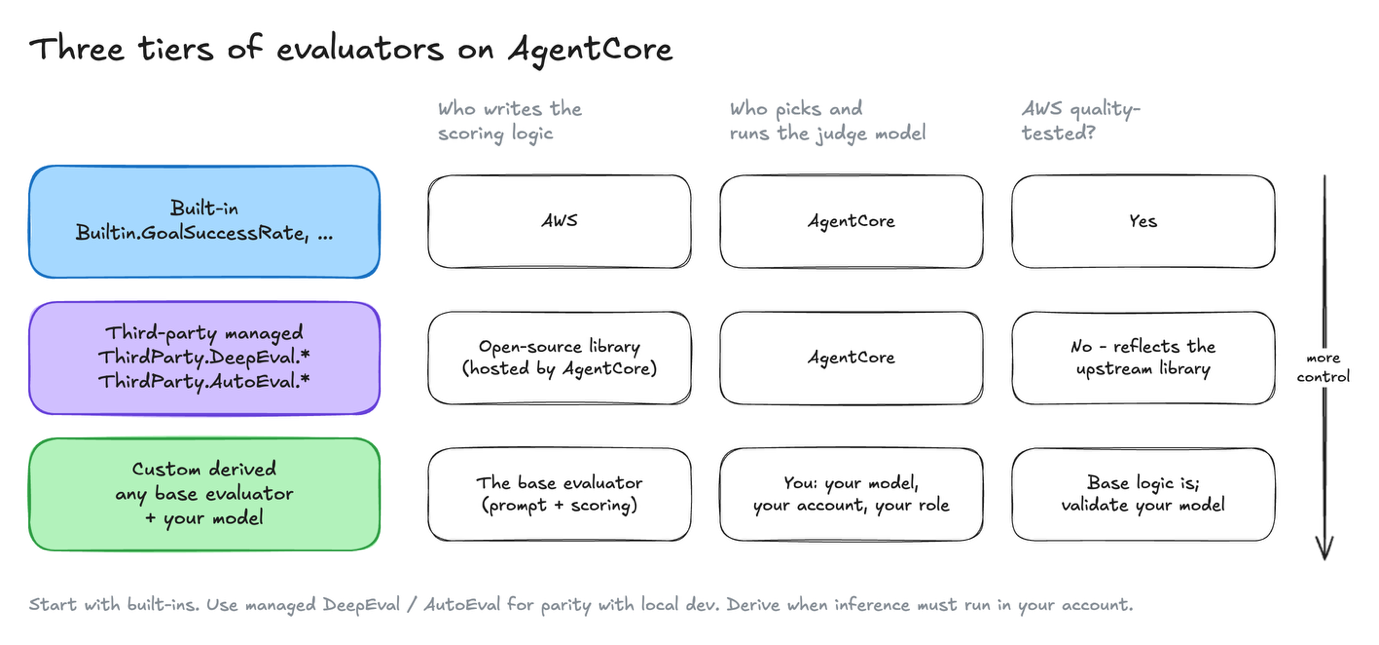
Figure 3: The three evaluator tiers trade AWS quality assurance for increasing control over the model and account that run inference
After creation, a custom derived evaluator is used exactly like other ones.
The evaluator landscape
AgentCore ships with a broad catalog of evaluators, so you rarely start from a blank page. Before you write a custom judge, check whether one already measures the behavior you care about. The following figure shows the whole landscape.
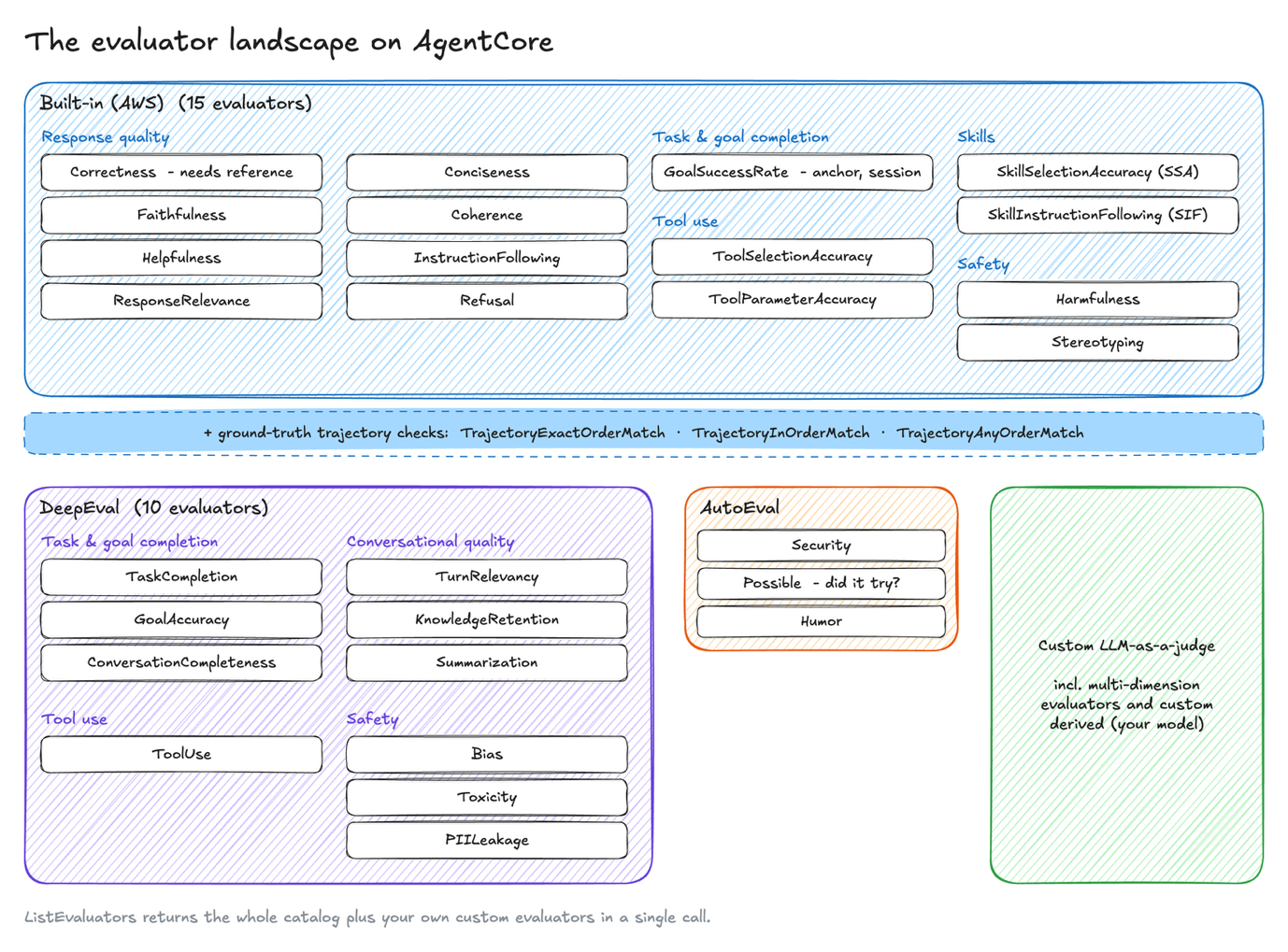
Figure 4: The full evaluator landscape on AgentCore across built-in, DeepEval, AutoEval, and custom sources
Built-in AWS evaluators fall into five groups:
- Response quality covers whether the answer is accurate, grounded, and well-formed:
Correctness,Faithfulness,Helpfulness,ResponseRelevance,Conciseness,Coherence,InstructionFollowing, andRefusal. - Task and goal completion has
GoalSuccessRate, which looks at the whole session and asks whether the user’s goal was met. - Tool use has
ToolSelectionAccuracyandToolParameterAccuracy, which check whether the agent picked the right tool and passed it the right arguments. - Skills has
SkillSelectionAccuracyandSkillInstructionFollowing, for agents that load skills: was the right skill invoked, and were its steps followed? - Safety has
HarmfulnessandStereotyping.
Next to these are three ground-truth trajectory checks: TrajectoryExactOrderMatch, TrajectoryInOrderMatch, and TrajectoryAnyOrderMatch. They compare the agent’s actual tool path against the one you expected. Reach for them when how the agent got there matters as much as what it produced.
DeepEval provides managed open-source metrics in four groups:
- Task and goal completion:
TaskCompletion,GoalAccuracy, andConversationCompleteness. - Conversational quality:
TurnRelevancy,KnowledgeRetention, andSummarization. - Tool use:
ToolUse. - Safety:
Bias,Toxicity, andPIILeakage.
These metrics are especially useful for multi-turn agents. ConversationCompleteness catches an agent that answers the latest message but quietly drops earlier requests. KnowledgeRetention catches an agent that forgets something the user said three turns ago.
AutoEval offers more specialized signals:
Securityflags malicious output, such as attempts to inject instructions or reveal system prompts.Possiblecatches over-cautious agents that wrongly declare a valid task impossible.Humormatters for consumer-facing agents where personality is part of the product.
Custom evaluators. When no evaluator in the catalog fits, you can write a custom LLM-as-a-judge.
Every evaluator’s exact definition, scoring scale, and input requirements are in the prompt template library in the AgentCore documentation. That includes the judge prompt it uses, the trace or session level it runs at, and whether it needs a reference answer or an expected trajectory. You can call the ListEvaluators API to get the full catalog and your own custom evaluators in one response.
Multi-dimension evaluators
Each evaluator so far returns one score per trace or session. That works when you measure one behavior. But step 2 of the outcome mapping rarely gives one behavior per evaluator. A support reply must resolve the issue, follow refund and data policy, and stay professional. One judge that weighs all three returns one number, and you cannot tell which criterion drove it.
A multi-dimension evaluator is a custom LLM-as-a-judge with a list of dimensions instead of one scale. Each dimension has its own name, instruction, and numeric or categorical scale. The judge reads the trace once and scores every dimension in the same call. AgentCore returns one result per dimension.
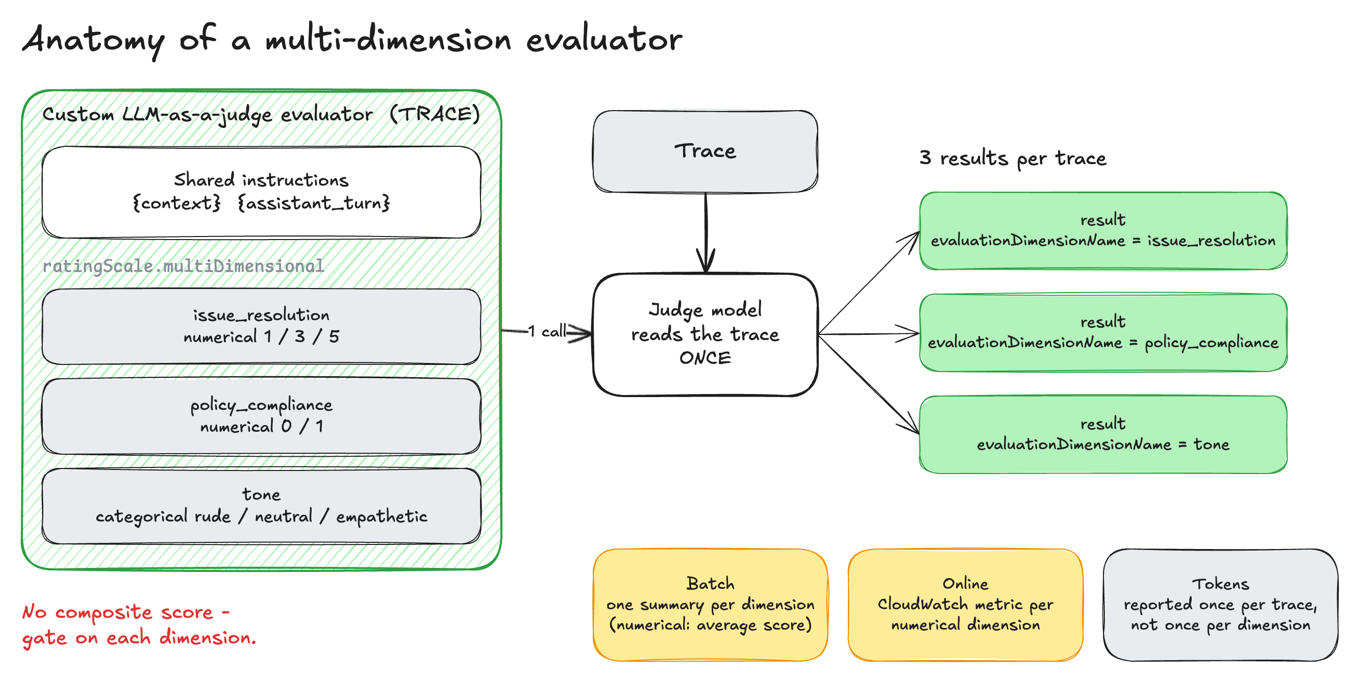
Figure 5: A multi-dimension evaluator scores several dimensions from a single judge call and returns one result per dimension with no composite score
Use a multi-dimension evaluator when your success criteria can fail independently, such as an answer that’s accurate but non-compliant, or resolved but rude. It also needs every criterion to be judgeable from the same evidence, so that one judge call replaces several near-identical evaluators re-reading the same trace. When you score the criteria separately, you can gate on each one. A release that improves tone but regresses policy compliance fails, and a single blended score would hide that.
Keep criteria in separate evaluators when an established built-in or third-party metric already covers them, such as Builtin.Correctness or ThirdParty.DeepEval.PIILeakage. Also keep them separate when they need different levels or judge models, because the dimensions in one evaluator share a single level and model. Do the same when some criteria need ground truth such as {expected_response} or {assertions}. Keeping the reference-free criteria in their own evaluator means it can still run on live traffic.
Example stacks by agent type
Each of the following stacks starts with two or three evaluators that best match the business outcome. Add the others when you find a failure mode the first set misses. Evaluators marked “needs ground truth” run in batch evaluation only, because live traffic has no reference answer or expected path.
| Customer support | Multi-step research | Domain content (medical, legal, financial) | |
| Business outcome | Problem solved in one session, with no downstream risk | Complete, well-sourced answer through a defined workflow | Correct, unbiased, secure answers within the domain |
| Main risk | Dropped requests, unsafe or non-compliant replies | Right answer through the wrong tool path, or lost context in long sessions | A wrong answer. A wrong answer is worse than no answer. |
| Start with |
|
|
|
| Add when needed |
|
|
|
| Derived evaluators | Optional | Use for trajectory and skill metrics if inference must stay in your account | Almost always, so every judge call stays under your data governance |
Running evaluations: The three modes
AgentCore supports three evaluation modes.
On-demand evaluation is the fastest feedback loop. Pass a session directly to client.evaluate() during development or debugging. Every evaluator in the system, including third-party, works here.
Online evaluation attaches to your live agent runtime and samples real traffic at a configured rate. This is your production health signal. Built-in and third-party evaluators mix freely in a single online evaluation config.
Batch evaluation runs a defined evaluator stack against a fixed set of sessions: your golden dataset for regression testing before releases. Use this to confirm that a prompt change or model upgrade preserved quality across every dimension you care about.
All three modes use the same evaluator IDs. Switching from on-demand development testing to production online evaluation is a configuration change, not a code rewrite.
Putting it together
Increasingly, the hard part is choosing which evaluators to pick. Pick the two or three behaviors that best show whether you reached your business outcome, and measure those first. Add an evaluator when you find a failure your current set missed.
To see the full catalog, call the ListEvaluators API. It returns the built-in, DeepEval, and AutoEval evaluators in one response along with any custom evaluators in your account. Before you pick any of them, answer two questions: “What does success look like for this agent?” and “What behavior in the trace shows that it happened?”
About the authors
When you deploy an agent, whether it is working is really several questions: did it finish the task, stay on topic, leak data, or skip steps? This post shows how to evaluate agents on Amazon Bedrock AgentCore with built-in, DeepEval, and AutoEval evaluators, and how to match each behavior that matters to the right evaluator at the right level. Read More