
As enterprises deploy AI agents across teams, vendors, and infrastructure, managing agent-to-agent communication becomes a growing operational burden. Without a centralized layer, each new agent integration adds point-to-point connections, separate credentials, and custom routing logic. Teams spend engineering cycles wiring up connectivity instead of building agent capabilities. Access control becomes fragmented, with no single place to enforce which clients can reach which agents. The result is slower time-to-market for new agent workflows, increased security risk from inconsistent auth policies, and operational overhead that scales quadratically with each new agent added to the network.
The gateway pattern addresses this by placing a single entry point in front of your agents, regardless of whether they run on Amazon Elastic Container Service (Amazon ECS), AWS Lambda, Amazon Bedrock AgentCore Runtime, a non-AWS cloud, or a hybrid environment. It handles routing and enforces fine-grained permissions centrally, without binding teams to a particular runtime, framework, or orchestration layer. This pattern builds on the Agent-to-Agent (A2A) protocol, which standardizes how agents communicate with each other. Without a central orchestrator, a deployment of 20 agents requires up to 190 point-to-point connections.
In this post, you will learn how to build a serverless A2A gateway on AWS that hosts multiple agents behind a single domain using path-based routing (/agents/{agentId}). Standard A2A clients work without modification. The solution has three layers:
- Management layer: Centralized agent registry with discovery and semantic search.
- Control layer: Fine-grained access control using JSON Web Token (JWT) scopes and a Lambda authorizer.
- Execution layer: Single-domain routing with OAuth backend authentication and Server-Sent Events (SSE) streaming support.
Follow along, and you will deploy a Terraform-provisioned gateway that A2A-adherent agents can connect to.
Architecture
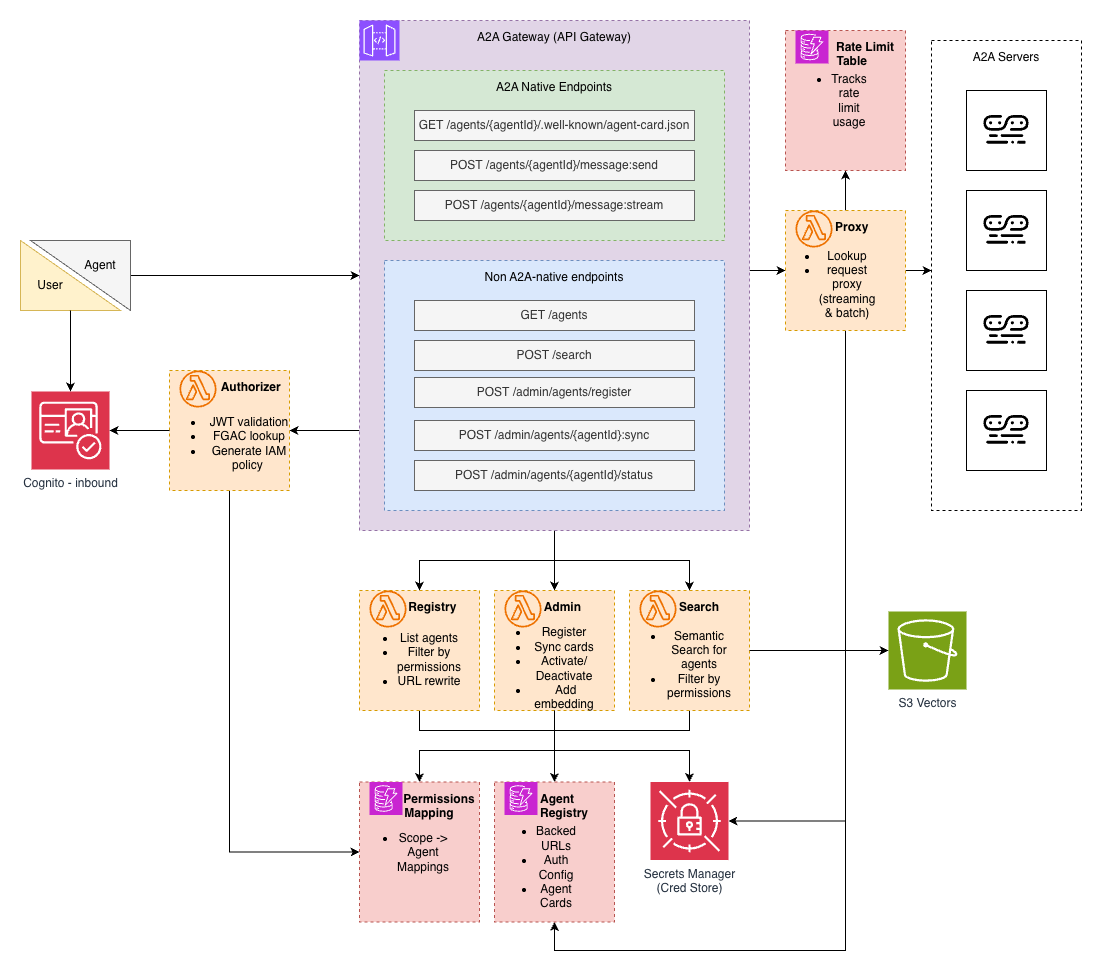
The following diagram shows the gateway’s components and how requests flow through the system.
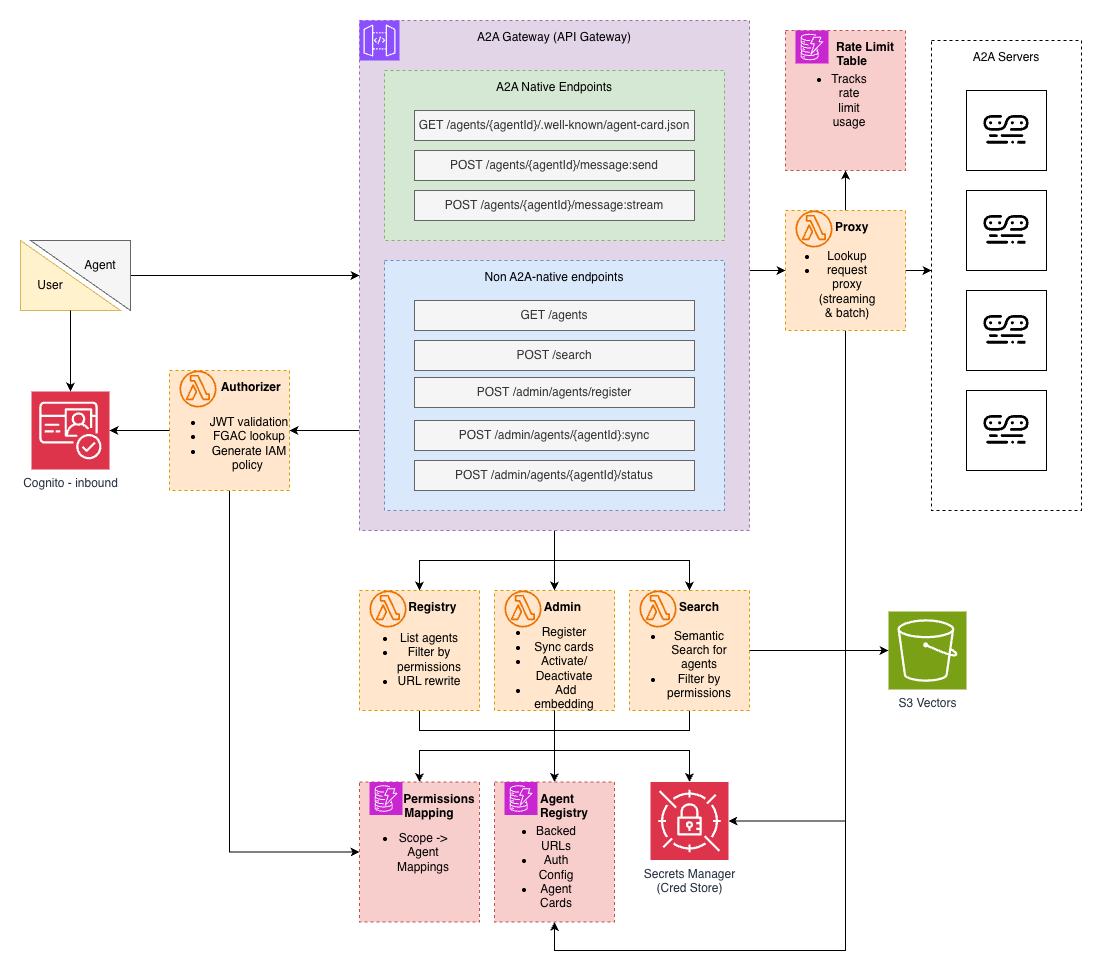
Amazon API Gateway (REST API) serves as the single-entry point. The architecture uses a REST API because REST APIs support response streaming. Streaming is required for SSE-based real-time agent responses. The Lambda authorizer inspects JWT scopes and generates AWS Identity and Access Management (IAM) policies that allow access to specific agent paths (/agents/agent-a/*) while denying others.
Lambda functions implement the gateway logic:
- Authorizer: Validates JWTs and generates IAM policies based on scope-to-agent mappings.
- Registry: Lists agents the caller can access, with URLs rewritten to point to the gateway.
- Search: Semantic agent discovery using Amazon Titan Text Embeddings in Amazon Bedrock.
- Proxy: Routes requests to backend agents with OAuth authentication, supports SSE streaming via Lambda Web Adapter.
- Admin: Agent registration and lifecycle management.
Amazon DynamoDB stores three tables. The Agent Registry maps agent IDs to backend URLs, auth configs, and cached agent cards. The Permissions table maps JWT scopes to allowed agents. A RateLimitCounters table counts requests per minute.
Amazon Cognito handles authentication using OAuth 2.0 client credentials flow. Scopes in the token determine which agents the caller can access. When a client authenticates, they receive a JWT containing scopes like billing:read or support:write. The authorizer looks up these scopes in the Permissions table to determine which agents the client can reach.
AWS Secrets Manager stores backend credentials. When the Proxy Lambda needs to authenticate with a backend agent, it retrieves the OAuth client secret by Amazon Resource Name (ARN). Secrets aren’t stored in DynamoDB.
For semantic search, agent descriptions are embedded using Amazon Titan Text Embeddings and stored in Amazon S3 Vectors. This allows clients to discover agents using natural language queries rather than exact name matches.
Gateway design
A2A native endpoints follow the A2A protocol specification and route to backend agents. The gateway supports both protocol bindings defined in the spec. JSON-RPC uses a single endpoint per agent with the method in the request body:
- GET /agents/{agentId}/.well-known/agent-card.json – Fetch agent capabilities.
- POST /agents/{agentId} with
{"method": "SendMessage", ...}(for buffered response). - POST /agents/{agentId} with
{"method": "SendStreamingMessage", ...}(for SSE streaming).
The HTTP+JSON/REST binding is also supported for clients that prefer RESTful URLs.
These endpoints are fully A2A protocol aligned. Clients point to the gateway URL instead of individual backend URLs. However, A2A native endpoints alone don’t solve the management problem. Clients still need a way to discover which agents exist, search for agents by capability, and manage the agent lifecycle.
Gateway endpoints provide this layer:
- GET /agents – List agents the caller can access.
- POST /search – Semantic search for agents.
- POST /admin/agents/register – Register a new backend agent.
- POST /admin/agents/{agentId}/sync – Refresh cached agent card.
- POST /admin/agents/{agentId}/status – Activate or deactivate an agent.
Every request follows the same path. The client sends a request with a JWT in the Authorization header. API Gateway invokes the Lambda authorizer, which validates the JWT and looks up the caller’s scopes in the Permissions table. The authorizer returns an IAM policy allowing or denying access to specific agents. If allowed, the request routes to the appropriate Lambda: Proxy for A2A traffic, Registry for agent discovery, Search for semantic queries, or Admin for management operations. For A2A requests, the Proxy Lambda authenticates with the backend using OAuth and forwards the request. Unauthorized requests are rejected at API Gateway and don’t reach the backend Lambdas.
The three-layer model
As agent deployments grow, teams need visibility into what’s available. The management layer provides a centralized registry where agents are cataloged with their capabilities, backend URLs, and status. When a new agent is deployed, it’s registered once in the gateway and immediately discoverable by authorized clients. The registry also caches agent cards, so clients don’t need to fetch capabilities from each backend individually. Cached cards have their URLs rewritten to point through the gateway, so clients interact with the single gateway domain rather than discovering backend URLs. For larger deployments, semantic search lets clients find agents by describing what they need rather than knowing exact names.
In an enterprise, not every client should access every agent. The control layer enforces fine-grained permissions based on JWT scopes. When a client authenticates, their token contains scopes like billing:read or support:admin. The Lambda authorizer maps these scopes to specific agents in the Permissions table and generates IAM policies that allow or deny access at the API Gateway level. Unauthorized requests don’t reach backend Lambdas. Additionally, rate limiting is enforced per-user, per-agent at the proxy level. The proxy tracks request counts using atomic DynamoDB counters with automatic time-to-live (TTL) expiration, returning a 429 with a Retry-After header when a client exceeds its quota. Permissions and rate limits are centrally managed: to grant or revoke access or adjust quotas, you update the Permissions table rather than modifying each agent.
The execution layer handles the actual routing of requests to backend agents. Clients connect to a single domain, and the gateway routes to the appropriate backend based on the path. This simplifies network configuration: instead of opening connectivity to every agent, clients only need to reach the gateway. The Proxy Lambda handles OAuth authentication with backends, so clients don’t manage backend credentials. It retrieves secrets from Secrets Manager, fetches access tokens, and forwards requests transparently. For real-time use cases, the proxy supports SSE streaming, allowing agents to send incremental responses back to clients as they’re generated.
Deploy the solution
The gateway deploys entirely with Terraform. First, verify that you have the following.
Prerequisites
- Terraform >= 1.5.0.
- Python 3.12.
- AWS Command Line Interface (AWS CLI) configured with valid credentials.
- Docker (for building the proxy Lambda container).
- An Amazon Simple Storage Service (Amazon S3) bucket for Terraform state (optional, for remote state).
The gateway code is available on the aws-samples GitHub repository.
Clone the repository and configure your variables:
Edit terraform/terraform.tfvars with your region and naming preferences:
aws_region = "us-east-1"
project_name = "a2a-gateway"
environment = "poc"
Build the Lambda package and deploy:
Terraform creates the resources in one go: DynamoDB tables, Cognito user pool, Amazon Elastic Container Registry (Amazon ECR) repository, Lambda functions, API Gateway, and IAM roles. Terraform builds and pushes the proxy Lambda container as part of the deployment.
Test the solution
Get your gateway credentials from Terraform outputs:
Obtain a JWT:
This repository includes deployable A2A example agents in the examples/ directory: a Weather Agent and a Calculator Agent. They can be deployed using their own Terraform configuration. Optionally, deploy them with cd examples/terraform && terraform apply, then capture their outputs:
Then register the agent with the gateway (using the $GATEWAY_URL and $JWT captured earlier):
The gateway enforces fine-grained access control. Each OAuth scope must be explicitly granted access to specific agents in the DynamoDB permissions table.
Update permissions to allow your scope to access the registered agent:
Discover registered agents and send a message through the gateway:
Clean up
To clean up the solution, run terraform destroy from the /terraform folder. Terraform will ask for your permission to delete the resources.
Security considerations
This gateway is a reference implementation. Before moving to production, review the following areas that require hardening based on your organization’s security posture.
Backend trust model
The gateway operates on a trust-after-authentication model. After a backend agent is registered and OAuth credentials are validated, the gateway proxies the responses directly to clients without content inspection. A2A messages are proxied without modification, so backend agents are responsible for implementing their own prompt injection defenses and input validation. In production, implement an approval workflow for agent registration where administrators review backend agents before they become accessible. Integrate this with your continuous integration and continuous delivery (CI/CD) pipeline so agents are vetted as part of the deployment process, not after.
Rate limiting and quotas
The gateway enforces per-user, per-agent rate limits at the proxy layer. Each request increments an atomic counter in DynamoDB keyed by user, agent, and minute window. When a client exceeds its quota, the proxy returns a 429 with a retry-after header and the request does not reach the backend. Counters expire automatically via DynamoDB TTL, so there’s no cleanup overhead. Limits are configured alongside access controls in the Permissions table, either as a default requests-per-minute or as per-agent overrides, giving administrators granular control over consumption.
Private deployment
For environments that require private infrastructure, the gateway supports an optional Amazon Virtual Private Cloud (Amazon VPC) deployment mode. When you enable this mode, the Lambda functions run inside private subnets. The API Gateway switches to a private endpoint accessible only within the VPC. VPC endpoints handle traffic to AWS services without traversing the internet.
The gateway supports both creating a new VPC and bringing your own. To deploy into an existing VPC, provide your VPC ID, subnet IDs, route table IDs, and security group IDs in terraform.tfvars:
enable_private_deployment = true
existing_vpc_id = "vpc-0123456789abcdef0"
existing_subnet_ids = ["subnet-aaa", "subnet-bbb", "subnet-ccc"]
existing_route_table_ids = ["rtb-aaa"]
existing_lambda_security_group_id = "sg-aaa"
existing_vpc_endpoint_security_group_id = "sg-bbb"
Note that this mode makes the gateway’s infrastructure private, but your VPC still needs outbound internet connectivity for OAuth token exchange with Cognito or other external identity providers. This is typically handled through a network address translation (NAT) gateway or AWS Transit Gateway routing to a shared egress VPC. AWS service traffic (DynamoDB, Amazon S3, Secrets Manager, S3 Vectors) stays private through VPC endpoints. Only the OAuth token exchange requires outbound connectivity. If you need semantic search with Amazon Bedrock, set enable_bedrock_endpoint = true to add an Amazon Bedrock Runtime VPC endpoint as well.
For agents running on-premises or on other clouds, the private gateway is reachable over AWS Direct Connect or AWS Interconnect (preview). This lets the gateway govern agents across environments without exposing traffic to the public internet.
A2A server authentication
The gateway authenticates with backend agents using OAuth 2.0 client credentials flow. Each registered agent includes its token URL and credentials, and the Proxy Lambda handles token acquisition transparently. This means backend agents must be deployed with OAuth authentication enabled regardless of where they run.
When using Amazon Bedrock AgentCore Runtime specifically, a key detail: configure the customJWTAuthorizer with allowedClients set to your Cognito client ID, not allowedAudience. Cognito client credentials tokens include a client_id claim but don’t include the standard JWT aud claim. The allowedAudience parameter validates the aud claim and will return 401 Unauthorized for Cognito machine-to-machine (M2M) tokens. Using allowedClients validates against client_id, which Cognito tokens provide. See the AgentCore A2A protocol contract for the full set of authentication options.
Conclusion
As organizations move from a handful of agents to dozens or hundreds, the operational challenges shift from building individual agents to managing the connections between them. Point-to-point integrations don’t scale. Teams shouldn’t need to know where every agent lives, manage separate credentials for each one, or build their own discovery and access control from scratch.
This gateway gives you a single place to register agents, control who can access them, and route traffic. Because it operates at the protocol level, it governs agents across environments: AWS services, third-party clouds, on-premises infrastructure, or a combination. Backends that speak A2A work. Register the agent with its URL and OAuth credentials, and the gateway handles the rest. The underlying runtime doesn’t matter. New agents become discoverable the moment they’re registered, and access controls and rate limits are managed centrally rather than scattered across backends.
The A2A protocol standardizes how agents talk to each other. A gateway standardizes how your organization manages that communication. The full source code is available in the aws-samples repository.
About the authors
In this post, you will learn how to build a serverless A2A gateway on AWS that hosts multiple agents behind a single domain using path-based routing (/agents/{agentId}). Standard A2A clients work without modification. Read More