
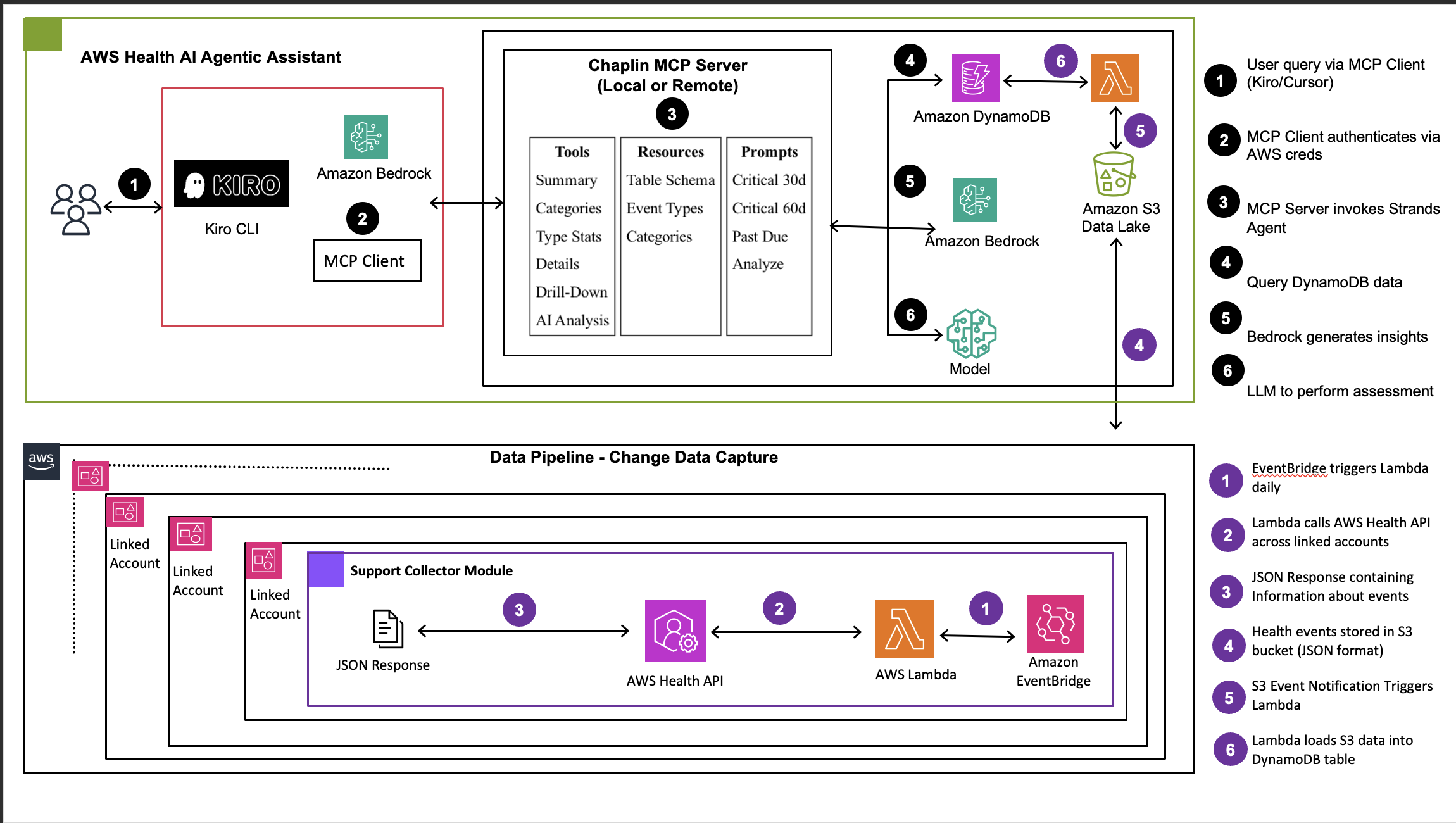
On a typical Monday morning, an enterprise operations team receives multiple AWS Health notifications about Amazon Linux 2 end-of-life, RDS version deprecations, and EC2 instance retirements across 50+ accounts. Without self-service analytics, the team has no way to quickly identify the events that affect production systems, the events that require immediate action versus long-term planning, and the business impact of each event category.
Operations teams also spend time waiting for Technical Account Managers (TAMs) to interpret health events, adding delays to critical operational decisions. The result is time spent on reactive firefighting rather than innovation.
In this post, we show you how to build Chaplin (Customer Health and Planned Lifecycle Intelligence Nexus), an open source solution that uses AI agents exposed through the Model Context Protocol (MCP) to provide self-service health event analytics. With Chaplin, teams can ask questions in natural language directly from MCP-compatible AI assistants and receive precise, contextualized answers without depending on AWS Support for routine analysis. Detailed deployment instructions are available in the Chaplin AWS Health Agentic Assistant GitHub repository.
The challenge: Reactive health event management
Enterprises running production workloads on AWS manage a constant stream of health events – service changes, maintenance windows, security patches, and operational notifications – across dozens or hundreds of accounts. AWS Health provides comprehensive event data through the AWS Health API and Amazon EventBridge, but reactive management approaches leave gaps.
- Teams depend on TAMs for health event interpretation and impact analysis, creating bottlenecks in decision-making. Business intelligence dashboards with predefined schemas cannot adapt to dynamic questions or provide the contextual insights that operations teams need in the moment.
- DevOps and cloud operations teams spend significant time manually categorizing and prioritizing thousands of health events scattered across multiple accounts and regions. Without a central location for analysis, it is difficult to assess overall impact, coordinate responses across teams, or identify proactive opportunities – such as planning migrations or scheduling maintenance before issues become critical.
Eligible Health events will soon be linked directly to AWS Transform templates, enabling customers to act on events directly. Chaplin can surface and prioritize these actionable events for your environment.
Solution overview: Self-service analytics with Chaplin
Chaplin implements self-service health event analytics using agentic AI powered by Amazon Bedrock, delivered through the Model Context Protocol (MCP). Instead of predefined dashboard schemas, Chaplin exposes AI-powered tools that MCP-compatible clients can consume. Teams interact with Chaplin directly from their AI assistant – such as Claude Code or Kiro CLI – and ask questions in natural language. For example, a team member might ask for upcoming RDS lifecycle events in the next 60 days, request a summary of open EC2 events prioritized by urgency, query security patches affecting production environments, or check which maintenance windows could affect high-priority applications.
Your teams can continue to query until you have all the information required to make an informed decision and draw up a remediation plan. This approach enables DevOps, security, and operations teams to independently analyze health events, plan migrations, and assess operational impacts without creating bottlenecks. Because Chaplin uses MCP, teams can also combine it with other MCP-enabled tools (like JIRA, GitHub, or ServiceNow) in their workflow to perform actions with agentic experience.
Additionally, MCP enables direct association of AWS data and metadata with business or application-level context – such as resource tags, environment classifications, and ownership information – enriching health event analysis with organizational relevance.
How agentic AI unifies structured and unstructured data
Chaplin uses a multi-agent architecture that addresses a fundamental challenge in enterprise data analytics: effectively combining structured and unstructured data processing. Traditional Retrieval-Augmented Generation (RAG) systems and generative AI approaches face a critical limitation: they are inherently non-deterministic when handling numerical operations and aggregations. Vector similarity search, the foundation of RAG, retrieves semantically similar content but cannot guarantee mathematical accuracy. When asked to count, sum, or aggregate data, RAG-based systems may hallucinate results (for example, reporting 190 health events related to End-of-life when the actual count is 958). This non-determinism stems from the probabilistic nature of both the retrieval mechanism (which ranks documents by semantic similarity rather than exact matches) and the language model’s generation process (which predicts likely tokens rather than computing precise values).
AWS Health events present this exact challenge. Each event contains structured metadata – event type, service name, affected resources, timestamps, severity levels, and account IDs – that requires precise filtering and aggregation. Each event also contains unstructured descriptions with natural language explanations of the issue, impact assessments, and recommended actions that require semantic understanding and contextual analysis.
Intelligent query processing
When you ask Chaplin a question, three specialized components work together. The Natural Language to Structured Query Agent converts plain English questions into precise structured data queries against health event metadata. It understands the schema of your health events – which fields exist, such as event_type, affected_accounts, and start_time – and constructs filters that match your intent. A question like “Show me EC2 retirements in production accounts” becomes a structured query with exact field filters rather than keyword matching.
- The Contextual Impact Analysis Agent handles unstructured health event descriptions by combining them with your customer metadata – production vs. non-production environments, business units, application tiers, and ownership information. This agent performs system-level reasoning, interpreting not just what the event says but what it means for your specific infrastructure and organizational context.
- The Pattern-Based Classification Engine categorizes health events using rule-based pattern matching, which eliminates AI processing costs for routine categorization while maintaining high accuracy. This cost optimization layer makes the solution practical at scale.
Cost-optimized AI architecture
Chaplin implements intelligent cost optimization through selective AI enhancement. The system uses a pattern-first processing approach where rule-based classification handles most events without incurring AI costs. Pre-built summarized views for 30-day, 60-day, and 120-day windows with filters help teams quickly identify critical alerts. In the current implementation, Amazon Bedrock with Claude processes only unstructured data that requires contextual analysis. But the solution is also LLM-agnostic, supporting multiple model providers such as Amazon Bedrock, OpenAI, Anthropic, or local models like Ollama, providing flexibility based on your requirements and cost constraints. Intelligent caching reduces redundant AI processing, and structured query precision uses the AWS Health API schema for exact numerical analysis without AI inference costs.
Architecture overview
The following diagram illustrates the complete Chaplin architecture. It shows how health events flow from multiple AWS accounts through a centralized data pipeline, into an MCP server powered by AI agents built on Amazon Bedrock, and finally to MCP-compatible AI assistants where teams interact with the data through natural language. Each layer is described in detail after the diagram.
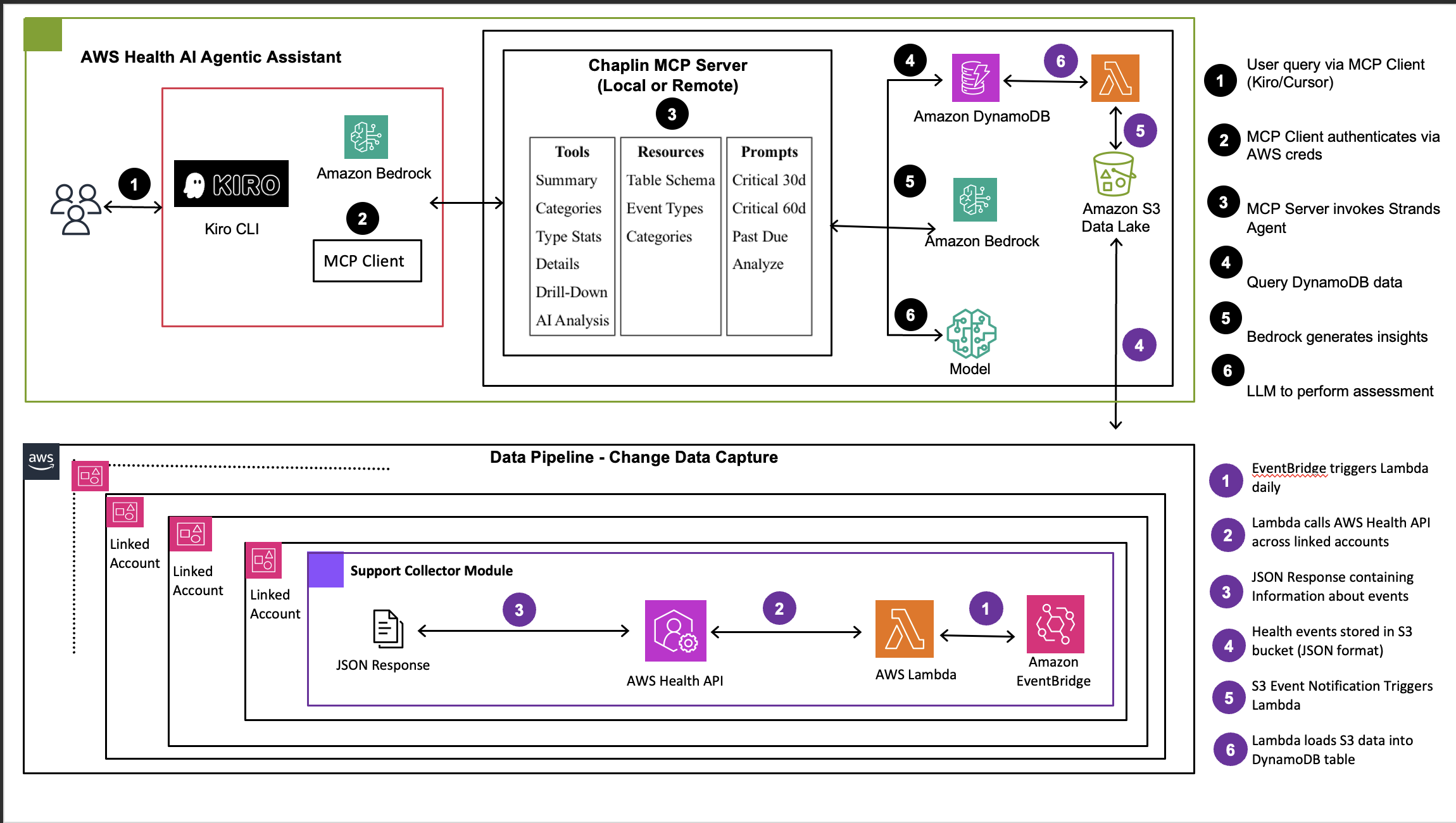
Figure 1: Chaplin architecture showing three-layer system with multi-account data collection, AI-powered MCP server with Amazon Bedrock agents, and MCP client integration”
The architecture consists of three primary layers working together to deliver intelligent health event analytics.
1. Data tier – Collection layer (multi-account)
The data tier collects health events from across your AWS Organization and centralizes them for analysis. In each member account, AWS Health API serves as the source of health events. Amazon EventBridge provides event-driven triggers for real-time capture, and AWS Lambda collector functions retrieve events using cross-account IAM roles configured with least-privilege access.
These events flow to a centralized management account where an Amazon Simple Storage Service (Amazon S3) data lake stores collected health events with intelligent partitioning by account, date, and event type. When new events arrive, S3 event notifications trigger an AWS Lambda function that processes the JSON health events and loads them into Amazon DynamoDB for fast querying.
This multi-account architecture supports two deployment models:
- Option 1: AWS Organizations API for centralized, automated deployment across your accounts.
- Option 2: Individual account deployments for organizations with security restrictions.
2. Middle tier – MCP server and intelligence layer
The middle tier is where raw health event data is transformed into actionable intelligence and exposed through an MCP server. Amazon DynamoDB serves as the primary data store for structured health event metadata, optimized for fast queries with indexes on event type, severity, date, and account. This enables real-time access for both pattern-based classification and AI analysis.
A pattern-based event classifier provides the first layer of intelligence. This rule-based categorization engine uses regex patterns on event types to map events to five business categories: Migration Requirements, Security & Compliance, Maintenance & Updates, Cost Impact Events, and Operational Notifications. Because most events follow predictable patterns, this approach processes the majority of events through efficient pattern matching without incurring AI costs.
For events requiring deeper analysis, the AI-powered analysis engine built on Amazon Bedrock takes over. This engine uses the Strands Agents framework, an open-source agentic framework developed by AWS, with Claude 4.5 Sonnet as the large language model. You can switch this to a preferred LLM of your choice. Three specialized agents handle different aspects of analysis: a SQL Query Agent converts natural language queries to structured DynamoDB queries for precise numerical analysis, an Impact Analysis Agent evaluates unstructured event descriptions against customer metadata such as environment, business unit, and ownership, and a DBQueryBuilder Agent generates optimized database queries for multi-dimensional aggregations. All these capabilities are exposed as MCP tools that compatible clients can invoke.
3. Presentation tier – MCP client – AI assistant integration
The presentation tier consists of an MCP-compatible AI assistant, such as Claude Code or Kiro CLI. Instead of a custom front end, Chaplin exposes its capabilities as MCP tools that these clients consume natively. Users interact through natural language in their existing development environment, and the AI assistant orchestrates calls to Chaplin’s MCP server to retrieve health event data, run AI-powered analysis, and present contextualized results – all within the same conversational interface they already use for development tasks.
Security relies on AWS Identity and Access Management (AWS IAM) for authentication and authorization. The MCP client mounts AWS credentials as read-only, and access is controlled through IAM roles with least-privilege principles. Data is encrypted with TLS 1.2+ in transit and AES-256 at rest, and AWS CloudTrail provides audit logging for API calls.
Key capabilities
Chaplin provides three core capabilities that address gaps in how organizations manage AWS Health events today.
Chaplin offers dynamic conversational analytics. It generates actionable insights on demand based on your specific questions, providing precise breakdowns with exact counts, affected accounts, and contextual analysis – generated dynamically within your AI assistant without pre-built reports or dashboards. Chaplin delivers this through three integrated capabilities:
MCP-powered health intelligence tools
Chaplin exposes a comprehensive set of MCP tools organized into three categories. Summary tools query DynamoDB directly and return instantly, providing high-level counts by service, status, category, and region. Detail tools let you drill into specific event categories, event types, or filtered event lists. AI analysis tools use Strands Agents with Amazon Bedrock to interpret your natural language queries, fetch relevant data, and generate contextual insights.
Multi-account data pipeline
Chaplin collects health events from your AWS accounts and centralizes data in Amazon S3, supporting flexible deployment models based on your security posture. The data pipeline consists of AWS Lambda functions for automated health event ingestion, Amazon EventBridge schedulers with configurable collection frequency (daily or hourly), cross-account IAM roles for secure multi-account data collection with least-privilege principles, an Amazon S3 data lake with partitioning for efficient querying, and automated lifecycle management with configurable retention policies.
Precise analytical processing
Chaplin combines structured and unstructured data processing for comprehensive analysis. For structured data, it delivers exact numerical results including event counts and distributions, timeline analysis with trend detection, multi-dimensional aggregations across account, service, and severity dimensions, and categorical breakdowns with precise percentages. For unstructured data, it provides contextual insights such as impact assessment based on event descriptions, architectural deficiency identification, risk correlation across related events, and recommended actions based on event context.
Implementation walkthrough: EC2 instance lifecycle management
To illustrate the breadth of what Chaplin can do, the following walkthrough shows a series of natural language queries issued through Kiro CLI. These examples are organized by use case – from getting a quick operational overview to deep-diving into specific services and planning remediation.
Note: The following examples use sample data to illustrate Chaplin’s capabilities. Your actual responses will vary based on the health events in your AWS environment.
Getting the operational picture
A team starting their day can quickly assess the current state of health events across your accounts and identify what needs immediate attention:

★
All events are of type AWS_RDS_PLANNED_LIFECYCLE_EVENT. 6 of 10 accounts have deadlines that are already past due, with the oldest being CustomerSupport-production-5365 (Oct 2024). The Orders account deadline of May 15, 2026 is the most urgent upcoming event.
6 accounts | 14 events | $304,400/mo at risk
| Account | BU | Division | Spend/mo | Events | Deadline |
|---|---|---|---|---|---|
| Analytics-production-8137 | Analytics | Retail | $76,700 | 2 | 2025-03-31 |
| DataScience-production-9480 | DataScience | Retail | $70,900 | 1 | 2026-07-14 |
| Payments-production-2382 | Payments | Engineering | $50,000 | 3 | 2025-03-31 |
| Security-production-2466 | Security | Engineering | $40,900 | 3 | 2025-09-30 |
| Logistics-production-5002 | Logistics | FinTech | $33,900 | 2 | 2025-03-31 |
| Support Cases – Q Test Acct 3 | Orders | Retail | $32,000 | 3 | 2026-05-15 |
4 accounts | 7 events | $73,700/mo at risk
| Account | BU | Division | Spend/mo | Events | Deadline |
|---|---|---|---|---|---|
| Payments-production-8452 | Payments | Retail | $24,700 | 1 | 2026-07-31 |
| CustomerSupport-prod-5365 | CustSupport | Engineering | $21,000 | 2 | 2024-10-31 |
| Case collection central | Operations | Infrastructure | $15,000 | 2 | 2025-11-01 |
| Analytics-production-2965 | Analytics | FinTech | $13,000 | 2 | 2025-09-30 |
Drilling into specific services and events
Once the team identifies areas of concern, they can drill down into specific services, event categories, or filtered views.
For example, asking about scheduled changes returns a detailed breakdown by service, status, and timeline:
★
Here’s the Scheduled Change events breakdown — 728 total events across 8 services.
| Status | Count |
|---|---|
| Closed | 596 |
| Open | 107 |
| Upcoming | 25 |
| Service | Events |
|---|---|
| EC2 | 493 |
| OpenSearch (ES) | 92 |
| SageMaker | 84 |
| Direct Connect | 39 |
| Kinesis Analytics | 8 |
| DocumentDB | 6 |
| Q Business | 3 |
| RDS | 3 |
25 Upcoming Events (all EC2 and Direct Connect, Aug 14–31):
- EC2 Instance Reboot (Flexible Maintenance) — 11 events across multiple accounts, windows from Aug 16–31
- EC2 Persistent Instance Retirement — 6 events, Aug 23–24
- EC2 Instance Stop — 4 events, Aug 15–23
- EC2 Dedicated Host Retirement — 1 event, Aug 27
- Direct Connect Maintenance — 2 events, Aug 14 and Aug 25
107 Open Events (notable ones):
- EC2 ODCR (On-Demand Capacity Reservations) — multiple events in account 230463653608 (no end date)
- Kinesis Analytics (Apache Flink) Maintenance — 2 accounts, window Aug 6–15
- SageMaker Notebooks Maintenance — 1 event in account 783088110329
Accounts with Most Activity
- 638942336102 — heavy EC2 reboot/retirement activity
- 230463653608 — multiple open ODCR scheduled events
- 238917806813 — several upcoming EC2 reboots
These are the top accounts with # of repeated issues and account notifications. These all stem from these issues in your architecture. Do you want information on how to fix this to reduce these notifications?
AI-powered analysis and remediation planning
★
Here are the accounts ranked by open EC2 health events:
| Rank | Account | Open Events | Key Event Types |
|---|---|---|---|
| 1 | 230463653608 | 22 | ODCR Scheduled (9), ODCR Pending (8), ODCR Canceled (6), ODCR Deposit (3) |
| 2 | 238917806813 | 19 | Auto Recovery Success (17), Planned Lifecycle Event (1)  |
| 3 | 513658358123 | 11 | Auto Recovery Success (10), Auto Recovery Failure (1) |
| 4 | 518792048957 | 5 | Auto Recovery Success (4), Instance Auto Recovery Success (1) |
| 5 | 456303994757 | 3 | Auto Recovery Success |
| 6 | 175059432382 | 3 | Auto Recovery Success |
| 7 | 559084127189 | 3 | Auto Recovery Success |
| 8 | 316575346316 | 2 | Auto Recovery Success |
For deeper analysis, the AI agent interprets the question, fetches relevant data, and generates contextual insights with recommended actions.
Each of these queries demonstrates a different facet of Chaplin’s capabilities: instant structured lookups from DynamoDB for operational overviews, filtered drill-downs by service, region, or event type, and AI-powered contextual analysis that generates insights and recommends specific remediation steps. Because this runs in an MCP-compatible AI assistant, the conversation is fluid – each answer naturally leads to the next question, and teams can combine Chaplin with other MCP tools in the same session.
The following example demonstrates how Chaplin combines multiple MCP tools to answer a complex analytical question. When asked about recurring health events and architectural remediation, the AI agent orchestrates calls to get_health_summary, get_event_categories, get_estimated_blast_radius, and get_event_type_stats to produce a comprehensive response:
★
get_health_summary
get_event_categories
get_estimated_blast_radius (service=ELASTICACHE, sort_by_tag=Tier)
get_estimated_blast_radius (service=VPN, sort_by_tag=Tier)
get_estimated_blast_radius (service=EC2, sort_by_tag=Tier)
get_event_type_stats
| Service | Events | Accounts Impacted | Spend at Risk |
|---|---|---|---|
| ElastiCache | 2,145 (45%) | 140 | $717K/mo |
| VPN | 647 (14%) | 14 | $33.5K/mo |
| EC2 | 351 (7%) | 62 | $544K/mo |
| ECS | 297 | — | — |
| CloudShell | 284 | — | — |
| Account | Events | Service | Spend | Tier |
|---|---|---|---|---|
| Payments-staging-0840 | 40 (ElastiCache) + 7 (EC2) | Multi | $45.3K | Tier-1 |
| DataScience-staging-6536 | 40 (ElastiCache) + 10 (EC2) | Multi | $28K | Tier-1 |
| Orders-staging-8655 | 39 (ElastiCache) | ElastiCache | $13.8K | Tier-2 |
| Analytics-production-8137 | 33 (ElastiCache) + 2 (EC2) | Multi | $76.7K | Tier-1 |
| Logistics-production-5002 | 32 (ElastiCache) + 4 (EC2) | Multi | $33.9K | Tier-1 |
| CustomerSupport-production-5365 | 30 (ElastiCache) + 1 (EC2) | Multi | $21K | Tier-2 |
| DataScience-production-9480 | 16 (ElastiCache) + 28 (EC2) | Multi | $70.9K | Tier-1 |
| Payments-production-2382 | 21 (ElastiCache) + 17 (EC2) | Multi | $50K | Tier-1 |
Note: One untagged account (456303994757) has 327 VPN events alone — a massive outlier.
- ElastiCache UPDATE_AVAILABLE — 2,100+ events, all past due (deadlines from Sep 2024). This is a patching backlog, not new incidents.
- VPN REDUNDANCY_LOSS — 647 events across 14 accounts. Recurring single-tunnel failures.
- EC2 INSTANCE_STOP_SCHEDULED / RETIREMENT — 351 events. Instance lifecycle maintenance.
- Maintenance Updates dominate at 2,447 events (52% of all events).
1. ElastiCache: Automate patching (eliminates ~2,100 events)
This is the single biggest win. Nearly all ElastiCache events are UPDATE_AVAILABLE with deadlines from September 2024, over 19 months past due.
- Enable auto-minor-version-upgrade on all ElastiCache clusters
- Set maintenance windows during low-traffic periods
- Use IaC (Terraform/CloudFormation) to enforce auto_minor_version_upgrade = true as a default across all accounts
- Implement AWS Config rules to detect clusters with auto-upgrade disabled
2. VPN: Fix single-tunnel architecture (eliminates ~647 events)
All VPN events are REDUNDANCY_LOSS — meaning connections are running on a single tunnel instead of two. Account 456303994757 alone has 327 events.
- Verify that both VPN tunnels are active on every AWS Site-to-Site VPN connection.
- Migrate to AWS Transit Gateway for centralized, redundant connectivity instead of per-VPC VPN connections
- Implement health checks on both tunnels with automatic failover
- Consider AWS Direct Connect with VPN backup for critical accounts
3. EC2: Move to managed/containerized compute (reduces ~351 events)
EC2 events are dominated by instance retirements, scheduled stops, and maintenance reboots — all inherent to managing individual instances.
- Migrate stateless workloads to ECS on AWS Fargate or EKS. AWS handles host maintenance transparently.
- Use Auto Scaling Groups with instance refresh for remaining EC2 workloads so retirements are handled automatically
- Replace long-running instances with Spot-friendly architectures using mixed instance policies
- Enable EC2 auto-recovery and verify it is on everywhere.
4. Cross-cutting: Operational hygiene
- Tag all accounts — 100+ accounts show as “N/A” with no tags, making triage impossible
- Automate Health event response with EventBridge rules that trigger Lambda functions for common event types
- Consolidate accounts — the ElastiCache patching backlog spans 140 accounts, suggesting over-provisioned or orphaned clusters in dev/sandbox environments. Audit and decommission unused resources.
- ElastiCache auto-patching — lowest effort, highest event reduction (2,100+ events)
- VPN tunnel redundancy — fixes a real availability risk.
- Account tagging — enables proper triage and ownership
- EC2 → managed compute migration — longer-term but eliminates an entire class of maintenance events
Deployment walkthrough
Chaplin offers two deployment options to match your team’s needs. Both are fully scripted – clone the repository and follow the guided setup in the README.
Option A: Local install – runs the MCP server on your machine, connecting directly to DynamoDB and Bedrock using your local AWS credentials. Best for individual developers or quick evaluation. One-click install buttons are available in the repository for Kiro IDE, Cursor, and VS Code.
Option B: Remote deploy (Lambda) – deploys the MCP server as a Lambda function in your AWS account. Team members connect via a lightweight local proxy – no local dependencies needed and a single instance of the server is hosted at a central location. Best for team-wide rollouts.
Both options deploy the backend infrastructure (DynamoDB table, S3-to-DynamoDB Lambda, and S3 event notifications) and configure your MCP client automatically.
Once deployed, open your MCP-compatible AI assistant and verify that the Chaplin health tools are available. Try a simple query like “What are the Scheduled Change events – planned maintenance and changes?” to confirm the connection is working.
Data pipeline
Chaplin requires AWS Health Events data. You can deploy Chaplin before or after setting up the data pipeline. The data pipeline supports two deployment models:
Option 1: AWS Organizations – bulk deployment across multiple accounts (recommended)
Option 2: Individual Accounts – manual deployment to specific accounts
For step-by-step deployment instructions, data pipeline setup, see the Chaplin GitHub repository.
Benefits and impact
Organizations implementing Chaplin experience measurable improvements across three dimensions of AWS Health event management: operational efficiency, cost optimization, and risk mitigation.
From an operational efficiency perspective, Chaplin enables proactive technology lifecycle management by identifying upcoming migrations and deprecations 60-90 days in advance, reducing emergency firefighting. Automated event categorization reduces the manual triage burden on operations teams. Self-service analytics removes dependencies on TAMs for routine analysis, enabling same-day remediation planning. Teams also benefit from early identification of deprecated services and configurations, preventing the accumulation of technical debt.
Cost optimization comes from multiple angles. Keeping up with lifecycle changes prevents costly emergency migrations and extended support fees. The pattern-first processing approach minimizes AI inference costs by routing majority of events through rule-based classification rather than LLM calls. Self-service capabilities reduce TAM engagement for routine inquiries, and better visibility into cost-impacting events enables proactive identification of Reserved Instance expirations and capacity changes. Configurable Amazon S3 retention policies help manage storage costs over time.
For risk mitigation, Chaplin provides early security visibility through proactive identification of security patches and vulnerabilities before they are exploited. Automated monitoring of compliance-related health events with audit trails supports compliance tracking. Contextual analysis of event impact on production systems helps prevent outages, and detection of configuration issues and architectural deficiencies catches problems before they cause incidents.
Looking ahead: From self-service analytics to autonomous operations with AWS DevOps Agent
While the current release focuses on conversational analytics and self-service capabilities, the long-term vision for Chaplin extends toward autonomous operations. Because Chaplin is built on MCP, it integrates naturally with AWS DevOps Agent – a frontier agent that autonomously investigates incidents, identifies root causes, and provides detailed mitigation plans. By registering Chaplin’s MCP server as a capability provider in an AWS DevOps Agent Space, operations teams gain health event intelligence directly within their incident response workflows. AWS DevOps Agent can correlate Chaplin’s health event data with application topology, telemetry, and deployment history to surface impact scope, prioritize remediation, and coordinate response through channels like Slack and ServiceNow.
This integration creates a powerful feedback loop. When AWS DevOps Agent investigates an incident, it can query Chaplin to determine whether a related health event – such as an upcoming instance retirement or service deprecation – is contributing to the issue. Chaplin’s impact scope analysis provides business context, showing which accounts and workloads are at risk and their associated spend, while AWS DevOps Agent maps that to specific application resources and their dependencies through its topology graph. Together, they enable automated triaging where health events are not just categorized but correlated with real-time infrastructure state, helping teams move from reactive firefighting to proactive incident prevention. As AWS Health introduces native prioritization capabilities, this pipeline will become even richer, allowing customers to define their own prioritization rules enriched by both health event metadata and operational telemetry.
Future enhancements will build on this foundation with predictive maintenance through event pattern analysis and guided remediation workflows with rollback capabilities – transforming operations teams from reactive responders to strategic orchestrators.
Conclusion
In this post, we showed how to build a self-service AWS Health Event analytics solution using agentic AI powered by Amazon Bedrock, delivered through the Model Context Protocol (MCP). Chaplin (Customer Health and Planned Lifecycle Intelligence Nexus) demonstrates a shift from static dashboard monitoring to proactive conversational analytics by combining the precision of structured data querying with the contextual understanding of AI-powered analysis – accessible directly from your AI assistant.
To get started, clone the Chaplin GitHub repository and deploy Option A (local install) for a quick evaluation with your own AWS Health data. Once running, try querying your upcoming lifecycle events or drilling into specific service categories. Share your experience and questions in the comments below.
Next steps
- Deploy Chaplin in your AWS environment using the GitHub repository
- Explore the Strands Agents framework for building custom AI agents
- Read about AI agents unifying structured and unstructured data
- Learn more about Amazon Bedrock capabilities
Learn more
- Amazon Bedrock Documentation
- AWS Health API Documentation
- AWS Organizations Multi-Account Strategy
- Model Context Protocol (MCP) Specification
For questions and feedback, visit AWS re:Post or contact AWS Support.
About the authors
In this post, we show you how to build Chaplin (Customer Health and Planned Lifecycle Intelligence Nexus), an open source solution that uses AI agents exposed through the Model Context Protocol (MCP) to provide self-service health event analytics. Read More