
Enterprises across healthcare, manufacturing, retail, and financial services struggle to automate legacy web applications that demand human-like interaction beyond what standard Robotic Process Automation (RPA) can provide at scale. Amazon Bedrock AgentCore Browser Tool, combined with Strands Agents, addresses this gap with a fully managed browser service that lets AI agents drive these legacy interfaces through secure, isolated sessions. With the majority of enterprises still running critical workloads on legacy technology, and with most of those systems exposing only HTML rendered by server-side middleware rather than modern APIs, high-volume manual data entry remains a significant cost center and a barrier to digital transformation.
Consider a scenario familiar to enterprises across industries: a large insurance company processes tens of thousands of operational changes annually across legacy policy administration systems, including plan modifications, claims adjustments, coverage updates, and endorsements. With dedicated staff navigating complex web interfaces generated by legacy server-side middleware, the organization faces significant annual losses from manual errors alone. Each change requires navigating multi-step workflows, entering data across multiple screens, and validating against business rules. These tasks consume thousands of hours. This pattern repeats across industries wherever legacy web applications remain the backbone of critical business operations.
The Amazon Bedrock AgentCore Browser Tool addresses these limitations by providing a fully managed, cloud-based browser service that AI agents use to interact with legacy web interfaces through secure, isolated browser sessions. The Browser Tool uses Playwright integration through WebSocket-based Chrome DevTools Protocol (CDP) connections, so AI agents can interact with legacy web applications regardless of their underlying technology stack. The Browser Tool runs a managed Chromium instance in the cloud. The target legacy application needs to be accessible over HTTP or HTTPS, regardless of which browser it was originally designed for.
Combined with Strands Agents for model-driven orchestration, organizations can implement sophisticated automation workflows that scale from single-step automations to complex multi-agent workflows. The solution integrates with Amazon Bedrock foundation models (FMs) through Amazon Bedrock AgentCore runtime, providing session-isolated security with AWS Identity and Access Management (IAM) controls and full audit trails. This can help companies modernize critical workflows while supporting their regulatory compliance requirements and preserving human oversight.
In this post, we walk through a reference implementation of an AI-powered digital worker built with Amazon Bedrock AgentCore Browser Tool and Strands Agents. We cover the architecture, the key design decisions, and an enterprise blueprint with terraform deployment. The complete source code is available on GitHub.
Understanding the business and technical challenge
Enterprise RPA implementations typically face three significant technical challenges that traditional automation approaches struggle to address. These are legacy web application integration complexity, regulatory compliance requirements in regulated industries, and scalability limitations that prevent successful production deployment.
Legacy web application complexity
Returning to our insurance company scenario, the policy administration system, like many legacy applications across industries, was built decades ago on server-side middleware that generates HTML, CSS, and JavaScript for the browser. These systems lack modern REST APIs, requiring automation solutions to interact through web interfaces originally designed for human users. The applications feature complex multi-step workflows, dynamic form validation, and session-dependent state management that traditional RPA bots can’t reliably navigate. Documentation gaps after decades of modifications create additional complexity, with critical business logic existing only in institutional knowledge rather than accessible system specifications.
Authentication mechanisms compound the problem. Some legacy applications require multi-factor authentication (MFA), some use proprietary single sign-on (SSO), and many rely on session tokens with unpredictable expiration rules. Rules-based RPA bots struggle here, which is why production deployments end up with a long tail of manual interventions. In our insurance scenario, operators navigate a complex web interface to make plan modifications. They update coverage amounts, adjust beneficiaries, and process endorsements, each requiring multiple screens and validation steps that a brittle, rules-based bot cannot reliably handle when the UI renders differently than expected.
Compliance and audit requirements
Regulated industries must implement comprehensive audit trails that capture user identity, timestamps, data modifications, and system interactions for GDPR, HIPAA, and financial regulations. Technical implementation requires immutable logging systems, encrypted data transmission, and role-based access controls that traditional RPA systems cannot provide without extensive custom development. Financial regulations mandate tamper-proof record retention for six years with immediate accessibility for the most recent 90 days. These requirements necessitate sophisticated logging architectures that most RPA systems lack.
Every policy modification in this scenario must be traceable. That means capturing who initiated the change, what was changed, when, and whether it was approved. An AI-powered digital worker must provide the same level of auditability as a human operator, if not more.
Scalability and brittleness
Traditional RPA solutions face fundamental architectural constraints that prevent enterprise-scale success. UI-based automation creates brittle dependencies on screen layouts, element positioning, and application timing that break with minor system updates. The rules-based nature of traditional RPA can’t handle exceptions, dynamic content, or cognitive decision-making required for complex business processes. Performance limitations compound these issues. Traditional RPA bots require dedicated virtual machines or physical systems, creating resource overhead and scaling constraints. Session management becomes complex when handling multiple concurrent processes, and error recovery mechanisms are limited to predefined scenarios rather than adaptive problem-solving.
For our insurance company, the organization processes tens of thousands of plan changes annually. Scaling traditional RPA to handle peak volumes such as enrollment periods, regulatory changes, and year-end processing while maintaining reliability proved impractical. The organization needed an approach that could scale elastically and recover intelligently when a page renders in an unexpected state.
Solution architecture
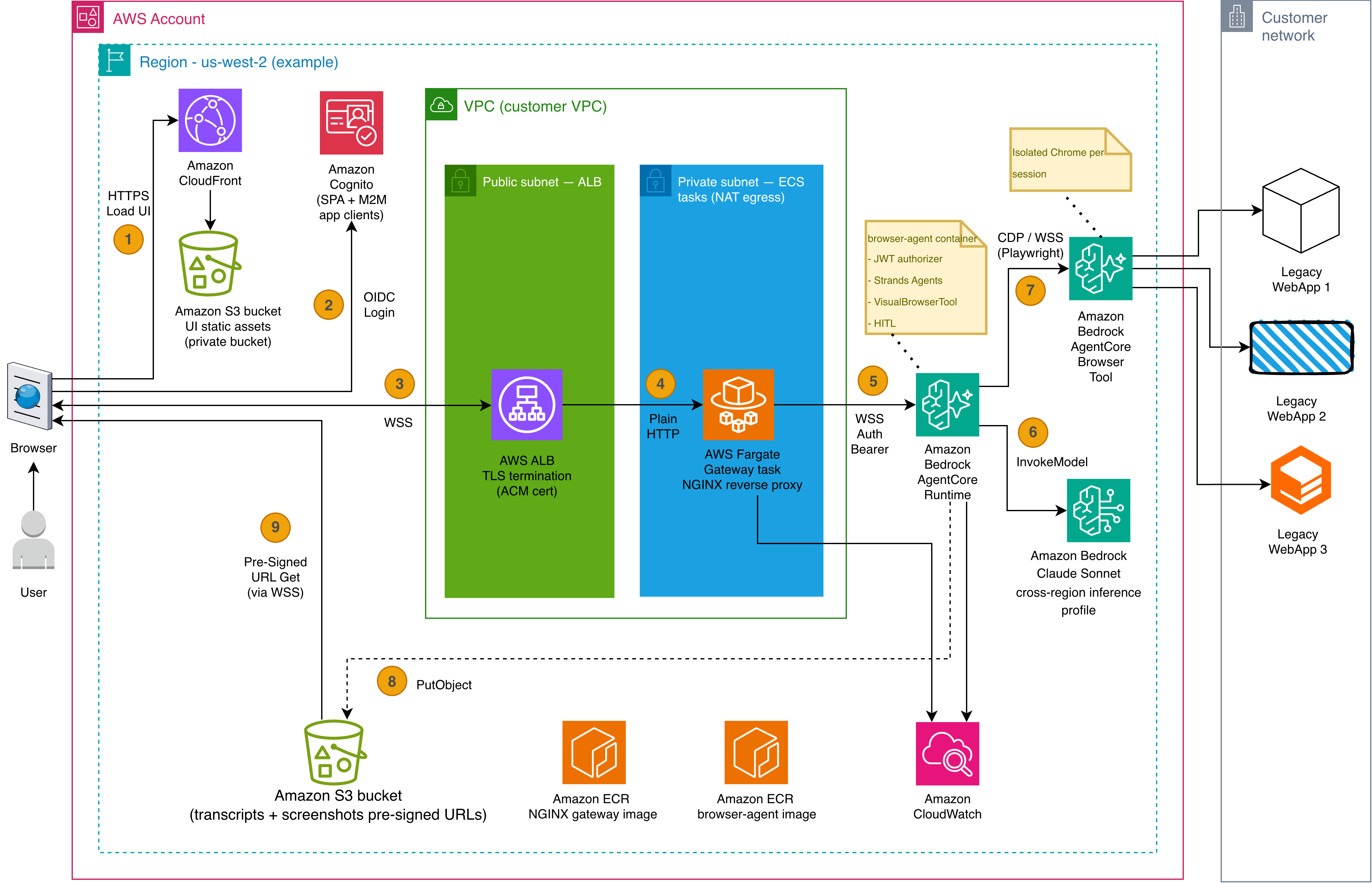
Addressing these challenges requires automation that can handle JavaScript-heavy web interfaces, isolate sessions between processes, expose programmatic control through APIs, log every interaction immutably, defer to a human when confidence is low, and scale elastically. The reference implementation meets these requirements through a small set of components with tightly scoped responsibilities. These include a React single-page app for the operator, a TLS-terminating proxy that solves a specific browser limitation, a Python worker running Strands Agents on Amazon Bedrock AgentCore runtime, and the managed browser environment provided by Amazon Bedrock AgentCore Browser Tool. Amazon Cognito signs the operator in and issues the JWT that flows through the stack. The architecture is designed to help increase automation return on investment while maintaining security, compliance, and human oversight.
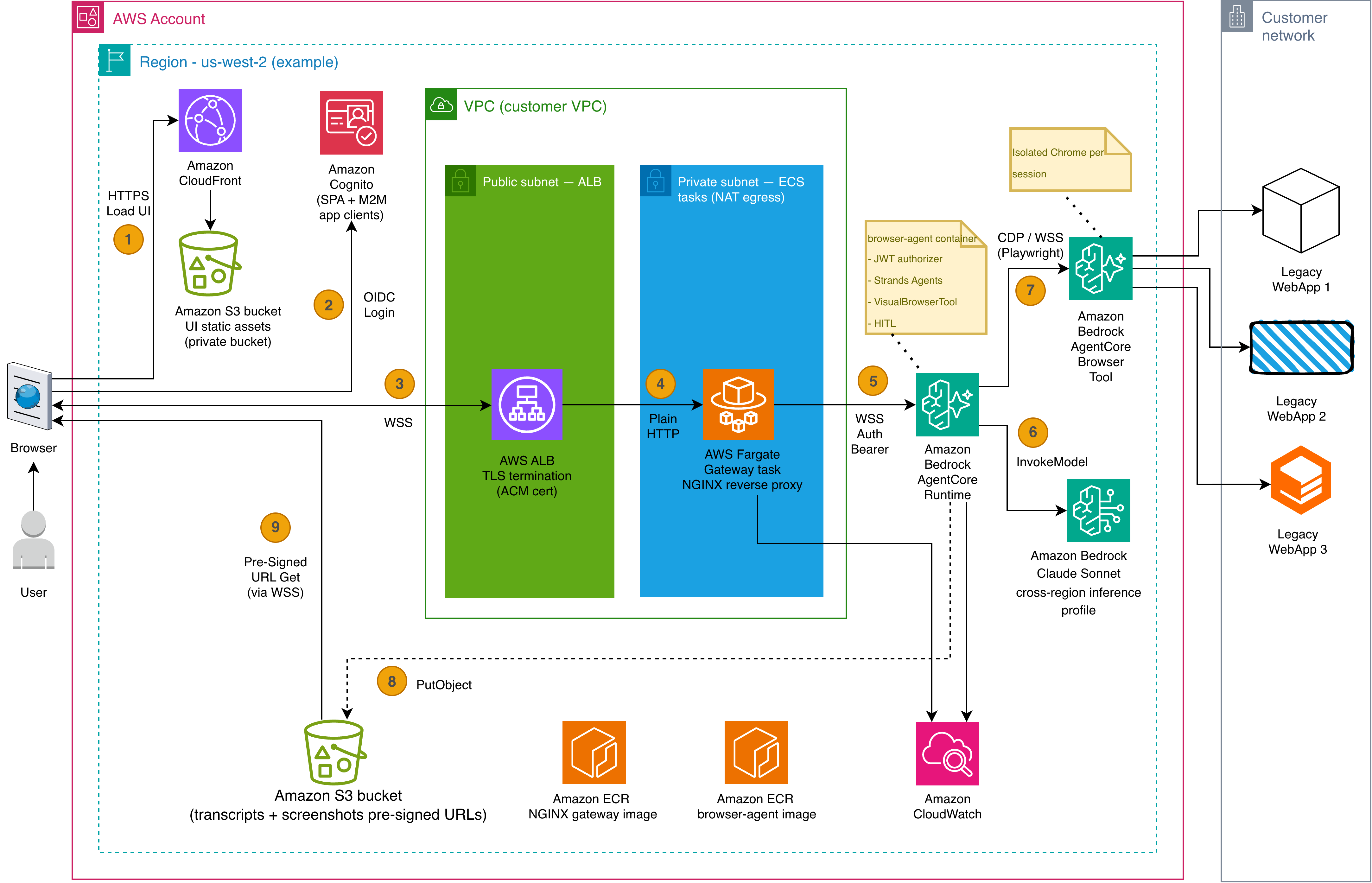
Figure 1: Solution architecture
The numbered steps in the diagram trace the end-to-end flow:
- Load UI. The user’s browser loads the React chat interface from Amazon CloudFront, backed by a private Amazon Simple Storage Service (Amazon S3) bucket hosting the static UI assets.
- OIDC Login. The user authenticates through Amazon Cognito (configured with SPA and machine-to-machine app clients) through the standard OpenID Connect (OIDC) sign-in flow.
- WSS. The browser opens a WebSocket connection through an AWS Application Load Balancer (ALB) that terminates TLS using an AWS Certificate Manager (ACM) certificate.
- Plain HTTP. The ALB forwards the WebSocket connection to an NGINX reverse proxy running as an AWS Fargate task in a private subnet. The proxy extracts the JWT from the query string and prepares it for the next hop.
- WSS Auth Bearer. The NGINX proxy forwards the connection to Amazon Bedrock AgentCore runtime with the JWT in the Authorization header. AgentCore runtime validates the token through its JWT authorizer and routes to the browser-agent container running Strands Agents, VisualBrowserTool, and the human-in-the-loop handler.
- InvokeModel. The agent calls a vision-capable foundation model on Amazon Bedrock to analyze screenshots and determine the next browser action.
- CDP / WSS (Playwright). The agent drives an isolated Chrome instance in Amazon Bedrock AgentCore Browser Tool over the Chrome DevTools Protocol. The browser navigates the target legacy web applications on the customer’s network.
- PutObject. The agent stores session transcripts and screenshots to an Amazon S3 bucket, generates a pre-signed URL for each screenshot, and streams the URL back to the user’s browser over the existing WebSocket connection.
- Pre-Signed URL Get. The user’s browser fetches the screenshot image directly from S3 using the pre-signed URL, rendering it in the chat UI alongside the agent’s reasoning trace. Image bytes don’t travel through the WebSocket. Only the short-lived URL does.
Supporting infrastructure includes Amazon Elastic Container Registry (Amazon ECR) (hosting the NGINX gateway and browser-agent container images) and Amazon CloudWatch (audit logging and observability).
AgentCore Browser Tool
Amazon Bedrock AgentCore Browser Tool provides a fully managed, cloud-based browser service. AI agents interact with legacy web interfaces through secure, isolated browser sessions. Each session runs in a dedicated, isolated environment with its own CPU, memory, and filesystem. When a session completes, the environment is terminated and the state is sanitized.
Agents connect through Playwright over WebSocket-based CDP for programmatic control of web applications, including JavaScript-heavy interfaces, dynamic forms, and multi-step workflows, regardless of the underlying technology stack.
Three capabilities directly address the challenges described earlier:
- Browser profiles persist authentication state across sessions. Authenticate once, or have a human operator perform the initial login through live-view, and subsequent sessions resume already signed in, alleviating repeated SSO and MFA flows.
- Proxy configuration routes traffic through corporate proxy infrastructure with domain-based routing and credentials on AWS Secrets Manager, making internal legacy applications behind corporate networks or IP-allowlisted portals reachable.
- Session recording captures browser interactions, including clicks, form inputs, and page navigation, and stores them in Amazon S3. Combined with AWS CloudTrail logging, this supports the audit trail requirements of financial regulations.
Returning to our insurance example, the Browser Tool navigates the policy administration system exactly as a human operator would. It signs in with profile-persisted session state, enters modifications across multiple screens, and submits changes, all within a secure, isolated session that produces a complete, replayable audit record.
Amazon Bedrock foundation models and Strands Agents orchestration
Amazon Bedrock provides the multi-modal foundation model that drives the agent’s decision loop. The reference implementation uses a vision-capable foundation model on Amazon Bedrock through cross-region inference to analyze screenshots of the browser’s current state and decide what action to take next. This is the core capability that differentiates the solution from traditional RPA. The model sees the page, reasons about what’s on screen, and determines the next browser action, whether that is a click, a fill, a scroll, or a pause for human confirmation.
Strands Agents is the orchestration framework that turns the model’s decisions into concrete tool calls. Rather than following a fixed script, the model drives its own behavior through a ReAct (Reason + Act) loop. The model captures a screenshot, analyzes the page visually, decides which tool to call, executes it, observes the result, and repeats. The framework supports multiple orchestration patterns, including Agents-as-Tools for hierarchical delegation, Graphs for structured workflows, and collaborative patterns for complex multi-step processes.
When an operator provides natural language instructions such as “open policy #12345, update the coverage amount to $500,000, and submit for approval,” the model decomposes these into sequential browser actions. After each action, the model takes a screenshot, interprets the new page state visually, and decides the next step. If a confirmation dialog appears unexpectedly or a field validates differently than anticipated, the model reasons through the new state rather than failing. This alleviates the brittleness that makes traditional RPA impractical at scale.
Applied to our insurance scenario, a single natural language instruction can drive a complete plan modification workflow. The model visually navigates to the right policy, identifies form fields from the screenshot, enters changes across multiple screens, handles unexpected validation prompts, and submits for approval. No human needs to script each step or maintain brittle selectors as the UI evolves.
Human-in-the-loop integration
The operator sees the automation as it happens. The agent streams reasoning traces and screenshots to the chat interface in real time. When the model determines it needs human input before, for example confirming that the correct policy was opened before submitting a change, it calls the handoff_to_user tool, which pauses the automation and presents the operator with a question and the current screenshot.
The browser session stays alive while the agent waits for a response (up to 300 seconds by default). The operator can approve, reject, provide additional instructions, or ask the agent to try a different approach. Once the response arrives, the model resumes the ReAct loop with the operator’s input. It takes a fresh screenshot to assess the current state and continues from there. If the operator doesn’t respond within the timeout window, the model decides whether to retry, attempt an alternative approach, or abort gracefully.
In the context of our insurance workflow, this means the digital worker pauses before critical actions such as submitting a plan modification, confirming a beneficiary change, or processing an endorsement that exceeds a threshold. This gives the operator the opportunity to verify accuracy on screen before the change becomes permanent. The operator remains in control without needing to drive every step manually.
Security and compliance
The architecture provides session isolation, IAM controls for access management, and ephemeral sessions where the state is cleared after each use. The reference implementation uses Amazon Cognito as the identity provider, with Microsoft Entra ID and Okta supported by swapping the OIDC discovery URL. Standards-aligned OIDC providers work with the same configuration surface.
For our insurance company, this means every policy modification performed by the digital worker is fully traceable, with session recordings stored in Amazon S3 and actions logged through Amazon CloudWatch. This supports the retention requirements of financial regulations.
Implementation walkthrough
The reference implementation ships as a Python worker built on Strands Agents, deployed on Amazon Bedrock AgentCore runtime. The agent uses the AgentCore Browser Tool SDK to create isolated browser sessions through the Strands AgentCoreBrowser base class. The complete source code is available in the GitHub repository.
How the agent drives the browser
The following diagram traces a single operator instruction through the full automation loop. The operator issues a natural language command, the agent starts a browser session, and the foundation model enters a ReAct cycle. It captures screenshots, analyzes page state visually, decides the next action, executes it through Playwright, and repeats until the task is complete.
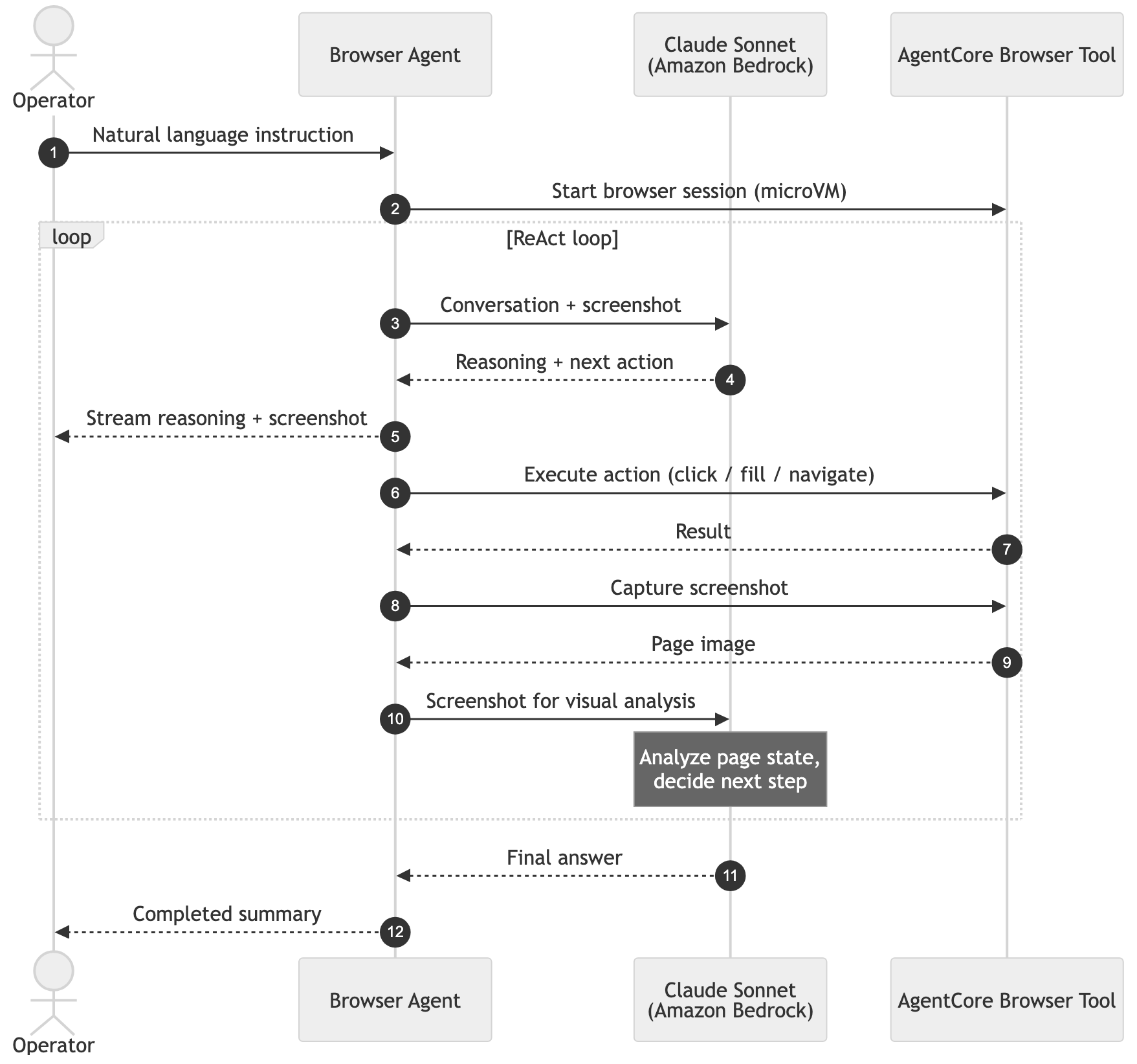
Figure 2: Chat flow, from operator instruction through the ReAct loop
When the model determines it needs human confirmation before a critical step, such as submitting a form or confirming a record selection, it pauses the automation and presents the operator with the current screenshot and a question. The operator responds, and the model resumes.
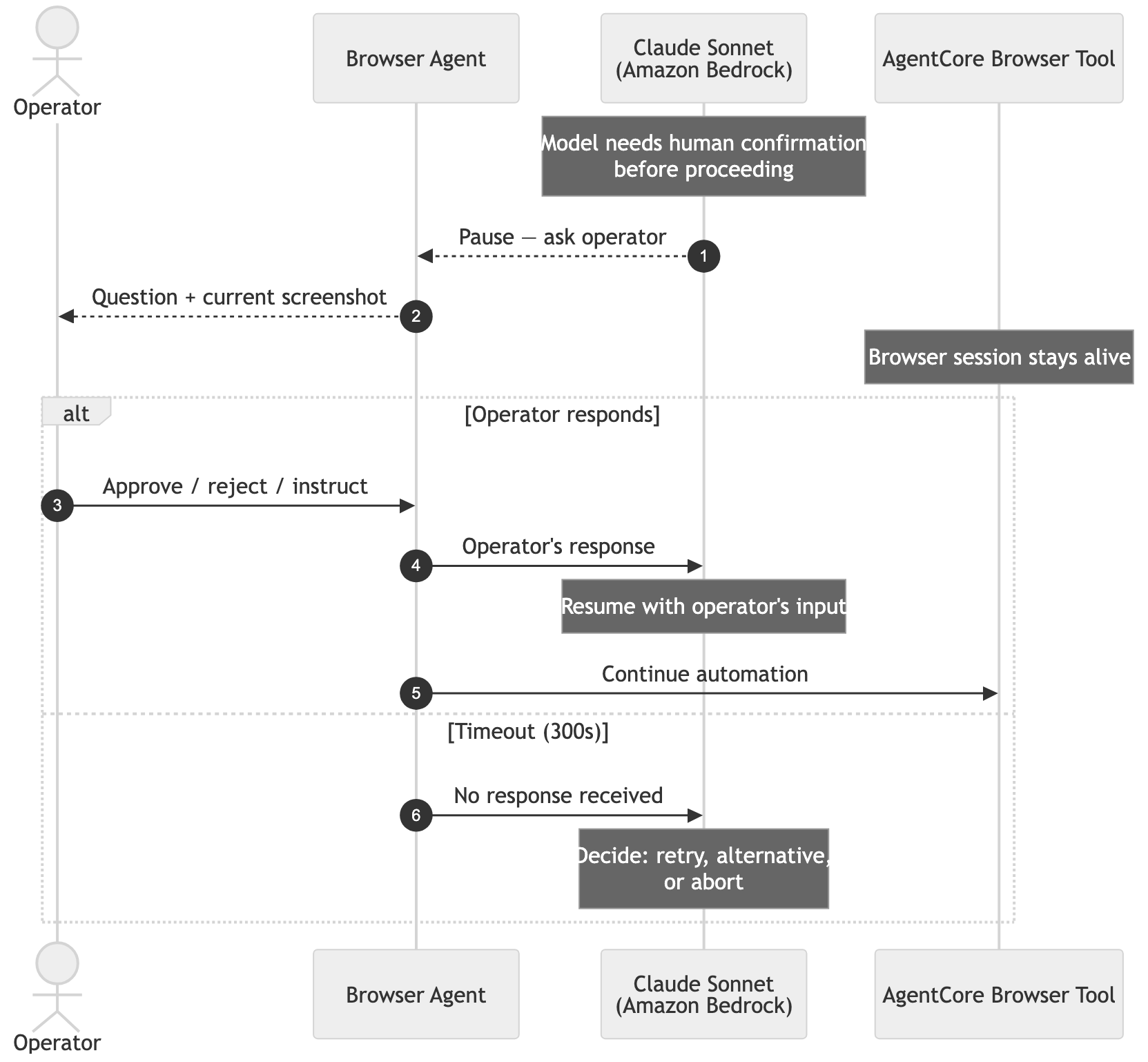
Figure 3: Human-in-the-loop, where the agent pauses for an operator decision
Key design decisions
Two implementation choices are worth calling out because they directly affect production reliability:
Event loop isolation. The browser agent runs alongside a WebSocket server that streams updates to the operator. The upstream browser tool’s threading model interferes with the server’s event loop, causing connections to drop after about 15 seconds. The reference implementation overrides this so browser operations run on their own isolated loop, keeping the operator’s connection stable throughout the session. See visual_browser_tool.py for the full implementation.
Semantic locators over CSS selectors. Traditional RPA bots break when UI elements move or get renamed. The semantic_action tool takes a different approach. The model describes what it sees (“click the button labeled Submit”) and the tool maps that to Playwright’s semantic Locator API using case-insensitive fuzzy matching. This makes the automation resilient to the minor UI variations common in legacy applications. This is exactly the brittleness problem the solution set out to solve. See semantic_action_tool.py for the full implementation.
Deployment and testing
The entire solution deploys with a single Terraform stack. The following steps take you from git clone to a working chat URL.
Prerequisites
You must have the following:
- An AWS account with Amazon Bedrock model access enabled for a vision-capable foundation model.
- AWS Command Line Interface (AWS CLI) v2 configured with credentials.
- Docker 24+.
- Terraform 1.5+.
- Node 20+ and Yarn.
- Python 3.12.
Deploy
The stack provisions the Cognito User Pool, CloudFront distribution, ECR repositories, ECS proxy service, AgentCore runtime with JWT authorizer, and S3 session storage. Terraform provisioners build and push both container images, compile the React UI, sync it to S3, and invalidate CloudFront, all in one pass. First apply takes approximately 20–30 minutes, most of which is CloudFront propagation and container image builds.
Test the solution
After deployment completes, Terraform outputs the CloudFront URL. Open it in a browser, sign in with a Cognito user, and try a prompt such as:
“Open https://httpbin.org/forms/post, fill the customer name with John Smith, pick medium pizza, check bacon topping, and submit the form.”
You should see the reasoning trace stream into the chat, screenshots appear alongside each step, and a human-in-the-loop prompt before the final submit. For additional test scenarios, example prompts, and screenshots of the UI in action, see the repository README.
Clean up
To avoid ongoing charges, destroy the infrastructure when you’re done:
This removes the provisioned resources including the Cognito User Pool, CloudFront distribution, ECR repositories, ECS services, AgentCore runtime, and S3 buckets.
Conclusion and next steps
The AI-powered digital worker described in this post makes that case achievable. Where traditional RPA is brittle because it couples to exact UI layouts, the combination of the vision-capable foundation models in Amazon Bedrock, the model-driven orchestration of Strands Agents, and the isolated browser sessions of AgentCore Browser Tool produces automation that reasons over page state, recovers from unexpected branches, and defers to a human when confidence is low. It does this without sacrificing the audit trail that regulated industries require.
The reference implementation leaves room to grow. If your workflow needs cross-session context, Amazon Bedrock AgentCore memory provides managed short-term and long-term recall. If you need to integrate existing REST APIs as tools the agent can call alongside its browser actions, Amazon Bedrock AgentCore Gateway handles that without writing custom Strands tools. For portals that require custom browser behavior, Chrome extensions can be loaded into AgentCore Browser Tool sessions at creation time. The complete source code is available on GitHub.
About the authors
Learn how to automate legacy web applications that need human-like interaction using Amazon Bedrock AgentCore Browser Tool and Strands Agents. This walkthrough covers a reference architecture for an AI-powered digital worker that drives legacy interfaces through secure, isolated browser sessions while preserving human oversight and full audit trails. Read More