
If you’re iterating on deploying large language models (LLMs) on AWS GPU instances, you’ve probably noticed the larger the model to be loaded into GPU High Bandwidth Memory (HBM), the longer the painful wait until the GPUs are ready for inference. As models grow to hundreds of billions of parameters and GPU environments grow ever larger, model load time negatively affects your end-to-end total time to first token (TTFT). This post explores how Amazon FSx for Lustre, combined with NVIDIA GPUDirect Storage (GDS), plus a bit of clever planning, can fundamentally change the cold-start TTFT equation. It reduces minutes of unproductive load time to seconds each time your model starts. While we’re on the topic of optimization, this post will also cover the effect of the recently announced TurboQuant KV cache in terms of a massive increase in context window size.
Background: NVIDIA Blackwell architecture on AWS
AWS recently launched the Amazon EC2 P6e and P6 instance families, powered by NVIDIA’s Blackwell architecture (watch the announcement). The flagship P6e UltraServer packs 72 NVIDIA Blackwell GPUs into a single NVLink domain with 130 TB/s of bisection bandwidth, 13.4 TB of HBM3e, and 360 petaflops of FP8 compute (720 at FP4). These UltraServers are typically used for large-scale distributed training of frontier models at the multi-trillion-parameter scale.
In this post, we focus on improving cold-start TTFT for a single P6 or P5en instance. Specifically, we cover how to get model weights in the correct format to HBM memory as quickly as possible. For UltraClusters with multiple nodes, this same process would be performed in parallel across all nodes in the cluster. Each node in the UltraServer loads the model independently from the shared FSx for Lustre filesystem, taking advantage of the massive scalable GDS-enabled throughput FSx for Lustre can provide.
The model loading bottleneck
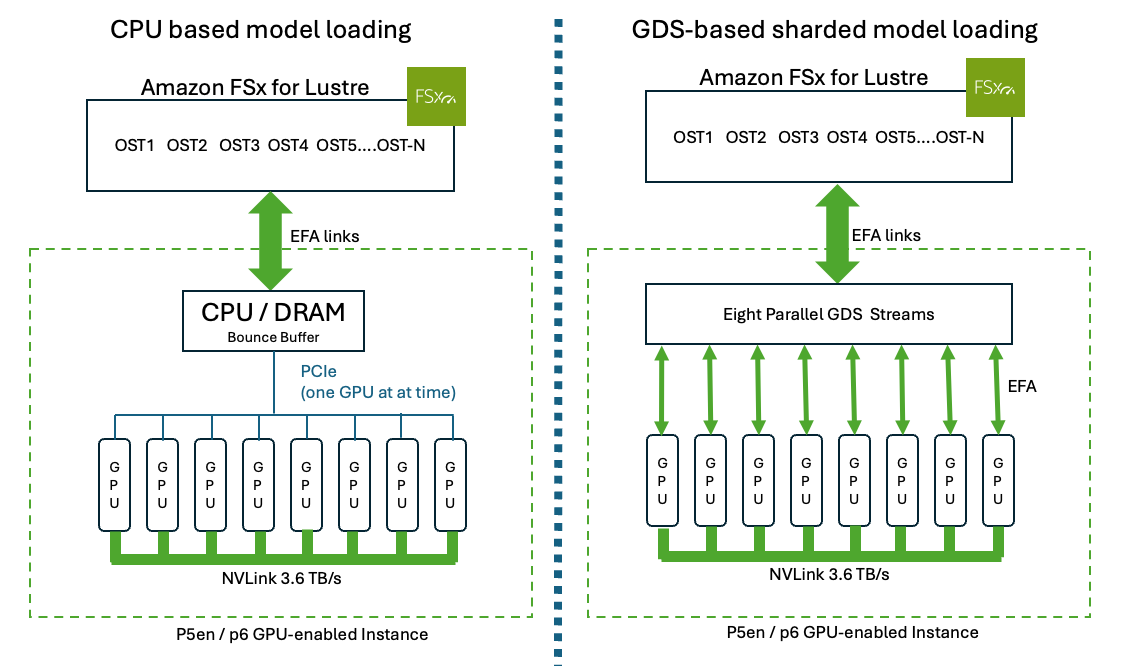
First, consider the basic difference between GPUDirect Storage and CPU-based model loading. Traditional CPU-based model loading (left) streams the checkpoint through CPU memory and copies weights to each GPU sequentially over PCIe. Sharded GPUDirect Storage loading (right) pre-splits the checkpoint across tensor-parallel ranks on Amazon FSx for Lustre, and all eight GPUs read their shards in parallel directly into HBM through EFA, bypassing the CPU entirely as shown in Figure 1.
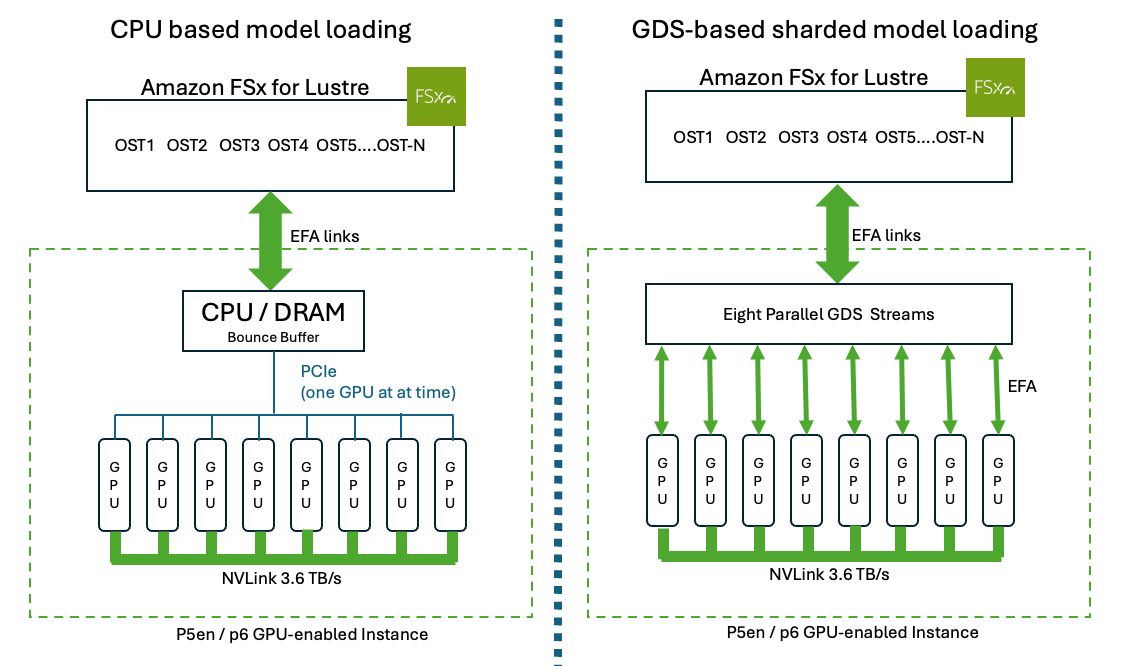
Figure 1: CPU-based model loading vs. sharded GPUDirect Storage loading on an 8-GPU instance.
Consider a 405B parameter model like Llama 3.1 405B, that’s roughly 800 GB of checkpoint data in BF16.The traditional model loading path looks like the following:
- Read checkpointed model file from storage into CPU system memory
- Deserialize the weights (torch.load or safetensors parsing)
- Optionally quantize on the CPU (BF16 → FP8 or INT4) – this reduces HBM requirements
- Copy weights from CPU memory to each GPU over PCIe, one at a time.
This pipeline is largely limited by being single-threaded, sequential and CPU bound. On a typical deployment without GDS, a single-threaded model load with CPU-side quantization takes 10–20 minutes for Llama 3.1 405B. Even with pre-sharded checkpoints, you’re still looking at several minutes. During that entire time, your GPUs (the most expensive resource in the stack) sit idle, increasing your cold start to first token time.
It’s worth noting that recent versions of serving frameworks like vLLM have made significant improvements to model loading. The vLLM V1 engine (default since vLLM 0.19) introduced parallel weight loading across GPUs, reducing load times considerably compared to earlier versions. However, even with these improvements data still flows through CPU memory and the PCIe bus. GDS removes this bottleneck entirely.
For inference serving, this isn’t just an inconvenience. Long model load times directly impact:
- Cold start latency – new instances can’t serve traffic until the model is loaded
- Autoscaling responsiveness – scaling events are delayed by minutes, not seconds
- Fault recovery – if a serving instance fails, replacement capacity takes minutes to come online
- Cost efficiency – GPU-hours consumed during loading are GPU-hours not serving requests
A direct path: FSx for Lustre with GPUDirect Storage
Amazon FSx for Lustre is a fully managed, high-performance parallel file system designed for compute-intensive workloads. When combined with support for NVIDIA GPUDirect Storage, FSx for Lustre establishes multiple direct data paths directly to GPU memory, bypassing the CPU and system memory entirely.
This integration relies on two key technologies working together:
- Amazon Elastic Fabric Adapter (EFA) uses the AWS Scalable Reliable Datagram (SRD) protocol to bypass operating system overhead. The P5en instance has 16 EFA interfaces at 200 Gbps each, providing 3,200 Gbps (400 GB/s) of aggregate network bandwidth. FSx for Lustre can use eight or more of these EFA interfaces for direct storage-to-GPU data transfer.
- NVIDIA GPUDirect Storage (GDS) enables DMA transfers directly from the network interface to GPU HBM, removing the CPU memory bounce buffer that creates the traditional bottleneck.
The result is a significant throughput improvement over traditional TCP-based storage access. But raw throughput is only part of the story. The real unlock comes from what this direct path enables architecturally: CPU bypass when using sharded parallel model loading.
For our test configuration, we use a Persistent_2 EFA filesystem at 1000 MBps/TiB with 20 Object Storage Targets (OSTs) (96 TiB capacity), delivering approximately 94 GiB/s of filesystem throughput. Throughput scales linearly with filesystem capacity. A larger filesystem means more OSTs and more parallel I/O paths. For a walkthrough on building high-throughput FSx for Lustre filesystems, refer to an earlier blog, Build and deploy a 1 TB/s file system in under an hour. See Stage 0 in the following section for the setup commands.
To configure your P5en client for GDS-enabled access to FSx for Lustre, follow the steps in Configuring EFA clients in the FSx for Lustre User Guide. The configuration script provided by AWS (setup.sh –optimized-for-gds) automatically detects your instance type, configures the correct EFA interfaces with NUMA-aware CPU partitioning, and creates a systemd service so the configuration persists across reboots. The P5en by default only uses 8 of its EFA interfaces for FSx for Lustre, which provides the direct GDS data path from storage to each GPU’s HBM.
Sharded parallel loading on P5en (8x H200)
To illustrate the sharded loading approach, we’ll use the P5en instance (p5en.48xlarge)—8 NVIDIA H200 GPUs with 141 GB of HBM3e each, connected using NVSwitch with 3.6 TB/s of bisection bandwidth. The P5en supports GDS and has the same 3,200 Gbps SRD EFA networking as the P6-B200, making it a well suited platform to demonstrate this pattern. The performance characteristics for the storage read stage would be identical on a P6 node because each node has the same per-instance network bandwidth.
For any sufficiently large model (such as Llama 3.1 405B at 400 GB in FP8), the weights don’t fit in a single GPU’s HBM (141 GB on the H200). Tensor parallelism is required, splitting the model across multiple GPUs. This implies low-latency communication between GPUs over NVLink during inference (for all-reduce operations after attention and Multi-Layer Perceptron (MLP) layers), which is why NVSwitch-connected instances like the P5en and P6 are essential for serving these models.The approach works in four stages:While we use Llama 3.1 405B as our reference model, this pattern applies to any model that supports tensor-parallel sharding, including Mixtral, DeepSeek, and custom architectures. The key requirement is that the serving framework can split the model into per-GPU shards.
Stage 0: Provision the infrastructure. Before loading any models, you need two things in the same Amazon Virtual Private Cloud (Amazon VPC) and Availability Zone (AZ): an EFA-enabled FSx for Lustre filesystem and a P5en (or P6) GPU instance configured for GPUDirect Storage. We provide AWS CloudFormation templates and setup scripts in the accompanying aws-samples repository that automate the infrastructure provisioning and GDS configuration described in the following section.
The FSx for Lustre filesystem should be a Persistent_2 SSD deployment with EFA enabled and a throughput setting of 1000 MBps/TiB, as described in the preceding A direct path section. The filesystem capacity determines your aggregate read throughput. More capacity means more OSTs and more parallel I/O paths.
The P5en instance needs all of its EFA interfaces configured, the EFA driver installed, the NVIDIA GDS nvidia-fs.ko kernel module built and loaded, NUMA-aware Lustre client networking configured for optimal throughput, and the GDS runtime configuration (cufile.json) in place. This involves several steps: building the NVIDIA nvidia-fs.ko module, aligning EFA interfaces to CPU partitions based on the instance’s NUMA topology, and tuning Lustre client parameters. Follow the Configuring EFA clients guide in the FSx for Lustre User Guide for the complete setup procedure.
After the infrastructure is ready, set up Lustre striping on the output directory to ensure concurrent GDS reads from multiple GPUs are distributed across all OSTs:
Stage 1: Pre-shard and pre-quantize the model weights. Offline, use vLLM to split the model into 8 tensor-parallel shards with FP8 quantization, and save them to FSx for Lustre. The source checkpoint is in BF16 (the standard format for Llama 3.1 on HuggingFace). The pre-sharding step quantizes the weights to FP8, halving the data that needs to be loaded via GDS:
This produces 8 tensor-parallel (TP) aware shards where each shard contains exactly the weight slices that GPU needs for inference. Attention heads and MLP columns are split correctly across GPUs. The shards are pre-quantized to FP8, reducing the total checkpoint size from ~800 GB to ~400 GB. The output directory will look like this:
This pre-sharding step needs to be repeated whenever you update the base model checkpoint, for example, after fine-tuning or switching to a new model version. Because it runs offline and the sharded output is reused on every subsequent load, the amortized cost is minimal.
If you control the training pipeline, you can remove this step entirely. Frameworks like Megatron-LM and NeMo can save checkpoints directly in the tensor-parallel layout and precision your serving stack expects. For example, 8-way TP shards in FP8 safetensors format. When training saves in the serving format, the checkpoint is ready for GDS parallel loading with zero post-processing. Note that Megatron-LM saves checkpoints in torch_dist format by default, which requires conversion using the Megatron Bridge before the shards can be used with safetensors-based loaders—a one-time conversion step that adds minimal overhead.
We chose FP8 for this post because it’s a first-class datatype on H200 and B200 with native Tensor Core support, requires a single flag in vLLM (–quantization fp8), and delivers near-zero accuracy loss on Llama-class models. More aggressive 4-bit weight quantization methods (AWQ, GPTQ, and HQQ), combined with optimized W4A16 serving kernels in vLLM, can reduce checkpoint size by another 2x and improve generation throughput on bandwidth-bound workloads (2–3x vs. FP8 at small batch sizes on H100/H200). AWQ and GPTQ require a short calibration pass over representative data. HQQ is data-free. The GDS loading pattern in this post is independent of the quantization method. Whatever format your serving framework supports, the parallel sharded load from FSx for Lustre applies the same way. A 4-bit 405B checkpoint loads in roughly half the time of the FP8 results reported in the following section.
FP8 quantization halves checkpoint size and thus load time, but weight quantization isn’t the only lever available. Emerging techniques like TurboQuant (Google Research, ICLR 2026) and its underlying PolarQuant method target the Key-Value (KV) cache. The memory that grows with context length during inference. TurboQuant compresses the KV cache to approximately 3 bits per value (a 6x reduction), with up to 8x speedup in attention computation on NVIDIA H100 GPUs, and zero accuracy loss, all without fine-tuning, according to the authors. While these methods don’t reduce checkpoint size or model load time directly, they significantly reduce HBM consumption during inference, clearing GPU memory for longer context windows or larger batch sizes. Combined with the FP8 weight quantization used in this post, KV cache compression further reduces overall HBM requirements. This can help you to serve larger models, or more concurrent requests, on the same hardware.
Stage 2: Parallel GDS reads. At load time, all 8 GPUs simultaneously read their assigned shard directly from FSx for Lustre into GPU HBM via GDS. Because the shards were pre-quantized to FP8, the total data to read is roughly 400 GB, or about 50 GB per GPU. GDS bypasses CPU memory entirely, so there’s no serialization through the host. All 8 reads happen in parallel.
For the GDS read path, we use fastsafetensors, an open source library that reads safetensors files directly into GPU memory using NVIDIA cuFile (the GDS API) and reconstructs PyTorch tensors without any CPU-side deserialization. Each GPU opens its shard file, performs a single large GDS read into a GPU buffer, and then extracts all tensors from the buffer using the safetensors header metadata. The tensor extraction step takes less than a millisecond because it’s pointer arithmetic into the already-loaded GPU buffer.
Before loading the model, verify that the GDS kernel module is loaded and the Lustre client is configured for EFA:
If nvidia_fs isn’t loaded, GDS reads will silently fall back to the CPU bounce-buffer path. You will still get correct results, but without the performance benefit. Load the module with sudo modprobe nvidia_fs.Using fastsafetensors, each GPU loads its shard in parallel:
Stage 3: Verify and serve. After the tensors are loaded into GPU HBM via GDS, all inference computation runs entirely from GPU memory. The filesystem is only involved during the initial load. The tensors dictionary from Stage 2 contains every weight for this rank, already on the correct GPU device and in the correct tensor-parallel layout. No CPU memory was touched, no deserialization occurred. The weights went directly from FSx for Lustre storage to GPU HBM.
These tensors are ready for any tensor-parallel inference engine that accepts pre-loaded weight dictionaries. The integration point is framework-specific: vLLM, TensorRT-LLM, and SGLang each have internal APIs for injecting weights into their TP-aware model graphs. As these frameworks adopt GDS-aware weight loading natively (fastsafetensors was built for exactly this integration by the Foundation Model Stack team), the full GDS path shown in Stage 2 will become a single-command operation.
For production serving today, vLLM can load the same pre-sharded checkpoints from FSx for Lustre:
vLLM’s built-in weight loader uses the standard CPU-based read path rather than GDS. The pre-sharded format still eliminates the deserialization and per-GPU weight-splitting overhead that dominates standard checkpoint loading, reducing load time from approximately 18 minutes to approximately 2 minutes for Llama 3.1 405B (see the performance tables in the following section). The GDS parallel path in Stage 2 takes this further, cutting that approximately 2 minutes down to approximately 6 seconds.
The performance difference
These are the measured results. The following tables compare model load times across different loading methods on a P5en instance (8x H200) with a 96 TiB Persistent_2 EFA filesystem (20 OSTs, ~94 GiB/s filesystem throughput).
Measured: Llama 3.1 70B Instruct (8-way TP, cold cache)
| Loading Method | Total Load Time | Speedup |
|---|---|---|
| Standard vLLM load (BF16 checkpoint, FP8 quantize-at-load, no GDS) | ~3 min | 1x |
| GDS parallel load — BF16 shards (141 GB) | 2.17 s | ~83x |
| GDS parallel load — FP8 shards (72 GB) | 1.28 s | ~141x |
GDS load times are per-rank (all 8 GPUs loading in parallel) using fastsafetensors, which reads safetensors files directly into GPU memory via GDS and reconstructs the tensors. There’s no CPU bounce buffer, no deserialization overhead. Each rank loads its shard and has all 1,124 tensors ready on the correct GPU device in just over a second. The baseline times include vLLM engine initialization and warmup in addition to weight loading, so the GDS rows represent the storage-to-GPU transfer time specifically.
Measured: Llama 3.1 405B Instruct (8-way TP, cold cache)
| Loading Method | Total Load Time | Speedup |
|---|---|---|
| Standard vLLM load (BF16 checkpoint, FP8 quantize-at-load, no GDS) | ~18 min | 1x |
| GDS parallel load — BF16 shards (812 GB) | 10.4 s | ~104x |
| GDS parallel load — FP8 shards (408 GB) | 6.4 s | ~169x |
These results were measured on a 96 TiB filesystem (20 OSTs). Since GDS throughput scales linearly with OST count, a larger filesystem would reduce load times proportionally. For example, a 342 TiB filesystem with 57 OSTs could potentially bring the FP8 load time under 3 seconds. The scaling math: 94 GiB/s × 57/20 OSTs ≈ 268 GiB/s theoretical ceiling. Conservatively, ~190 GiB/s accounting for per-OST overhead means 408 GB ÷ 190 GiB/s ≈ 2.0 seconds.Load performance would be identical on a P6 node, which has the same per-instance EFA bandwidth.This pattern is most impactful for models large enough to require tensor parallelism across multiple GPUs. That’s where the parallel read advantage kicks in. For smaller models that fit on a single GPU, the traditional loading bottleneck is the CPU (deserialization, quantization, and serial PCIe transfer), and GDS with parallel reads has less to offer. After you’re splitting across multiple GPUs, each one can read its shard independently via GDS, and the CPU is no longer in the critical path.Even with pre-quantized checkpoints, the single-threaded path still spends significant time on deserialization and serial host-to-device copies across all 8 GPUs over PCIe. This accounts for the gap between raw storage read time and total load time.The sharded GDS approach loads 408 GB of FP8 model weights to 8 GPUs in 6.4 seconds. That’s about 169x faster than a standard vLLM load without GDS, and on a 96 TiB filesystem. A larger filesystem would push the speedup even higher. This is the difference between “go get lunch” and “it’s already done.”The speedup comes from removing every bottleneck in the traditional path simultaneously:
- No CPU bounce buffer – GDS reads directly to GPU HBM
- No serial deserialization – pre-sharded model weights are ready to load as-is
- No CPU quantization – pre-quantized offline, not at load time
- No sequential GPU loading – all 8 GPUs read in parallel
- No all-gather needed – TP-aware shards mean each GPU already has exactly the weights it needs
But fast loading is only half the story. FP8 quantization not only cuts load time, it also halves the HBM footprint of the model weights, freeing memory for KV cache and serving. Combined with TurboQuant’s KV cache compression (3–4 bits per value), the usable GPU memory for inference increases dramatically:
| P5en (8x H200) | P6 node (8x B200) | |
|---|---|---|
| HBM per GPU | 141 GB (HBM3e) | 192 GB (HBM3e) |
| Total HBM | 1,128 GB | 1,536 GB |
| 405B FP8 weights per GPU | ~51 GB | ~51 GB |
| Free HBM per GPU for KV cache | ~85 GB | ~136 GB |
| FP16 KV cache context capacity | ~82K tokens | ~131K tokens |
| With TurboQuant K4/V4 (3.76x) | ~310K tokens | ~495K tokens |
| With TurboQuant K4/V3 (~5x) | ~412K tokens | ~660K tokens |
The combination of FP8 weights and TurboQuant KV cache compression means you can serve Llama 3.1 405B with context windows exceeding 400K tokens on a single P5en, or nearly 500K tokens on a P6 node. This is the difference between handling a few documents and processing an entire book in a single request.
It’s also worth noting that the FSx for Lustre filesystem isn’t single-purpose infrastructure. The same filesystem that accelerates model loading can serve as shared storage for training data, checkpoints, datasets, and model artifacts across your team. By reducing GPU idle time during model loads, you increase the rate at which you can iterate on model testing and evaluation. Loading a new model variant in seconds instead of minutes means more experiments per day. See FSx for Lustre pricing for current rates.
Integration with serving frameworks
This pattern works with the inference serving frameworks you’re likely already using.
TensorRT-LLM natively supports tensor-parallel checkpoint loading. You convert and build engines with 8-way tensor parallelism, and launch across all GPUs with mpirun. When the underlying filesystem supports GDS, TensorRT-LLM can leverage the direct storage-to-GPU path automatically.
vLLM supports tensor parallelism across GPUs and can be configured to serve models with –tensor-parallel-size 8. While vLLM’s default loading path is CPU-based, the pre-sharded checkpoint approach combined with GDS-enabled storage provides the I/O acceleration at the filesystem level.
Summary
By combining Amazon FSx for Lustre with NVIDIA GPUDirect Storage and pre-sharded, pre-quantized model checkpoints, we reduced Llama 3.1 405B load times from 10–20 minutes without GDS to 6 seconds with GDS on a 96 TiB filesystem. Further gains are available by scaling to larger filesystems. Additionally, by applying TurboQuant KV cache compression (3–4 bits per value), the available context window for Llama 3.1 405B increases from approximately 82K tokens to over 400K tokens on a P5en, or from approximately 131K to approximately 660K tokens on a P6. This is a 5x improvement on the same hardware.
The key benefits of this approach:
- Dramatically faster cold starts – new inference instances are ready in seconds, not minutes
- Improved autoscaling – scaling events respond in near real-time to demand spikes
- Lower cost per token – GPUs spend their time serving inference, not waiting for weights to load
- Faster fault recovery – failed instances are replaced and serving traffic in seconds
- Scales with the cluster – every node in an UltraCluster loads independently from the same shared filesystem in parallel
- Vastly increased context windows – TurboQuant KV cache compression enables 5x longer context on the same hardware
This pattern works today on P5en and P6 instances with FSx for Lustre Persistent_2 EFA filesystems, using standard serving frameworks like vLLM and TensorRT-LLM. Get started today by loading your larger models faster.
About the author
If you’re iterating on deploying large language models (LLMs) on AWS GPU instances, you’ve probably noticed the larger the model to be loaded into GPU High Bandwidth Memory (HBM), the longer the painful wait until the GPUs are ready for inference. As models grow to hundreds of billions of parameters and GPU environments grow ever Read More