
As you deploy generative AI applications to diverse user groups, you might face a significant challenge that impacts user safety and application reliability: verifying each AI response is appropriate, accurate, and safe for the specific user receiving it. Content suitable for adults might be inappropriate or confusing for children, while explanations designed for beginners might be insufficient for domain experts. As AI adoption accelerates across industries, the need to match responses to user age, role, and domain knowledge has become essential for production deployments.
You might attempt to address this through prompt engineering or application-level logic. However, these approaches can create significant challenges. Prompt-based safety controls can be bypassed through manipulation techniques that tricks models into ignoring safety instructions. Application code becomes complex and fragile as personalization requirements grow, and governance becomes inconsistent across different AI applications. Furthermore, the risks of unsafe content, hallucinated information, and inappropriate responses are amplified when AI systems interact with vulnerable users or operate in sensitive domains like education and healthcare. The lack of centralized, enforceable safety policies creates operational inefficiencies and compliance risks.
To address these challenges, we implemented a fully serverless, guardrail-first solution using Amazon Bedrock Guardrails and other AWS services that align with modern AI safety and compliance alignment needs. The architecture provides three main components: dynamic guardrail selection based on user context, centralized policy enforcement through Amazon Bedrock Guardrails, and more secure APIs for authenticated access. You can use this serverless design to deliver personalized, safe AI responses without complex application code more efficiently, securely, and at scale.
In this post, we walk you through how to implement a fully automated, context-aware AI solution using a serverless architecture on AWS. We demonstrate how to design and deploy a scalable system that can:
- Adapt AI responses intelligently based on user age, role, and industry
- Enforce safety policies at inference time that help prevent bypasses by prompt manipulation
- Provide five specialized guardrails for different user segments (children, teens, healthcare professionals, patients, and general adults)
- Enhance operational efficiency with centralized governance and minimal manual intervention
- Scale with user growth and evolving safety requirements
This solution helps organizations looking to deploy responsible AI systems, align with compliance requirements for vulnerable populations, and help maintain appropriate and trustworthy AI responses across diverse user groups without compromising performance or governance.
Solution overview
This solution uses Amazon Bedrock, Amazon Bedrock Guardrails, AWS Lambda, and Amazon API Gateway as core services for intelligent response generation, centralized policy enforcement, and secure access. Supporting components such as Amazon Cognito, Amazon DynamoDB, AWS WAF, and Amazon CloudWatch help enable user authentication, profile management, security, and comprehensive logging.
What makes this approach unique is dynamic guardrail selection, where Amazon Bedrock and Bedrock Guardrails automatically adapt based on authenticated user context (age, role, industry) to help enforce appropriate safety policies at inference time. This guardrail-first approach works alongside prompt-based safety measures to provide layered protection, offering five specialized guardrails: Child Protection (Children’s Online Privacy Protection Act or COPPA-compliant), Teen Educational, Healthcare Professional, Healthcare Patient, and Adult General. These guardrails provide an authoritative policy enforcement layer that governs what the AI model is allowed to say, operating independently of application logic.
The solution uses serverless scalability, enforces safety policies, and adapts responses based on user context—making it well-suited for enterprise AI deployments serving diverse user populations. The solution can be deployed using Terraform, enabling repeatable and end-to-end automation of infrastructure and application components.
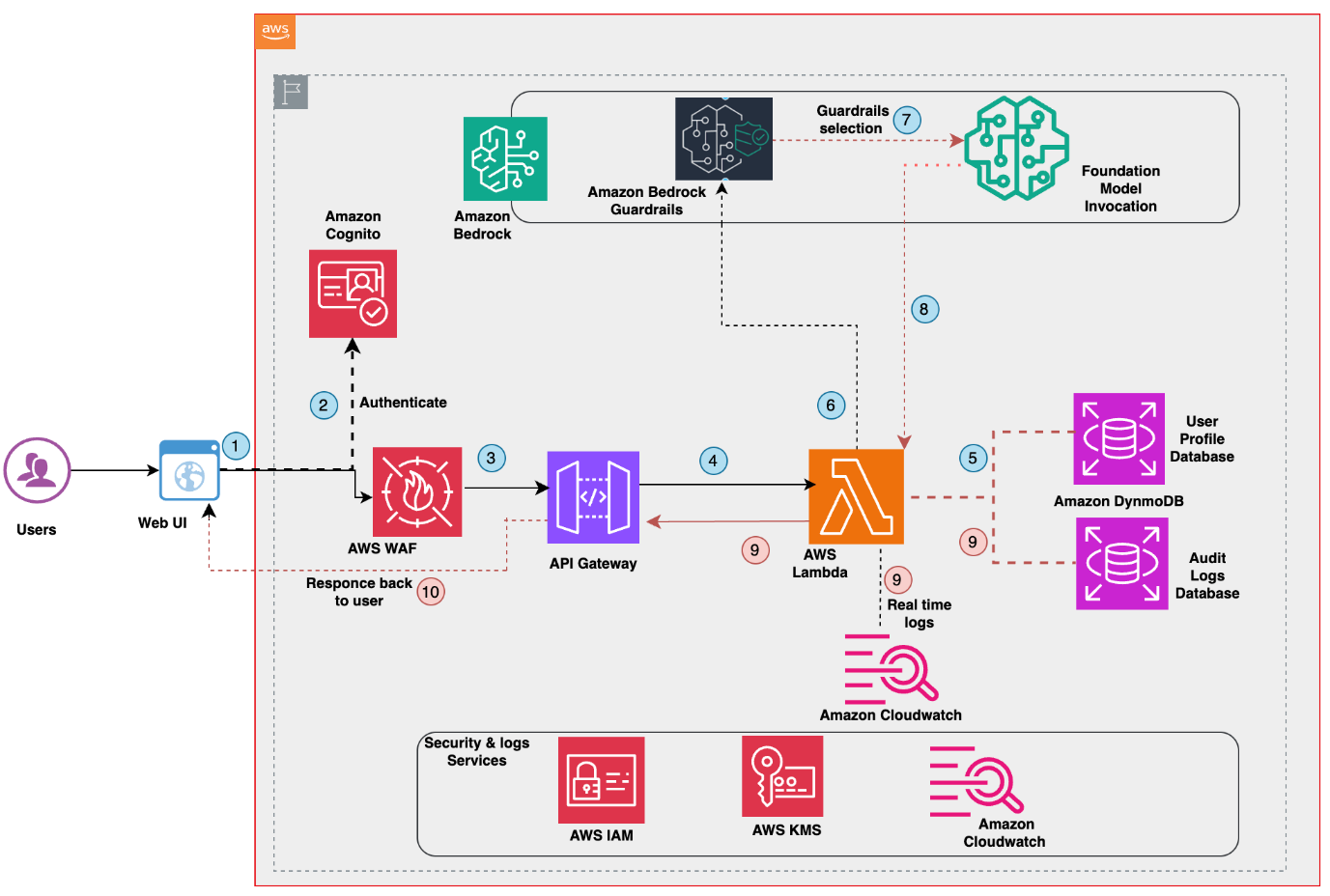
As shown in Figure 1, the web UI runs as a local demo server (localhost:8080) for testing and demonstration purposes. For production deployments, organizations can integrate the API endpoints with their existing web applications or deploy the interface to AWS services such as Amazon Simple Storage Service (Amazon S3) with Amazon CloudFront or AWS Amplify.
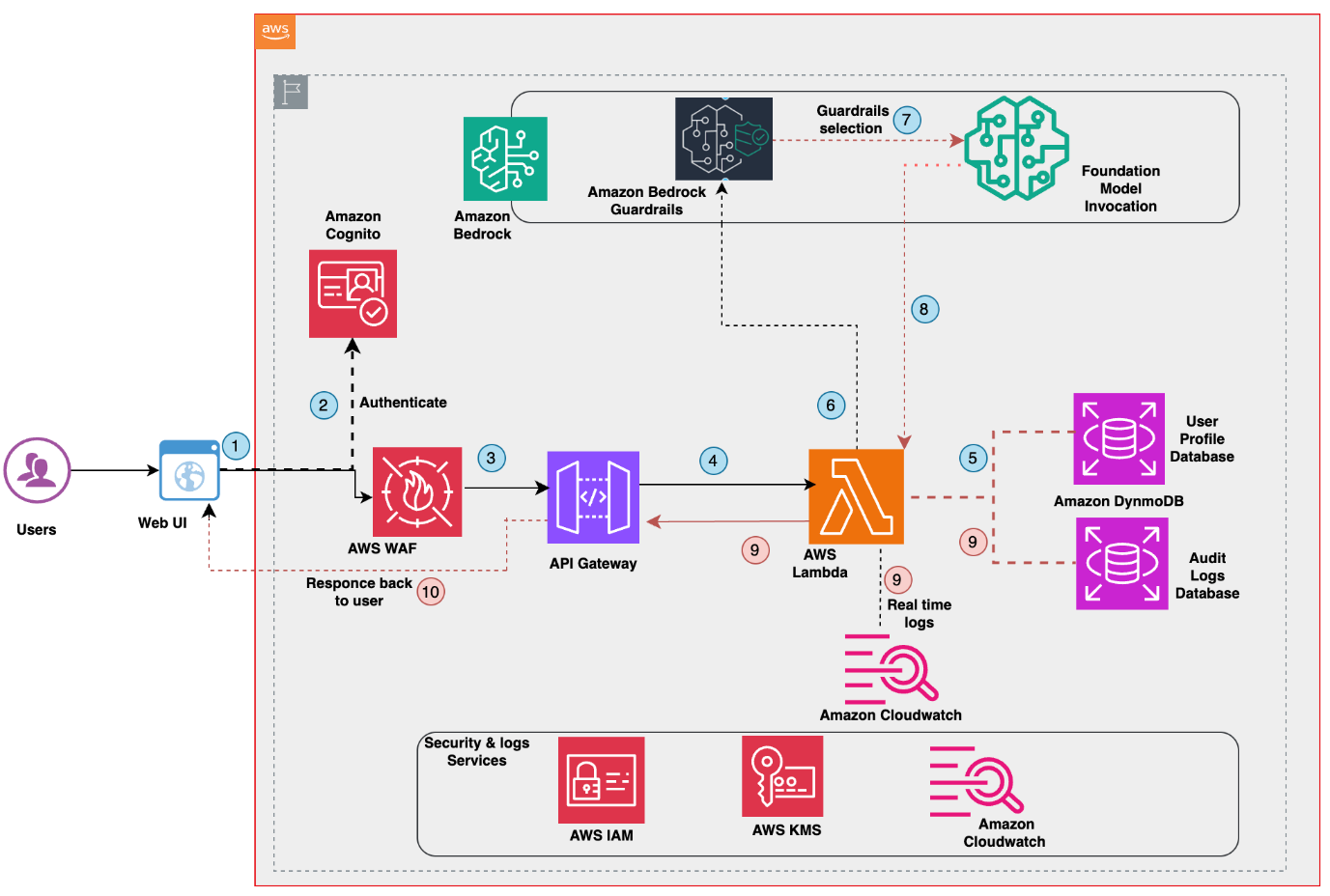
Figure 1: Serverless age-responsive-context-aware-ai-bedrock Architecture
Multi-context AI safety strategy
Now that you understand the architecture components, let’s examine how the solution dynamically adapts responses based on different user contexts.The following diagram (Figure 2: age-responsive, context-aware AI with Amazon Bedrock Guardrails workflow) shows how different user profiles are handled:
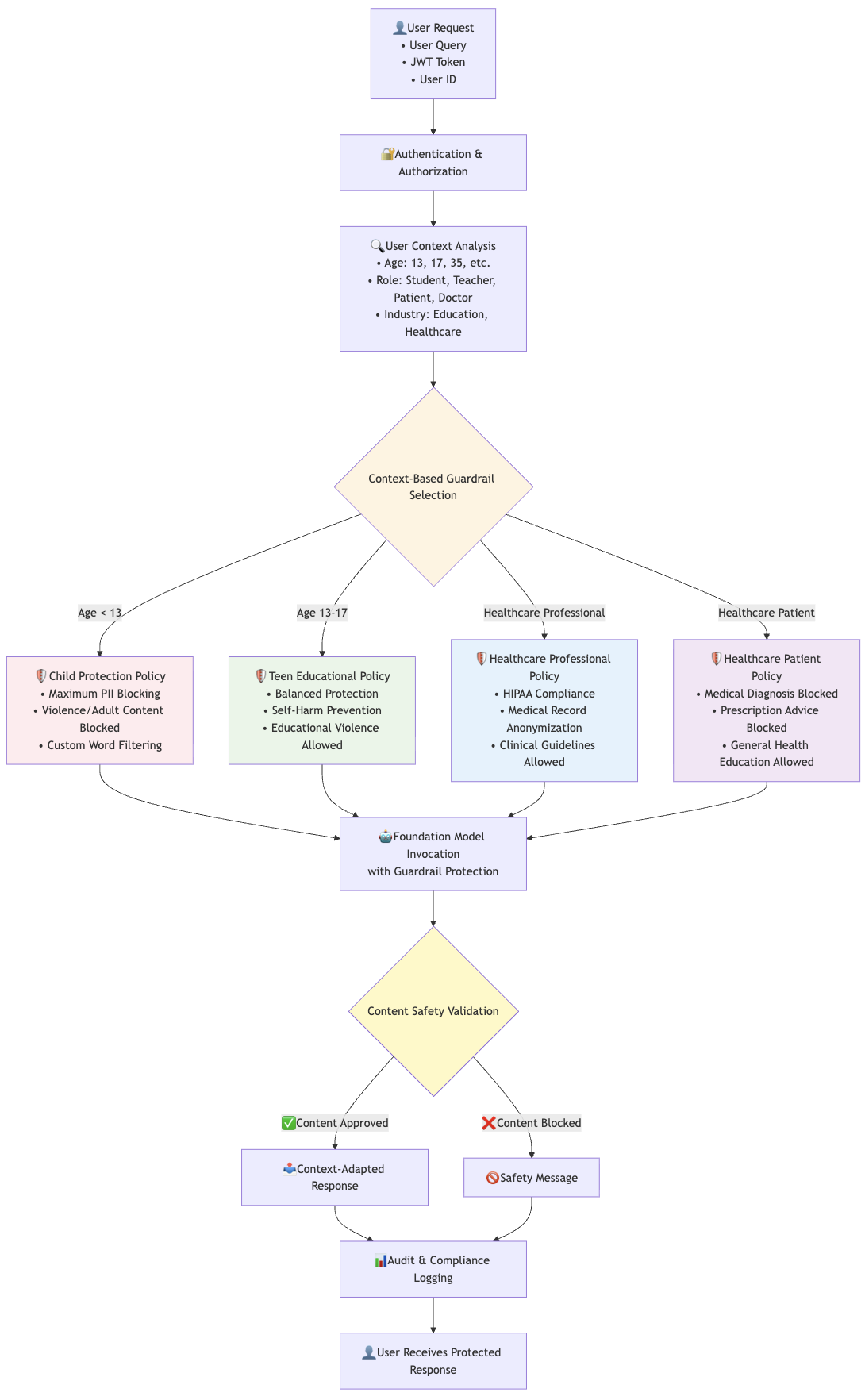
Figure 2: age-responsive-context-aware-ai-bedrock Workflow
How the solution works
The solution workflow includes the following steps (refer to Figure 1: Solution architecture for age-responsive, context-aware AI with Amazon Bedrock Guardrails):
- User request and web interface
- Web Interface: User accesses the local demo web interface (runs on localhost:8080 for demonstration purposes)
- User Input: User enters query through a web interface
- User Selection: User selects their profile (Child, Teen, Adult, Healthcare role)
- Request Preparation: Web interface prepares authenticated request with user context
- User authentication
- JSON Web Token (JWT) Token Generation: The Amazon Cognito user pool authenticates users and generates JWT tokens
- User Identity: JWT tokens contain user ID and authentication claim
- Token Validation: Secure tokens are passed with the API requests
- AWS WAF security layer
- Rate Limiting: AWS WAF applies 2,000 requests per minute limit per IP (adjustable in terraform/variables.tf in Code repository based on your requirements)
- Open Web Application Security Project (OWASP) Protection: Blocks common web threats and malicious requests
- Requests Filtering: Validates request format and blocks suspicious traffic
- API Gateway processing
- JWT Authorization: API Gateway validates JWT tokens from Cognito
- Request Routing: Routes authenticated requests to AWS Lambda functions
- Cross-Origin Resource Sharing (CORS): Manages cross-origin requests from the web demo
- Lambda function execution
- Input Sanitization: Lambda sanitizes and validates user inputs
- User Context Retrieval: Queries DynamoDB to retrieve user profiles (age, role, industry)
- Context Analysis: Analyzes user demographics to determine the appropriate guardrail
- DynamoDB user profile lookup
- Profile Query: Lambda queries the ResponsiveAI-Users table with
user_id - Context Data: Returns age, role, industry, and device information
- Audit Preparation: Prepares audit log entries for the ResponsiveAI-Audit table
- Profile Query: Lambda queries the ResponsiveAI-Users table with
- Dynamic guardrail selection
- Context Evaluation: AWS Lambda evaluates user age, role, and industry
- Guardrail Mapping: Automatic selection from five specialized Amazon Bedrock Guardrails:
- Child (Age < 13) → Child Protection Guardrail (COPPA-compliant)
- Teen (Age 13–17) → Teen Educational Guardrail (age-appropriate content)
- Healthcare Professional → Healthcare Professional Guardrail (clinical content enabled)
- Healthcare Patient → Healthcare Patient Guardrail (medical advice blocked)
- Default/Adult → Adult General Guardrail (standard protection)
- Safety: Every request must go through a guardrail—no bypass is possible
For a comprehensive overview of each guardrail’s configuration, including content filters, topic restrictions, PII handling, and custom filters, refer to the Guardrail Configuration Details in the Code repository.
- Bedrock AI processing with guardrail protection
- Model Invocation: Lambda invokes foundation model in Amazon Bedrock
- Guardrail Application: The selected guardrail filters both input and output
- Content Safety: Custom policies, topic restrictions, and personally identifiable information (PII) detection are applied
- Response Generation: The AI generates context-appropriate, safety-filtered responses
- Response processing and audit logging
- Content Approval: Safe responses are delivered with guardrail metadata
- Content Blocking: Inappropriate content triggers context-aware safety messages
- CloudWatch Logging: Interactions are logged for compliance tracking
- DynamoDB Audit: Guardrail interactions are stored in the Responsive AI-Audit table
- Response delivery to user
- API Gateway Response: Lambda returns processed responses through Amazon API Gateway
- Direct Response: The system delivers responses directly to users (AWS WAF only filters incoming requests)
- Web Demo Display: Users receive context-appropriate, protected responses
- User Experience: The same query generates different responses based on user context
Example response adaptation
1. For the question “What is DNA?”, the system generates different responses based on user context:
Student (Age 13):
“DNA is like a recipe book that tells your body how to grow and what you’ll look like! It’s made up of four special letters (A, T, G, C) that create instructions for everything about you.”
Healthcare Professional (Age 35):
“DNA consists of nucleotide sequences encoding genetic information through base pair complementarity. The double helix structure contains coding regions (exons) and regulatory sequences that control gene expression and protein synthesis.”
General Adult (Age 28):
“DNA is a molecule that contains genetic instructions for the development and function of living organisms. It’s structured as a double helix and determines inherited traits.”
2. The following example demonstrates how the same mathematical question receives age-appropriate responses:
Refer to the following screenshots for responses to the question: “How do I solve quadratic equations?” This makes it clearer how the same question gets different responses based on user context.
Teen Student (Age 13): Simple, step-by-step explanation with basic examples and friendly language suitable for middle school level (refer Figure 3)
For Math Teacher (Age 39): Comprehensive pedagogical approach including multiple solution methods, teaching strategies, and advanced mathematical concepts (refer to Figure 4)
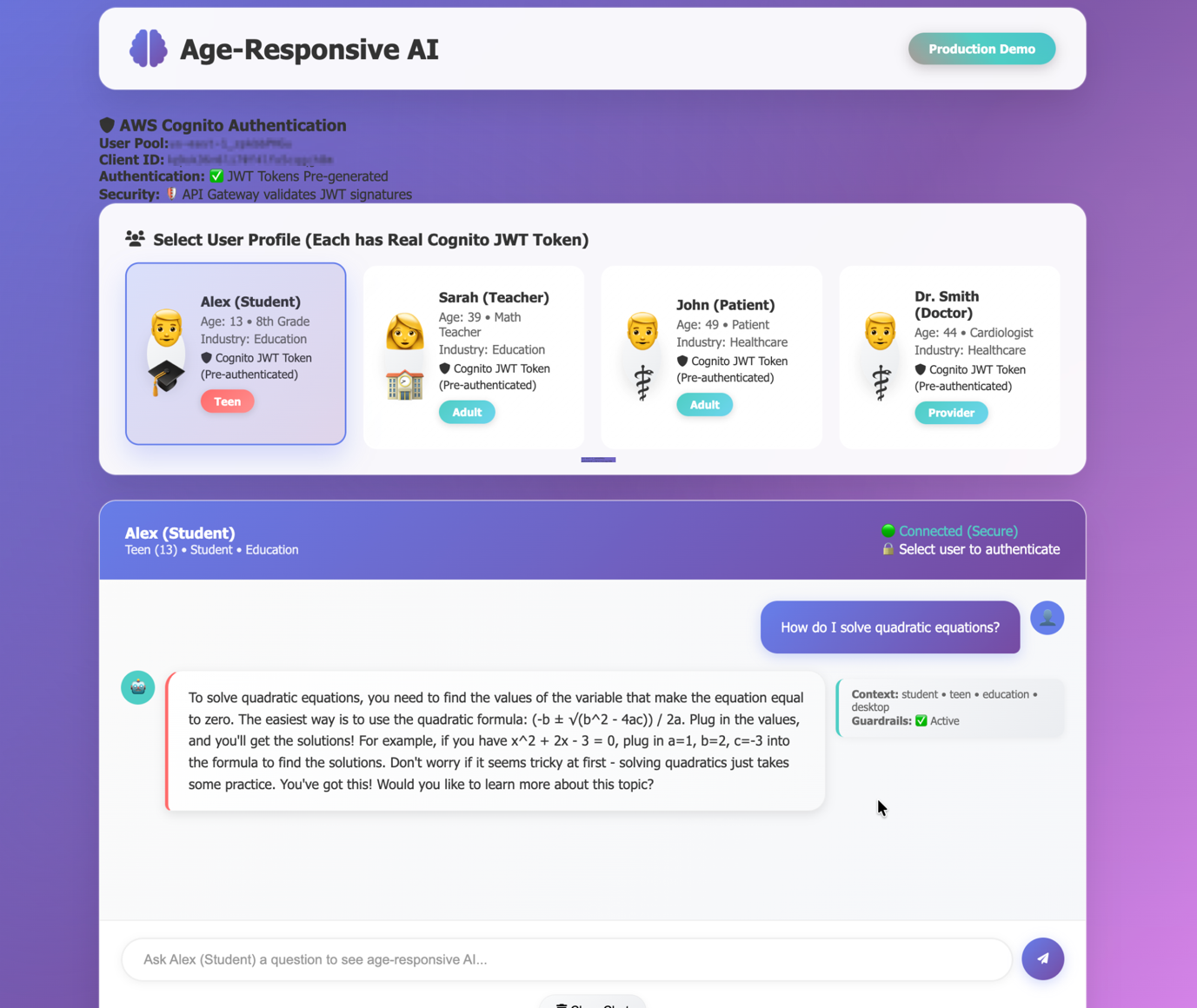
Figure 3: Teen Student response with step-by-step guidance
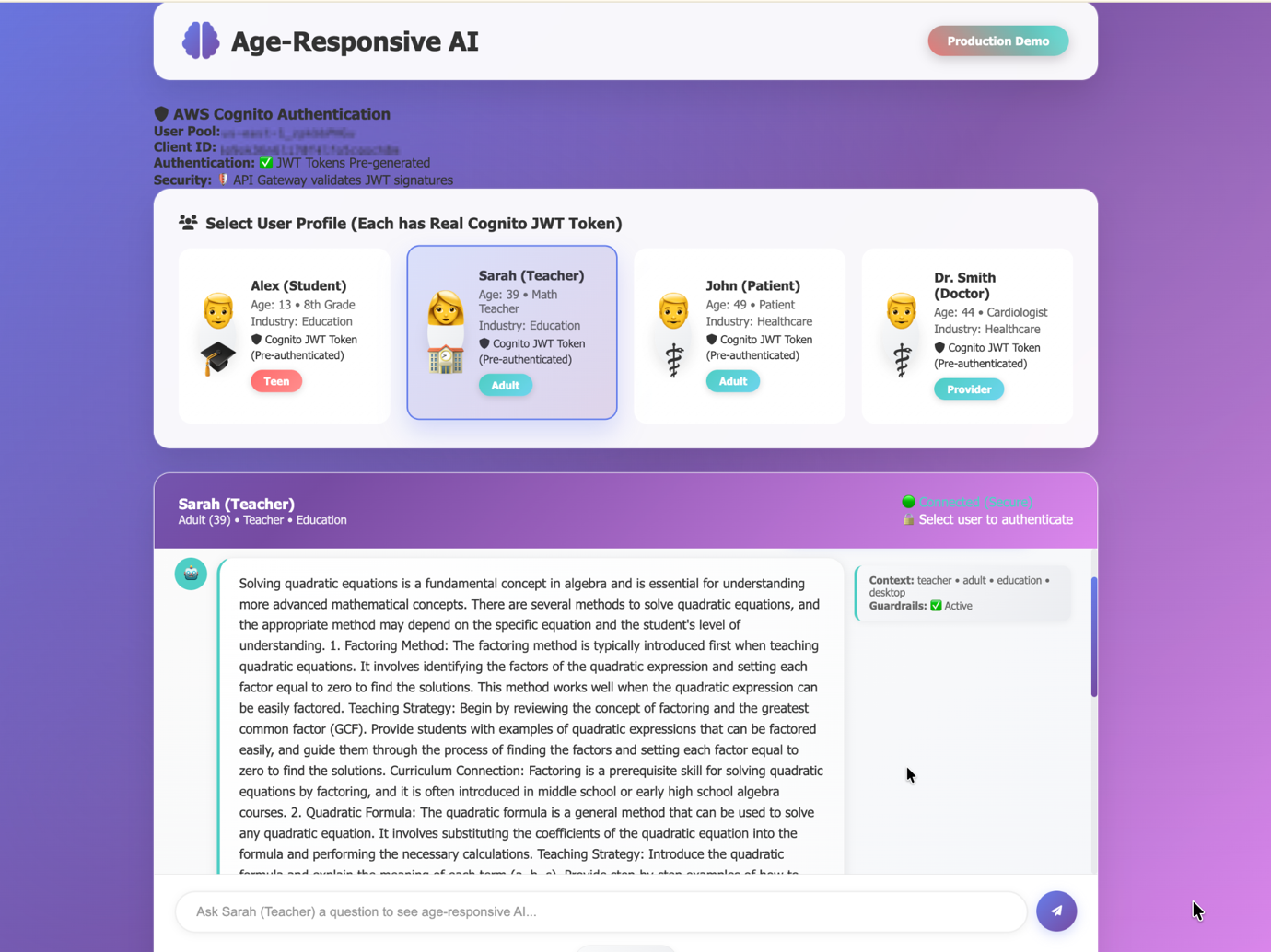
Figure 4: Educator response with comprehensive teaching approach
Prerequisites
Before deploying the solution, make sure that you have the following installed and configured:
- AWS account
- Required AWS Permissions: Your AWS user or role needs permissions for:
- Lambda (create functions)
- Amazon Bedrock (model invocation and guardrail management)
- Cognito (user pools and identity providers)
- AWS WAF (web ACLs and rules)
- DynamoDB (table operations)
- API Gateway (REST API management)
- CloudWatch
- Terraform installed: Required to deploy the solution infrastructure
Implementation
- Clone the GitHub repository:
- Open your terminal or command prompt.
- Navigate to the directory where you want to clone the repository.
- Run the following command to clone the repository into the local system.
- Deploy infrastructure using Terraform:
- Open your terminal or command prompt and navigate to the code repository.
- Use the deploy.sh to deploy the resources and the end-to-end solution.
Testing the solution
The solution includes a web-based demo for immediate testing and advanced API testing capabilities.
For production enterprise deployments, host the web interface using AWS Amplify, Amazon S3 and Amazon CloudFront, or container services like Amazon Elastic Container Service (Amazon ECS) and Amazon Elastic Kubernetes Service (Amazon EKS). For detailed Amazon Bedrock Guardrails testing scenarios, API examples, and validation procedures, refer to the TESTING_GUIDE.md file in the cloned repository.
Interactive web demo:
- To start the interactive web demo run:
- Open your browser and navigate to http://localhost:8080
- You can use the demo interface to:
- Select different user profiles (Child, Teen, Adult, Healthcare roles)
- Submit queries and observe context-aware responses
- View guardrail enforcement in real-time
- Monitor response adaptation based on user context
API testing :
- For programmatic testing, generate a JWT token:
- Test the API endpoint:
Try it yourself
Explore the solution’s capabilities with these scenarios:
- Age-appropriate responses: Submit the same query with different age groups
- Role-based adaptation: Compare professional versus general audience responses
- Content safety: Verify inappropriate content blocking across user types
- Guardrail enforcement: Test attempts to bypass safety controls
- Performance: Measure response times under various load conditions
Resources deployed and cost estimation
The cost of running this solution depends on usage patterns and scale. The following is an estimated monthly cost breakdown for a moderate usage scenario (1,000 API requests per day):
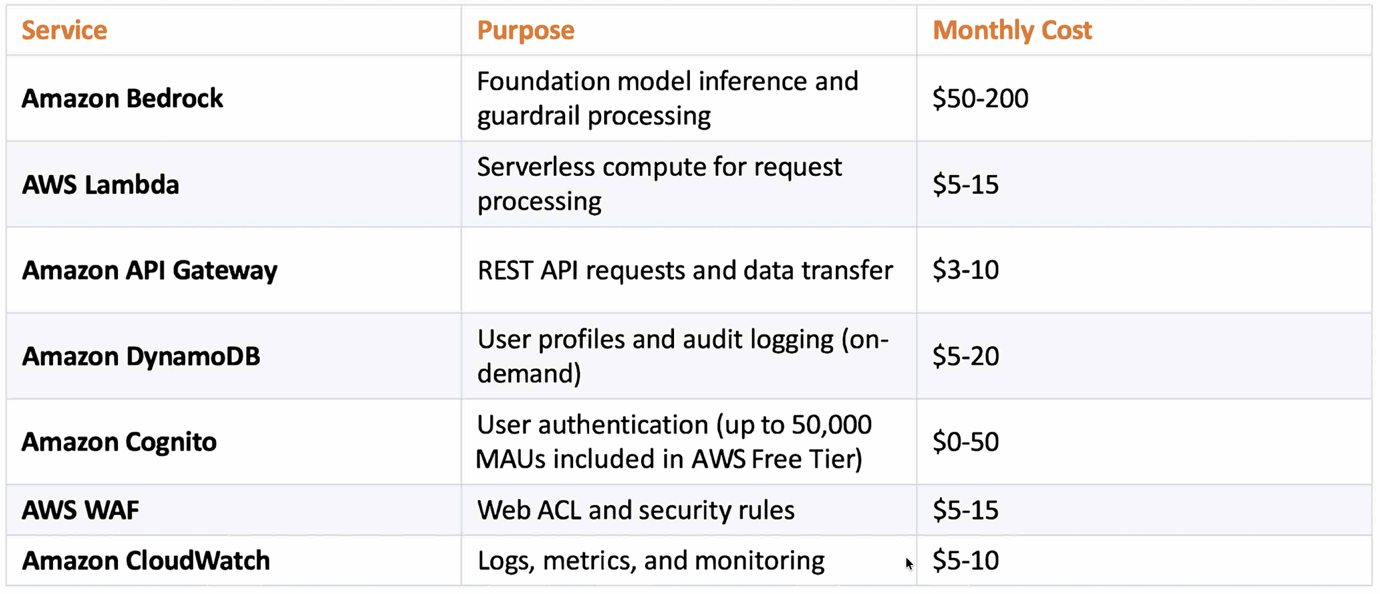
Estimated Total: $73-320/month depending on usage volume and model selection
Note: Actual costs vary based on request volume, model selection, data transfer, and Regional pricing. Use the AWS Pricing Calculator for customized estimates.
Cost optimization considerations
- Cost Tagging: Implement AWS cost allocation tags on the resources (for example, `Project:AgeResponsiveAI`, `Environment:Production`, `Team:AI-Platform`) to track expenses by department, project, or cost center
- Multi-Account Deployments: For enterprise deployments across multiple AWS accounts, consider using AWS Organizations with consolidated billing and AWS Cost Explorer for centralized cost visibility
- Reserved Capacity: For predictable workloads, consider Amazon Bedrock Provisioned Throughput to reduce inference costs
- DynamoDB Optimization: Use on-demand pricing for variable workloads or provisioned capacity with auto scaling for predictable patterns
- Lambda Optimization: Right-size memory allocation and use AWS Lambda Power Tuning to help improve the cost-performance ratio
- CloudWatch Log Retention: Configure appropriate log retention periods to balance compliance needs with storage costs
Cleanup
To avoid incurring ongoing charges, delete the AWS resources created during this walkthrough when they’re no longer needed. To remove deployed AWS resources and local files, run:
Key benefits and outcomes
This solution demonstrates a guardrail-first approach to building context-aware AI applications. Key benefits include:
- Context-aware safety: Different user groups can be protected by purpose-specific guardrails without deploying separate models or applications
- Centralized governance: Amazon Bedrock Guardrails helps enforce safety policies, topic restrictions, and hallucination controls at the infrastructure level rather than relying on prompt logic
- Managed content filtering: Amazon Bedrock Guardrails provides built-in content filters for hate speech, insults, sexual content, violence, misconduct, and prompt injection attacks without custom implementation
- Intelligent personalization: Adapts content complexity and appropriateness based on user context, delivering age-appropriate explanations for children and clinical detail for healthcare professionals
- Reduced bypass risk: Policies are applied at inference time and cannot be overridden by user input
- Operational flexibility: New user segments or policy updates can be introduced by updating guardrails instead of application code
- Enterprise readiness: Amazon Bedrock Guardrails provides version control, audit logging, and compliance alignment support with clear separation of concerns for long-term maintainability
Conclusion
In this post, we demonstrated how to implement a fully serverless, guardrail-first solution for delivering age-responsive, context-aware AI responses. We showed how the previously mentioned AWS services work together to help dynamically select specialized guardrails based on user context, enforce safety policies, and deliver personalized responses. We deployed the architecture using Terraform, making it repeatable and production-ready. Through dynamic guardrail selection and centralized policy enforcement, this solution tailors AI responses to each user segment—from COPPA-compliant protection for children to clinical content for healthcare professionals—while maintaining enterprise-grade security and scalability. Organizations serving diverse user populations can benefit from reduced bypass risk, centralized governance, and operational flexibility when updating policies without modifying application code.
To get started, clone the repository and follow the deployment instructions. Test the solution using the interactive web demo to see how responses adapt based on user context. To learn more about Amazon Bedrock Guardrails, visit the Amazon Bedrock Guardrails documentation.
About the authors
In this post, we walk you through how to implement a fully automated, context-aware AI solution using a serverless architecture on AWS. This solution helps organizations looking to deploy responsible AI systems, align with compliance requirements for vulnerable populations, and help maintain appropriate and trustworthy AI responses across diverse user groups without compromising performance or governance. Read More