
AI agents can autonomously handle complex, multi-step tasks, but their effectiveness depends on calling the right tools to retrieve information or take action. When an agent picks the wrong tool, formats parameters incorrectly, or breaks a workflow chain, task completion times grow, error rates rise, support costs increase, and user experiences degrade. As more organizations move agentic applications from pilot to production, having agents that select the right tool for each request is essential for reliable automation.
In this post, you learn how to use Supervised Fine-Tuning (SFT) and Direct Preference Optimization (DPO) together to improve the tool-calling accuracy of a small language model (SLM). The example uses Amazon SageMaker AI training jobs, so you can focus on training code instead of managing your own training infrastructure. You also learn how to evaluate tool-calling accuracy and compare a base model to several fine-tuned variants, so you can make data-driven decisions about model quality.
Fine-tuning methodologies
Supervised fine-tuning involves curating a high-quality dataset that aligns closely with the model’s intended function, providing explicit examples of how the model should perform certain tasks or interact with specific tools. This method is particularly effective for teaching the model to recognize the nuances of tool-specific language, commands, and constraints.
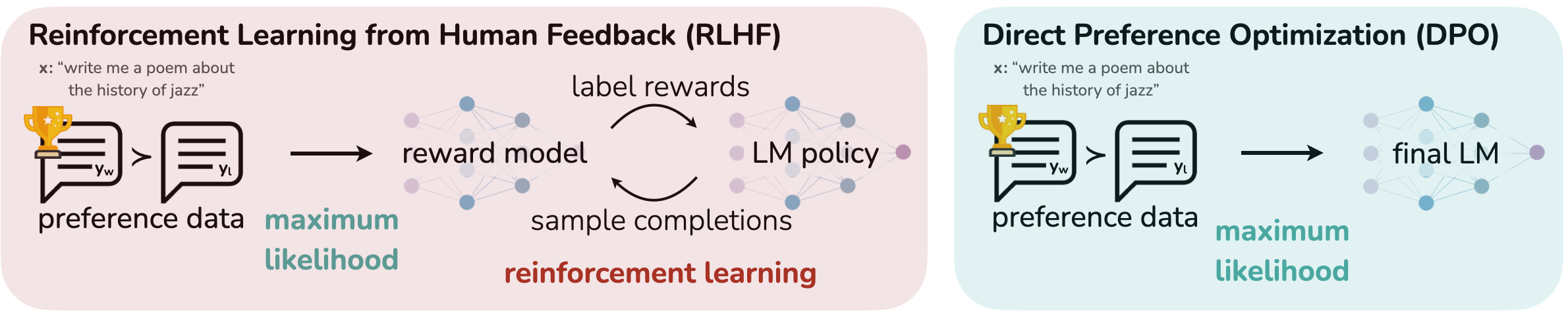
Direct Preference Optimization refines these interactions by incorporating human feedback or predefined objectives directly into the training loop. DPO aligns the model’s output more closely with target outcomes by emphasizing a preference for certain types of responses or behaviors over others. The training data in DPO contains a “like this, not like that” preference, which optimizes the same goals as reinforcement learning without reward functions or reward models. This approach reduces resource requirements and training time while maintaining quality.
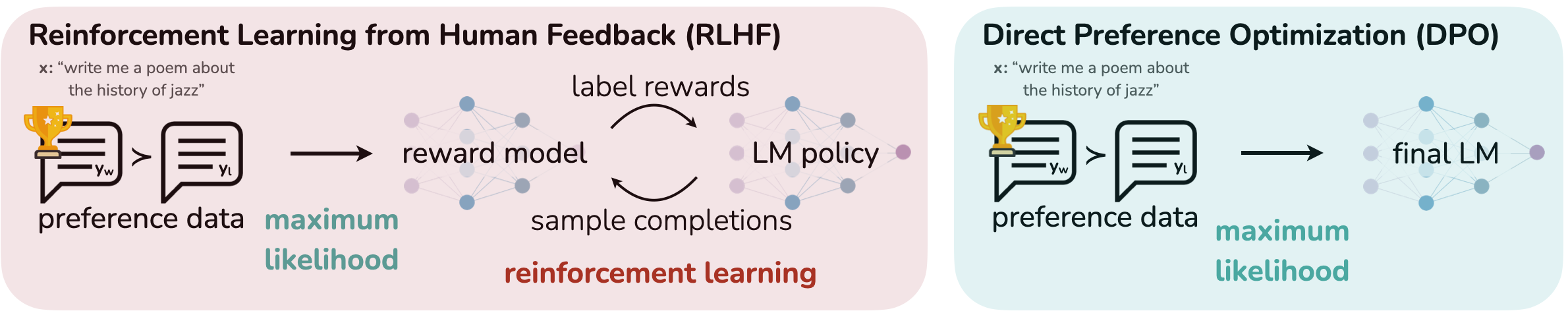
Source: arXiv:2305.18290 [cs.LG]
For example, the HuggingFace TRL library for DPO takes training samples in the following format:
This feedback-driven approach allows for iterative improvement of the model’s tool-interaction capabilities based on real-world usage patterns in the training data.
Together, SFT and DPO form a robust framework for fine-tuning language models to interface with a wide range of digital tools. By using these techniques, you can build AI systems that understand and generate human-like text and that perform complex tasks by autonomously interacting with external applications, broadening the scope and utility of AI in both consumer and enterprise environments.
To understand the costs associated with Amazon SageMaker Studio notebooks and Amazon SageMaker AI training jobs, refer to the SageMaker AI pricing page.
Solution overview
In this section, we walk through how to fine-tune Qwen3 1.7B on Amazon SageMaker AI training jobs, a fully managed service that supports distributed multi-GPU and multi-node configurations. With SageMaker AI training jobs, you can spin up high-performance clusters on demand, train billion-parameter models faster, and automatically shut down resources when the job finishes. Metrics from infrastructure and from inside the training loop are sent to MLflow on SageMaker AI for later analysis.
Prerequisites
To fine-tune function-calling models on SageMaker AI, you need the following prerequisites:
- An AWS account that contains your AWS resources.
- An AWS Identity and Access Management (IAM) role to access SageMaker AI. To learn more about how IAM works with SageMaker AI, see AWS Identity and Access Management for Amazon SageMaker AI.
- A development environment configured to access your AWS account. You can run the notebook from your preferred environment, including integrated development environments (IDEs) such as PyCharm or Visual Studio Code. To set up your local environment, refer to Configuring settings for the AWS Command Line Interface (AWS CLI). We recommend Amazon SageMaker Studio for a streamlined experience on SageMaker AI.
- To track your experiments in SageMaker AI with MLflow, follow the instructions in the SageMaker AI documentation.
- Access to the SageMaker AI compute instances used in this post. We use SageMaker AI training jobs and a single
ml.p4d.24xlargeinstance for training. To check your quota, review the AWS service quotas in the AWS Management Console.- View the SageMaker AI ml.p4d.24xlarge for training job usage quota in the Service Quotas console.
- If the Applied account-level quota value is 0, request an increase at the account level of 1.
- Access to the GitHub repository for this post.
Set up your environment
In the following sections, we run the code from a SageMaker Studio JupyterLab notebook instance. You can also use your preferred IDE, such as VS Code or PyCharm. Make sure your local environment is configured to work with AWS, as listed in the prerequisites.
Complete the following steps to set up your environment:
- On the SageMaker AI console, choose Domains in the navigation pane, then open your domain.
- In the navigation pane under Applications and IDEs, choose Studio.
- On the User profiles tab, locate your user profile, then choose Launch and Studio.
- In SageMaker Studio, launch an
ml.t3.mediumJupyterLab notebook instance with at least 50 GB of storage. A large notebook instance isn’t required because the fine-tuning job runs on a separate ephemeral training job instance with NVIDIA accelerators. - To begin fine-tuning, clone the GitHub repository:
git clone https://github.com/aws-samples/amazon-sagemaker-generativeai.git. - Navigate to the
6_use_cases/usecases/function-calling-sft-dpodirectory. - Launch the
run_training_job.ipynbnotebook with a Python 3.12 or higher version kernel.
Dataset preparation
Choosing and creating the right dataset is an important first step in fine-tuning foundation models (FMs). This example uses the When2Call dataset published by NVIDIA, a benchmark designed to evaluate tool-calling decision-making for FMs. It includes when to generate a tool call, when to ask follow-up questions, when to indicate that the question can’t be answered with the tools provided, and what to do if the question seems to require tool use but a tool call can’t be made.
The evaluation code and synthetic data generation scripts used to generate the datasets are in NVIDIA’s GitHub repository.
The datasets contain three different parts.
- Dataset for supervised fine-tuning (SFT), which contains 15,000 samples.
- Dataset for preference alignment, which uses Direct Preference Optimization (DPO) in this example. This data contains 9,000 samples.
- The dataset for testing performance has two files: Multi-Choice Question evaluation (
mcq) and LLM-as-a-judge (llm_judge), which is a subset of the MCQ evaluation set and can be downloaded as a singleDatasetDict.
For this use case, we need to do a bit of preprocessing on the dataset to match the expected formats for TRL’s SFTTrainer and DPOTrainer. To do that, we need to build a system prompt that contains the list of available tools and add the system prompt to the messages lists from the original dataset.
In addition to what we did for SFT, we need to prepare the data for DPO. The DPOTrainer from TRL accepts a specific format that includes columns labeled as chosen and rejected in addition to messages, so we need to create the messages column and rename chosen_response and rejected_response.
Now, save the SFT and DPO datasets in Amazon Simple Storage Service (Amazon S3) to make them available for training.
Supervised fine-tuning (SFT) on the base model
The following example demonstrates how to fine-tune the Qwen3-1.7B model. The repository contains the recipe in the scripts directory, where you can modify the base model and training parameters for SFT. This example uses a Spectrum-based fine-tuning recipe, but you can also use other PEFT techniques like LoRA or QLoRA.
The recipe contains the configuration for the model and training parameters:
Create a training job with SageMaker AI ModelTrainer
Next, we use a SageMaker AI training job to spin up a training cluster and run the model fine-tuning. The SageMaker AI Python SDK ModelTrainer APIs run training jobs on fully managed infrastructure, handling environment setup, scaling, and artifact management. By using ModelTrainer, you can specify training scripts, input data, and compute resources without manually provisioning servers.
First, configure the training environment:
To enable experiment tracking in MLflow, supply the MLflow tracking server ARN to the job.
The Compute section of the training setup determines the infrastructure requirements for training. In the SourceCode section, we define the local paths to code that will be imported into the training job.
The following is the directory structure for fine-tuning on SageMaker AI training jobs. We also provide the requirements.txt file in the scripts directory, which ModelTrainer automatically detects and installs the listed dependencies at runtime. For advanced scenarios such as disabling build isolation, you can provide a bash script as the entry point to run shell commands prior to starting training.
Next, specify the Amazon Elastic Container Registry (Amazon ECR) location for the training container, where to store model checkpoints, and what to name the SageMaker AI training job. These values are supplied to the ModelTrainer API to configure the job.
Finally, configure the input data parameters for where the training data resides and start the SFT training job with .train().
To fine-tune across multiple GPUs, we use Hugging Face Accelerate and DeepSpeed ZeRO-3, which work together to train models across multiple GPUs or nodes more efficiently. Hugging Face Accelerate streamlines distributed training launches by automatically handling device placement, process management, and mixed precision settings. DeepSpeed ZeRO-3 reduces memory usage by partitioning optimizer states, gradients, and parameters across GPUs, so billion-parameter models fit and train faster.
You can run your SFTTrainer script with Hugging Face Accelerate using a command like the following:
With the SFT model artifact ready, you can now use that as a base model for DPO training. The DPO training recipe looks similar to the SFT one with a few small changes.
beta– This is a DPO-specific hyperparameter, typically bound between 0–2, that controls how aggressively the model adopts new preferences. A value closer to 0 is more aggressive and a value closer to 2 is more conservative. A typical starting point is 0.1 to 0.5, which can drive significant changes in behavior. However, this can lead to high variance or even degradation. The optimal value is highly dependent on the dataset.learning_rate– DPO benefits from lower learning rates (for example, 5e-7) with awarmup_ratioto prevent overfitting. This value contrasts with the SFTlearning_ratefrom the previous run of 5e-5. Although this example uses a constantlr_scheduler_type, cosine annealing is another common option.batch_size– Large batch sizes tend to perform better. The batch size in this example is intentionally small to reduce resource requirements.
Optionally, you can provide a combination of loss values to perform Mixed Preference Optimization, which allows for the combination and weighting of multiple loss types. In this example, there is SFT training data and DPO training data that are run separately. If you only have DPO training data, you can use MPO with the sft loss type to use the accepted column in the DPO data for SFT. If possible, providing separate, unique datasets results in a larger corpus of data and better results.
If loss_weights is omitted, all loss types will have equal weights (1.0 by default).
Direct Preference Optimization (DPO) training on the SFT-trained model
In the DPO example, we show how you can pass configuration data into the training container as hyperparameters or as environment variables. The former is picked up in the training script with TRLParser and the latter with Python os.environ references.
The DPO training configuration is defined as follows:
Then kick off the training job for DPO:
Results
We ran the experiment for three different models, using the NVIDIA-provided script for evaluation, with the following results. Among the base models, Qwen3-0.6B was the strongest performer out of the box despite being the smallest, beating Qwen3-1.7B by approximately 6 percent and Llama-3.2-3B-instruct by approximately 1 percent.
After a cycle of fine-tuning, the rankings change. The Qwen3-1.7B model gains approximately 19 percent in accuracy and outperforms the others by approximately 4–7 percent. The round of preference optimization was also effective, adding another approximately 10.5 percent accuracy and ending the experiment in the lead by approximately 8–9 percent over the other models.
This shows the effectiveness of a multi-step approach to model customization. Qwen3-1.7B gained 30 percent in overall accuracy and performed 9 percent better than the Llama-3.2-3B model, which has almost twice the parameter count. Achieving similar or better performance with a smaller model can reduce cost and improve throughput when it is time to host the model.
| Model | Tuning Technique | Acc-Norm |
| Llama 3.2 3B Instruct | Base | 46.50% |
| Llama 3.2 3B Instruct | Spectrum SFT | 53.41% |
| Llama 3.2 3B Instruct | Spectrum SFT + DPO | 62.67% |
| Qwen3-0.6B | Base | 47.64% |
| Qwen3-0.6B | Spectrum SFT | 56.10% |
| Qwen3-0.6B | Spectrum SFT + DPO | 62.02% |
| Qwen3-1.7B | Base | 41.57% |
| Qwen3-1.7B | Spectrum SFT | 60.43% |
| Qwen3-1.7B | Spectrum SFT + DPO | 71.06% |
Clean up
To avoid incurring charges for resources you no longer need, complete the following clean-up steps:
- Delete any SageMaker AI training jobs you launched. Training jobs that complete successfully don’t continue to incur charges, but you can clean up records from the SageMaker AI console or with the AWS CLI.
- Remove the datasets you uploaded to Amazon S3:
- Stop or delete the SageMaker Studio JupyterLab notebook instance to avoid idle charges.
- Delete any model checkpoints stored in Amazon S3 that you no longer need.
Conclusion
In this post, we showed how to improve an agent’s tool-calling accuracy by combining supervised fine-tuning (SFT) with Direct Preference Optimization (DPO) on Amazon SageMaker AI. SFT uses labeled datasets to refine model parameters, so the model develops a foundational understanding by learning from expert-annotated examples. DPO then aligns the model’s outputs with human preferences or specific performance criteria through direct feedback, without the need to define reward functions.
By integrating these two methodologies, you get a better-performing model that benefits from the structured, knowledge-driven approach of SFT and the adaptability and user-centered refinement of DPO. The result is a model that is more accurate, more relevant, and better aligned with how users want it to behave.
For more examples on fine-tuning foundation models, visit the SageMaker AI generative AI samples GitHub repository. For more information about training models in SageMaker AI, see the SageMaker AI documentation.
About the authors
In this post, you learn how to use Supervised Fine-Tuning (SFT) and Direct Preference Optimization (DPO) together to improve the tool-calling accuracy of a small language model (SLM). The example uses Amazon SageMaker AI training jobs, so you can focus on training code instead of managing your own training infrastructure. You also learn how to evaluate tool-calling accuracy and compare a base model to several fine-tuned variants, so you can make data-driven decisions about model quality. Read More