
With a wide array of Nova customization offerings, the journey to customization and transitioning between platforms has traditionally been intricate, necessitating technical expertise, infrastructure setup, and considerable time investment. This disconnect between potential and practical applications is precisely what we aimed to address. Nova Forge SDK makes large language model (LLM) customization accessible, empowering teams to harness the full potential of language models without the challenges of dependency management, image selection, and recipe configuration. We view customization as a continuum within the scaling ladder, therefore, the Nova Forge SDK supports all customization options, ranging from adaptations based on Amazon SageMaker AI to deep customization using Amazon Nova Forge capabilities.
In the last post, we introduced the Nova Forge SDK and how to get started with it along with the prerequisites and setup instructions. In this post, we walk you through the process of using the Nova Forge SDK to train an Amazon Nova model using Amazon SageMaker AI Training Jobs. We evaluate our model’s baseline performance on a StackOverFlow dataset, use Supervised Fine-Tuning (SFT) to refine its performance, and then apply Reinforcement Fine Tuning (RFT) on the customized model to further improve response quality. After each type of fine-tuning, we evaluate the model to show its improvement across the customization process. Finally, we deploy the customized model to an Amazon SageMaker AI Inference endpoint.
Next, let’s understand the benefits of Nova Forge SDK by going through a real-world scenario of automatic classification of Stack Overflow questions into three well-defined categories (HQ, LQ EDIT, LQ CLOSE).
Case study: classify the given question into the correct class
Stack Overflow has thousands of questions, varying greatly in quality. Automatically classifying question quality helps moderators prioritize their efforts and guide users to improve their posts. This solution demonstrates how to use the Amazon Nova Forge SDK to build an automated quality classifier that can distinguish between high-quality posts, low-quality posts requiring edits, and posts that should be closed. We use the Stack Overflow Question Quality dataset containing 60,000 questions from 2016-2020, classified into three categories:
HQ(High Quality): Well-written posts without editsLQ_EDIT(Low Quality – Edited): Posts with negative scores and multiple community edits, but remain openLQ_CLOSE(Low Quality – Closed): Posts closed by the community without edits
For our experiments, we randomly sampled 4700 questions and split them as follows:
| Split | Samples | Percentage | Purpose |
| Training (SFT) | 3,500 | ~75% | Supervised fine-tuning |
| Evaluation | 500 | ~10% | Baseline and post-training evaluation |
| RFT | 700 + (3,500 from SFT) | ~15% | Reinforcement fine-tuning |
For RFT, we augmented the 700 RFT-specific samples with all 3,500 SFT samples (total: 4,200 samples) to prevent catastrophic forgetting of supervised capabilities while learning from reinforcement signals.
The experiment consists of four main stages: baseline evaluation to measure out-of-the-box performance, supervised fine-tuning (SFT) to teach domain-specific patterns, and reinforcement fine-tuning (RFT) on SFT checkpoint to optimize for specific quality metrics and finally deployment to Amazon SageMaker AI. For fine-tuning, each stage builds upon the previous one, with measurable improvements at every step.
We used a common system prompt for all the datasets:
This is a stack overflow question from 2016-2020 and it can be classified into three categories:
 * HQ: High-quality posts without a single edit.
 * LQ_EDIT: Low-quality posts with a negative score, and multiple community edits. However, they remain open after those changes.
 * LQ_CLOSE: Low-quality posts that were closed by the community without a single edit.
 You are a technical assistant who will classify the question from users into any of above three categories. Respond with only the category name: HQ, LQ_EDIT, or LQ_CLOSE.
 **Do not add any explanation, just give the category as output**.
Stage 1: Establish baseline performance
Before fine-tuning, we establish a baseline by evaluating the pre-trained Nova 2.0 model on our evaluation set. This gives us a concrete baseline for measuring future improvements. Baseline evaluation is critical because it helps you understand the model’s out-of-the-box capabilities, identify performance gaps, set measurable improvement goals, and validate that fine-tuning is necessary.
Install the SDK
You can install the SDK with a simple pip command:
Import the key modules:
Prepare evaluation data
The Amazon Nova Forge SDK provides powerful data loading utilities that handle validation and transformation automatically. We begin by loading our evaluation dataset and transforming it to the format expected by Nova models:
The CSVDatasetLoader class handles the heavy lifting of data validation and format conversion. The query parameter maps to your input text (the Stack Overflow question), response maps to the ground truth label, and system contains the classification instructions that guide the model’s behavior.
Next, we use the CSVDatasetLoader to transform your raw data into the expected format for Nova model evaluation:
The transformed data will have the following format:
Before uploading to Amazon Simple Storage Service (Amazon S3), validate the transformed data by running the loader.validate() method. This helps you to catch any formatting issues early, rather than waiting until they interrupt the actual evaluation.
Finally, we can save the dataset to Amazon S3 using the loader.save_data() method, so that it can be used by the evaluation job.
Run baseline evaluation
With our data prepared, we initialize our SMTJRuntimeManager to configure the runtime infrastructure. We then initialize a NovaModelCustomizer object and call baseline_customizer.evaluate() to launch the baseline evaluation job:
For classification tasks, we use the GEN_QA evaluation task, which treats classification as a generative task where the model generates a class label. The exact_match metric from GEN_QA directly corresponds to classification accuracy, the percentage of predictions that exactly match the ground truth label. The full list of benchmark tasks can be retrieved from the EvaluationTask enum, or seen in the Amazon Nova User Guide.
Understanding the baseline results
After the job completes, results are saved to Amazon S3 at the specified output path. The archive contains per-sample predictions with log probabilities, aggregated metrics across the entire evaluation set, and raw model predictions for detailed analysis.
In the following table, we see the aggregated metrics for all the evaluation samples from the output of the evaluation job (note that BLEU is on a scale of 0-100):
| Metric | Score |
| ROUGE-1 | 0.1580 (±0.0148) |
| ROUGE-2 | 0.0269 (±0.0066) |
| ROUGE-L | 0.1580 (±0.0148) |
| Exact Match (EM) | 0.1300 (±0.0151) |
| Quasi-EM (QEM) | 0.1300 (±0.0151) |
| F1 Score | 0.1380 (±0.0149) |
| F1 Score (Quasi) | 0.1455 (±0.0148) |
| BLEU | 0.4504 (±0.0209) |
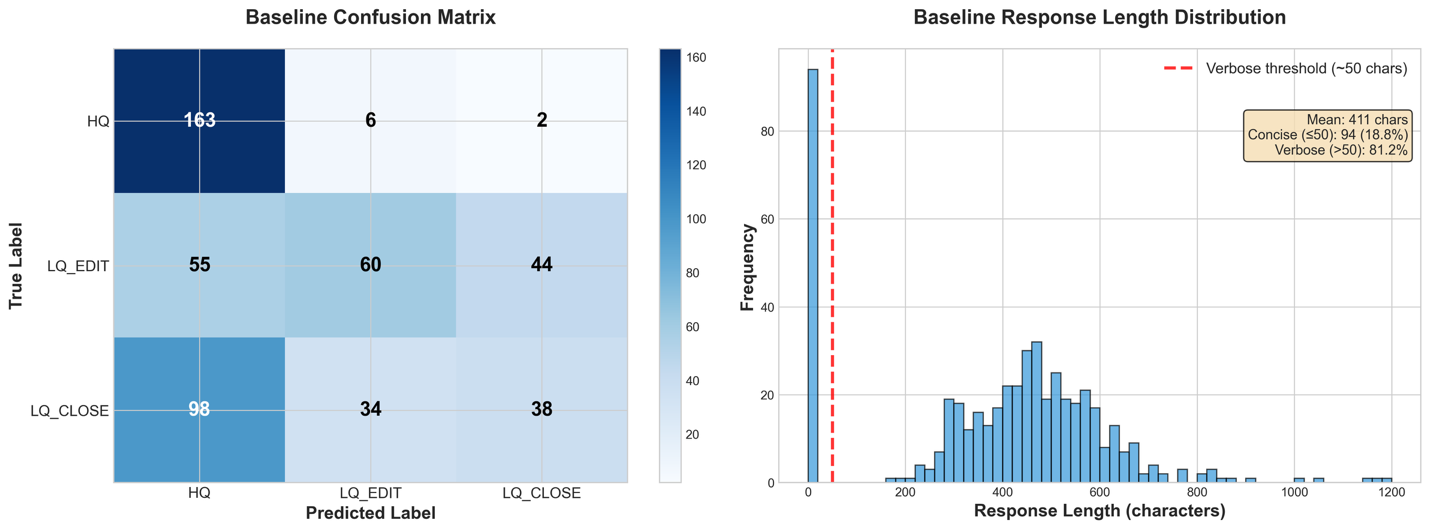
The base model achieves only 13.0% exact-match accuracy on this 3-class classification task, whereas random guessing would yield 33.3%. This clearly demonstrates the need for fine-tuning and establishes a quantitative baseline for measuring improvement.
As we see in the next section, this is largely due to the model ignoring the formatting requirements of the problem, where a verbose response including explanations and analyses is considered invalid. We can derive the format-independent classification accuracy by parsing our three labels from the model’s output text, using the following classification_accuracy utility function.
However, even with a permissive metric, which ignores verbosity, we get only a 52.2% classification accuracy. This clearly indicates the need for fine-tuning to improve the performance of the base model.
Conduct baseline failure analysis
The following image shows a failure analysis on the baseline. From the response length distribution, we observe that all responses included verbose explanations and reasoning despite the system prompt requesting only the category name. In addition, the baseline confusion matrix compares the true label (y axis) with the generated label (x axis); the LLM has a clear bias towards classifying messages as High Quality regardless of their actual classification.
Given these baseline results of both instruction-following failures and classification bias toward HQ, we now apply Supervised Fine-Tuning (SFT) to help the model understand the task structure and output format, followed by Reinforcement Learning (RL) with a reward function that penalizes the undesirable behaviors.
Stage 2: Supervised fine-tuning
Now that we have completed our baseline and conducted the failure space analysis, we can use Supervised Fine Tuning to improve our performance. For this example, we use a Parameter Efficient Fine-Tuning approach, because it’s a technique that gives us initial signals on models learning capability.
Data preparation for supervised fine-tuning
With the Nova Forge SDK, we can bring our datasets and use the SDKs data preparation helper functions to curate the SFT datasets with in-build data validations.
As before, we use the SDK’s CSVDatasetLoader to load our training CSV data and transform it into the required format:
After this transformation, each row of our dataset will be structured in the Converse API format, as shown in the following image:
We also validate the dataset to confirm that it fits the required format for training:
Now that we have our data well-formed and in the correct format, we can split it into training, validation, and test data, and upload all three to Amazon S3 for our training jobs to reference.
In this post, we walk you through the process of using the Nova Forge SDK to train an Amazon Nova model using Amazon SageMaker AI Training Jobs. Read More