
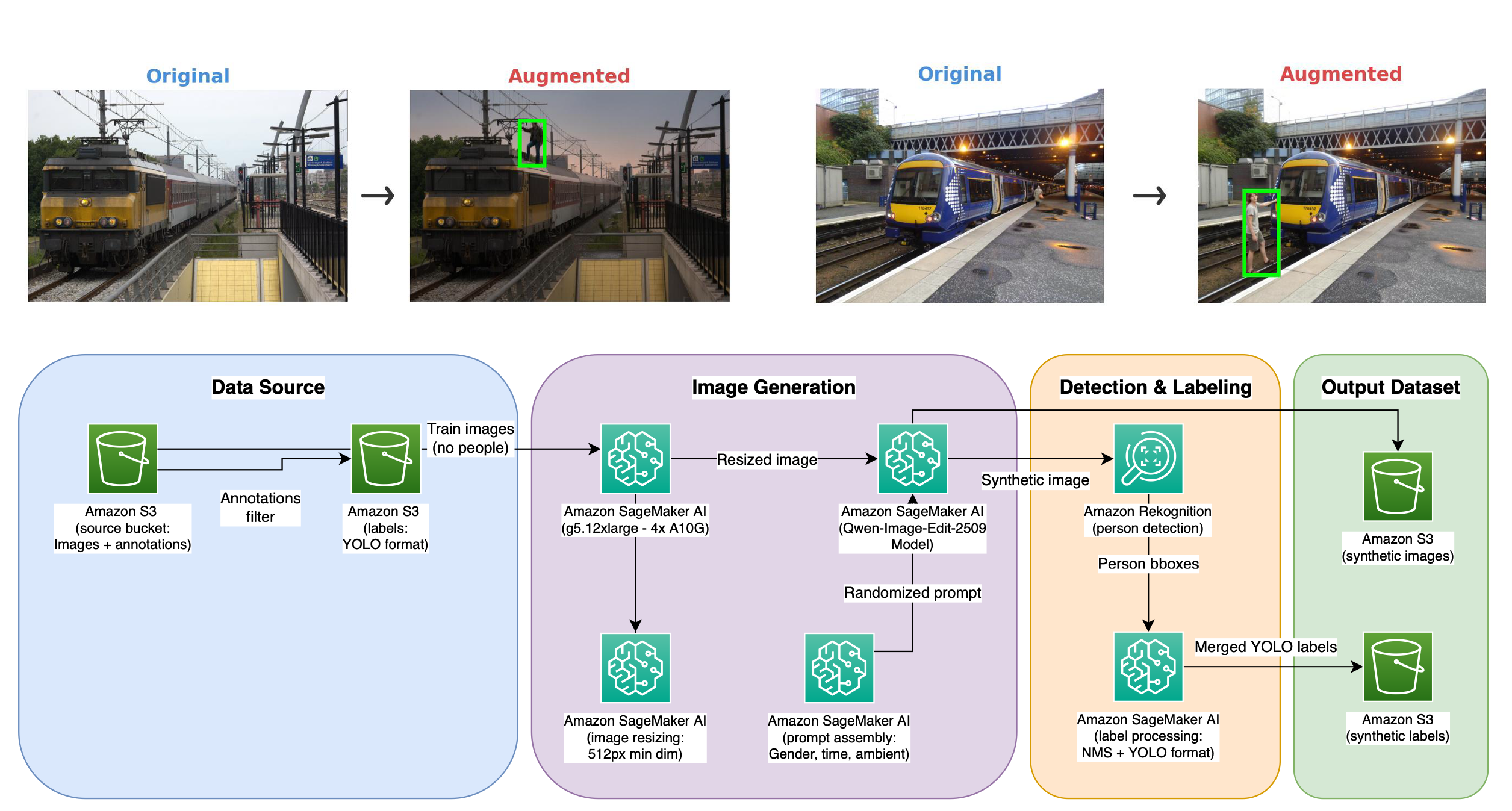
Industrial safety AI refers to the use of technologies like computer vision and predictive analytics to find and stop workplace dangers. Synthetic data augmentation is emerging as a practical solution to one of the hardest problems in industrial safety AI: the scarcity of training images depicting people in dangerous proximity to heavy machinery. Industries deploying autonomous equipment (for example, agriculture, construction, mining, and manufacturing) need reliable person-detection models. However, the highest-risk scenarios (for example, a worker standing in a blind spot, a child near a moving implement) are precisely the ones that are rarest in real-world datasets. They are also the most dangerous to stage for data collection.
In this post, we show how to use a synthetic data augmentation pipeline built on Amazon SageMaker AI and Amazon Rekognition to generate photo-realistic training images with automated labels. Our experiments showed up to 160 percent improvement in person detection mAP50 (mean Average Precision at an Intersection over Union threshold of 0.5) without manual annotation or hazardous photography sessions.
The challenge: Training data scarcity for safety-critical edge cases
Industrial companies developing AI-powered safety systems for heavy machinery face a critical bottleneck. They need thousands to millions of training images showing people in dangerous positions near equipment to train object detection models that can help prevent accidents. However, this data is extremely difficult to obtain:
- Safety and ethics: Deliberately placing people, including vulnerable populations such as children, near active machinery for photography is unsafe, unethical, and often impractical.
- Rarity of real events: The hazardous scenarios that matter most (a person standing on tracks, climbing on equipment, or in the path of a vehicle) are the rarest in naturally collected datasets. This creates severe class imbalance.
- Cost and scale: Manual data collection and annotation can cost an estimated $3–$5 per image and scales poorly, with annotation teams typically processing on the order of 2,000 images per day.
- Edge deployment constraints: Detection models must run on edge devices co-located with equipment (cameras mounted on tractors, forklifts, or railcars), constraining model size to lightweight architectures where every training example matters disproportionately.
These challenges leave edge-deployed models with insufficient training signal for person detection in the exact scenarios where detection failures have the most severe consequences.
Solution architecture
This section describes our end-to-end synthetic data augmentation pipeline, which operates in two stages: photo-realistic image generation and automated labeling.
Overview of the two-stage synthetic data generation framework
Our solution is an end-to-end synthetic data augmentation pipeline that generates labeled training images without manual annotation. The pipeline operates in two stages:
- Photo-realistic synthetic image generation – A diffusion-based model (Qwen-Image-Edit-2509) hosted on Amazon SageMaker AI inserts synthetic people into real scene images while preserving background, lighting, and scale.
- Automated labeling – The Amazon Rekognition DetectLabels API automatically generates bounding-box annotations for the inserted people, alleviating manual annotation.
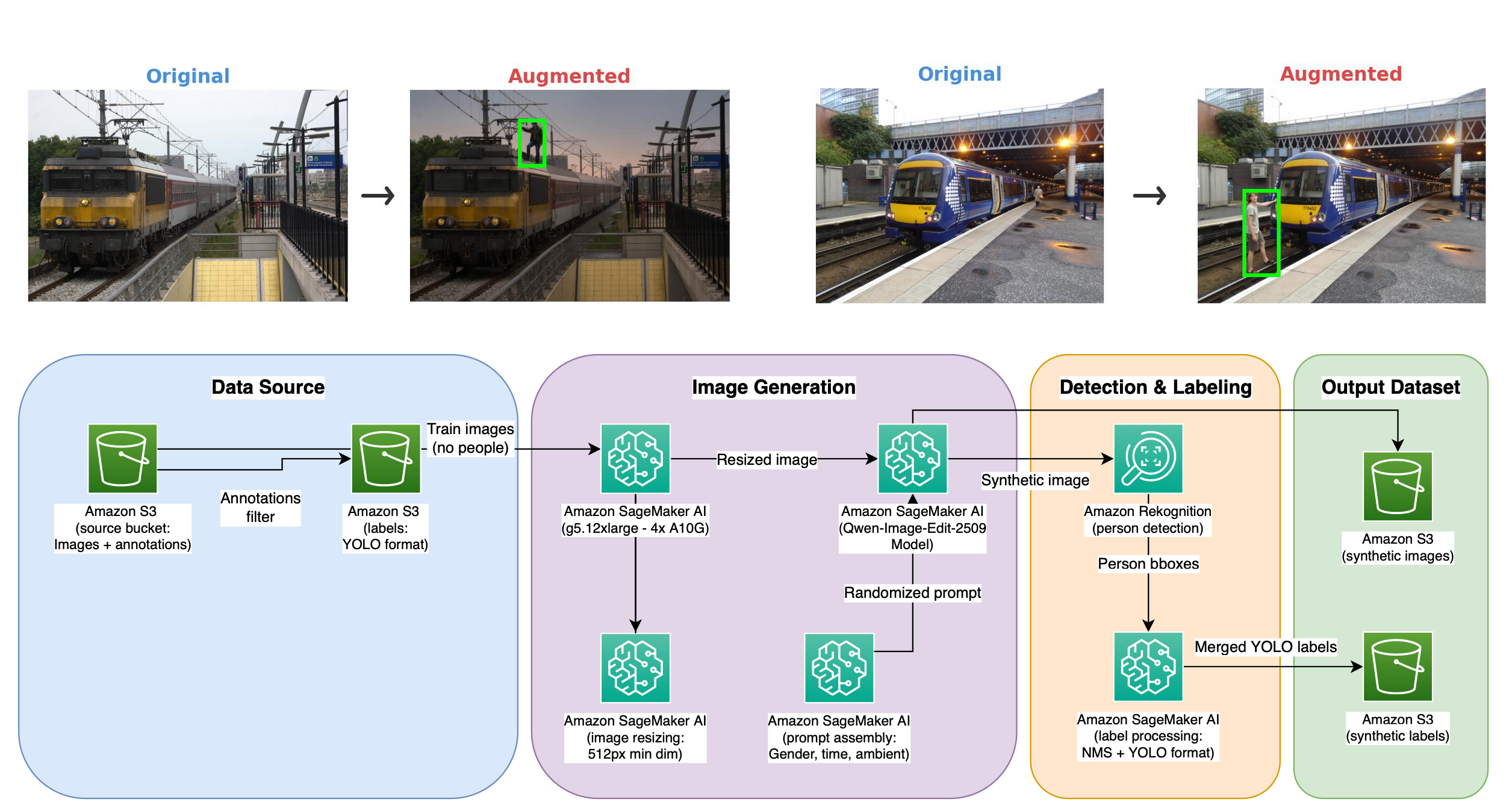
In our approach, we edit real images rather than generating entirely synthetic scenes from scratch. This preserves background fidelity, avoids domain gap, and allows existing equipment annotations to remain valid. Domain gap is the performance drop that occurs when a model trained on one data distribution, such as fully synthetic scenes, is applied to real-world images. The diffusion model’s scene understanding produces contextually coherent insertions with realistic lighting and proportions.
Stage 1: Photo-realistic synthetic image generation
We deploy the Qwen-Image-Edit-2509 diffusion model on Amazon SageMaker AI using an ml.g5.12xlarge instance (4× NVIDIA A10G GPUs, 96 GB total VRAM). The model receives a structured prompt specifying:
- Object to insert: A person with randomized gender for demographic diversity.
- Placement strategy: Hazardous positioning relative to equipment (for example, on tracks, on top of equipment, hanging from edges, or standing in a vehicle’s path).
- Constraints: No distortion of existing elements, sharp focus, and realistic integration with the scene.
The model edits real images containing equipment but no people as substrates, inserting synthetic people while preserving the original scene context, lighting, and scale. This in-place editing approach avoids the domain gap issues that plague fully synthetic scene generation.
Stage 2: Automated labeling with Amazon Rekognition
Each generated image is processed through the Amazon Rekognition DetectLabels API with a minimum confidence threshold of 80 percent. Detected bounding boxes are deduplicated by using non-maximum suppression (NMS) with IoU threshold > 0.5 and converted to YOLO format. These pseudo-labels (machine-generated annotations produced automatically in place of human labeling) are merged with existing equipment annotations from the original image.
This automated labeling alleviates manual annotation for synthetic images while maintaining label quality sufficient for training edge-deployed detectors. The synthetic images and their automated annotations are combined with real training data to form the final training set. Pre- and post-processing steps (image filtering, image resizing, prompt assembly, and label processing) allow the pipeline to run as an automated workflow.
Implementation details
This section covers the model deployment configuration, the synthetic image generation methodology, and the automated annotation pipeline.
Technical setup and configuration
The Qwen-Image-Edit-2509 model is deployed on Amazon SageMaker AI with the following configuration:
- Instance type:
ml.g5.12xlarge(4× NVIDIA A10G GPUs, 96 GB total VRAM). - Model size: approximately 60 GB unquantized weights distributed across 4 GPUs.
- Inference steps: 25.
- CFG scale: 4.0.
- Minimum image dimension: 512 px.
- Generation time: ~166 seconds per image.
The model requires a custom device map that distributes its 60 transformer layers across the available GPUS. For efficient inference, we recommend avoiding cross device communication. Deploy on a single gpu with sufficient VRAM, such as the NVIDIA H100 GPU provided by ml.p5.4xlarge instances, or employ weight quantization techniques. We project that inference cost per image will drop around 10x using such hardware, but this measurement is not yet validated.
Synthetic human insertion methodology
The pipeline selects real training images that contain locomotives but no people as editing substrates. For each image, the diffusion model receives a structured prompt. Here is an example prompt structure:
Our experiments revealed a critical finding: prompt-guided placement is the single most important factor for downstream detection performance. Instructing the model to place people in domain-relevant hazardous positions doubled person detection mAP50, while placing people in the background actually degraded performance.
Amazon Rekognition integration for automated annotation
Each generated image is processed through the Amazon Rekognition DetectLabels API. The model computes bounding boxes for humans using the query words: person, human, man, woman, boy, girl, child, adult, people. This automates label creation at scale. We use:
- Minimum confidence threshold: 80 percent.
- Post-processing: Non-maximum suppression (NMS) with IoU threshold > 0.5.
- Label format: Bounding boxes converted to YOLO format and merged with existing equipment annotations.
Dataset composition
We used an OpenImages subset as a publicly shareable analog to our customer’s industrial equipment dataset:
- Real training images: approximately 3,200 images from OpenImages containing trains (as a proxy for heavy machinery).
- Synthetic augmentation: Up to 1,000 additional images with synthetically inserted people.
- Test set: Real OpenImages images only (no synthetic data), filtered to contain at least one locomotive.
- Task: 2-class detection (person and train) with severe class imbalance.
Results and performance improvements
We evaluated the impact of synthetic data augmentation across three dimensions: prompt placement strategy, synthetic data volume, and model capacity.
Evaluation methodology
We evaluated our pipeline using YOLO11 as a representative edge-deployable detector family, trained on Amazon SageMaker AI with PyTorch 2.1.0. Models were trained with image size 640, early stopping (patience 50), and a maximum of 500 epochs.
Key finding 1: Domain-relevant placement doubles detection performance
Our prompt ablation study with YOLO11-nano compared four synthetic data conditions against a real-data-only baseline. We used 1,000 synthetic images in each scenario. The following table shows key performance metrics for each scenario.
| Condition | Person mAP50 | Person Recall | Person Precision | Agg mAP50 (Person and Train) |
| Baseline (real only) | 0.051 | 0.170 | 0.338 | 0.517 |
| Hazardous placement | 0.106 | 0.234 | 0.409 | 0.558 |
| Hazardous + scene variation | 0.088 | 0.128 | 0.492 | 0.547 |
| Background placement | 0.046 | 0.219 | 0.217 | 0.527 |
| Background + scene variation | 0.051 | 0.085 | 0.421 | 0.532 |
Takeaway: What the model generates (a person in a domain-relevant position) matters far more than how the scene is varied around it (for example, ambient condition or time of day). Hazardous placement doubled person mAP50 (from 0.051 to 0.106), while background placement slightly degraded it.
Key finding 2: Optimal synthetic volume is a hyperparameter
To explore the impact of synthetic data volume on detection performance, we swept the number of synthetic images from 250-1,000 while keeping the person placement condition and model size constant (hazardous placement with no scene variation, YOLO11-nano). The following table shows key performance metrics for each scenario:
| Synthetic Images | Person mAP50 | Person Recall | Agg mAP50 (Person and Train) |
| 0 (baseline) | 0.051 | 0.170 | 0.517 |
| 250 | 0.069 | 0.170 | 0.540 |
| 500 | 0.092 | 0.213 | 0.556 |
| 750 (best) | 0.134 | 0.213 | 0.597 |
| 1,000 | 0.106 | 0.234 | 0.558 |
Takeaway: In our experiments, performance peaked at 750 synthetic images with 160 percent improvement in person mAP50 over baseline (from 0.051 to 0.134). Beyond this point, accumulated generation artifacts (for example, garbled faces and over-saturation) introduced noise that degraded both localization confidence and detection coverage. Treat synthetic data volume as a hyperparameter to validate, not maximize.
Key finding 3: Match model capacity to dataset size
To explore the impact of model capacity, we swept YOLO11 across five model scales with 1,000 synthetic images (hazardous placement with no scene variation):
| Model | Parameters | Person mAP50 | Person Recall | Agg mAP50 (Person and Train) |
| Nano (baseline) | 2.6M | 0.051 | 0.170 | 0.517 |
| Nano + synth | 2.6M | 0.106 | 0.234 | 0.558 |
| Small + synth | 9.4M | 0.135 | 0.170 | 0.591 |
| Medium + synth | 20.1M | 0.135 | 0.340 | 0.604 |
| Large + synth | 25.3M | 0.142 | 0.244 | 0.584 |
| XLarge + synth | 56.9M | 0.093 | 0.149 | 0.551 |
Takeaway: YOLO11-medium achieved the best aggregate performance (0.604 mAP50) and the highest person recall (0.340), doubling recall compared to the baseline. The 57M-parameter XLarge model regressed below the Nano+synth result, demonstrating that with only approximately 4,200 training images, there is insufficient data to regularize a model of that capacity.
Significance for safety-critical applications
The combined pipeline improvements are particularly significant for safety:
- Person recall doubled from 17 percent to 34 percent with medium-capacity model, meaning the system detected twice as many people in hazardous positions.
- Aggregate detection maintained: Train mAP50 remained stable (0.73–0.79 range) across all conditions.
- Edge-deployable: All improvements achieved with a 20M-parameter model suitable for real-time inference on edge hardware.
Cost and efficiency benefits
The synthetic data pipeline delivers significant cost, safety, and speed advantages over manual data collection. In the following sections, we compare the two approaches, outline scalability benefits, and summarize time-to-deployment improvements.
Synthetic generation compared to manual collection and annotation
Beyond per-image cost savings, the pipeline provides structural advantages that compound as teams scale their training data efforts. The following table compares the synthetic data augmentation pipeline with the manual approach across five different dimensions.
| Factor | Manual Approach | Synthetic Pipeline |
| Per-image cost | $3–$5 (collection + annotation) | $0.33 assuming ~166s GPU inference ($7.09/hour for ml.g5.12xlarge instance) + Amazon Rekognition DetectLabels API call ($0.001/image) |
| Safety risk | Requires staging dangerous scenarios | Alleviated physical risk |
| Annotation labor | Manual bounding box drawing | Fully automated through Amazon Rekognition |
| Rare scenarios | Years of natural occurrence | Unlimited generation on demand |
| Scalability | ~2,000 images/day with teams | Bounded only by compute budget |
Scalability advantages
- Unlimited scenario generation: Produce training images for a wide range of hazardous position configurations that can be described in a text prompt.
- Modular prompt structure: You can replace placement instructions for your specific domain (construction, agriculture, warehousing) while reusing the generation and pseudo-labeling infrastructure.
- Cloud-native architecture: Built entirely on managed AWS services, requiring no custom infrastructure.
Time-to-deployment improvements
By alleviating manual data collection and annotation, the pipeline shortens the path from identifying a training data gap to having labeled images ready for model training. This reduces the timeline from weeks or months to hours. The infrastructure is reusable: After set up, generating additional training data for new scenarios requires only new prompt templates.
Getting started
The code for this solution is available in our GitHub repository. To deploy the solution in your own environment, follow the instructions in the following sections.
Repository structure
The GitHub repository contains the following directories and files:
Prerequisites
Before you start, you will need:
- Python 3.11 (
>=3.11,<3.12) and uv. We have tested with this Python version, but others might work. - An AWS account with credentials configured (
aws configure, environment variables, or an AWS Identity and Access Management (IAM) role). - A GPU with 40 GB+ VRAM for the image-editing step (single H100/B200), or a multi-GPU instance such as
ml.g5.12xlarge(4× A10G) for the sharded path. The pipeline is set up to run on Amazon SageMaker AI. - Amazon SageMaker AI GPU service quota. New accounts have a quota of 0 for GPU training instances (for example,
ml.g5.12xlarge). Request an increase in the AWS Service Quotas console before launching jobs. Otherwise, jobs will fail or sit pending. - Amazon Rekognition access (
rekognition:DetectLabels): A billable AWS service used to auto-label the synthetic people. - Hugging Face access to download the
Qwen/Qwen-Image-Edit-2509model weights (downloaded automatically on first run).
Usage
Follow instructions for steps 1–6 of the Usage section in README.md:
From the README’s Usage section:
- Download OpenImages Data: Create an Amazon Simple Storage Service (Amazon S3) bucket, then run
data_prep/download_openimages.pyto copy Train-class images (train/validation/test splits) from the public OpenImages Amazon S3 mirror into your bucket. Images only, no labels yet. - Stage Annotation CSVs: Copy the four OpenImages annotation CSVs (cached locally by step 1) up to
s3://<amzn-s3-demo-bucket>/datasets/openimages/annotations/, because steps 3 and 4 read them from there. - Create YOLO Dataset: Run
data_prep/create_yolo_dataset.pyto reorganize the downloaded images into YOLO’simages/andlabels/directory structure and generatedata.yaml/data-with-synthetic.yaml, using the staged CSVs to build labels. - Generate Synthetic Data: Use
qwen_image_edit/generate_synthetic.py(interactively throughgenerate.ipynb, as a batch script, or launched as an Amazon SageMaker AI job by usinglaunch_generation.py) to add synthetic people to train images with Qwen-Image-Edit-2509 and pseudo-label them with Amazon Rekognition. Produces a complete augmented dataset under--dataset-prefixwith its owndata.yaml. - Train YOLO Model: Run
yolo_training/launch_training.pytwice: once on the step-3 baseline prefix (original images only) and once on the step-4 output prefix (original + synthetic), to produce a baseline and a synthetic-augmented model. - Evaluate: Use the scripts in
evaluation/(download_testdata.py,run_eval.py,extract_per_class.py,compare_results.py) to validate both trained models on the held-out test set and compare whether synthetic augmentation improved detection.
The pipeline is designed to be domain-agnostic. Whether your use case involves construction sites, agricultural equipment, manufacturing floors, or warehouse operations, the same architecture applies with domain-specific prompt templates.
Clean up
After you’re done experimenting, remove the following resources to avoid ongoing charges. Amazon SageMaker AI training and processing jobs and Amazon Rekognition API calls are billed only while they run, and they stop accruing cost automatically. However, a few resources persist until you delete them:
- Stop or delete any running Amazon SageMaker AI notebook instance (step 4’s interactive
generate.ipynbpath). - Delete the Amazon S3 bucket contents (and the bucket) if no longer needed. All datasets, annotation CSVs, synthetic images/labels, and training outputs live under the bucket you created in step 1.
- Remove the Amazon SageMaker AI execution role (optional). IAM roles have no cost on their own, so this step is about hygiene/security rather than billing.
Conclusion
We presented a practical, end-to-end pipeline for synthetic data augmentation that addresses the critical training data scarcity challenge in industrial safety AI. The pipeline combines diffusion-based image editing on Amazon SageMaker AI with automated pseudo-labeling through Amazon Rekognition to generate photo-realistic, labeled training images without manual annotation or hazardous staging.
Our controlled experiments yielded three actionable guidelines:
- Prompt for domain-relevant placement: Spatial positioning of synthetic objects relative to equipment is the dominant factor for detection improvement. Visual diversity (weather, lighting) is secondary.
- Validate synthetic volume: More synthetic data isn’t always better. Detection performance peaks at an optimal synthetic-data volume. Beyond that point, accumulated generation artifacts introduce noise that degrades the model.
- Match model capacity to data budget: With limited total training data, mid-sized edge models outperform both smaller and larger alternatives.
The result: a 160 percent improvement in person detection mAP50 and doubled recall for an edge-deployable model, achieved without manual annotation labor or dangerous data collection sessions.
To get started with this solution, visit our GitHub repository. To learn more about the services used in this post, see the following resources:
- Amazon SageMaker AI
- Amazon SageMaker AI documentation
- Amazon Rekognition
- Amazon Rekognition documentation
About the authors
Learn how to build a synthetic data augmentation pipeline on Amazon SageMaker AI and Amazon Rekognition that generates photo-realistic, auto-labeled training images for industrial safety AI. This approach improved person detection by up to 160% without manual annotation or hazardous data collection near heavy machinery. Read More